
— 28 attributes · Save once · Catalog consistency
Build a consistent brand face with the AI Influencer Model Generator
Create a reusable synthetic model for campaign, social, and catalog work without rebuilding the face every time. Select skin tone, age range, body type, hair, expression, and other traits with buttons and sliders, then save that model to your library for repeat use across SKUs. No studio. No samples. No prompts.
- ~$0.99 per model
- ~50–60s per generation
- 150+ styles
- 28 attributes × 10+ options
- Save once, reuse across catalog
- EU-hosted
7-day free trial • 50 tokens (10 images) • Cancel anytime

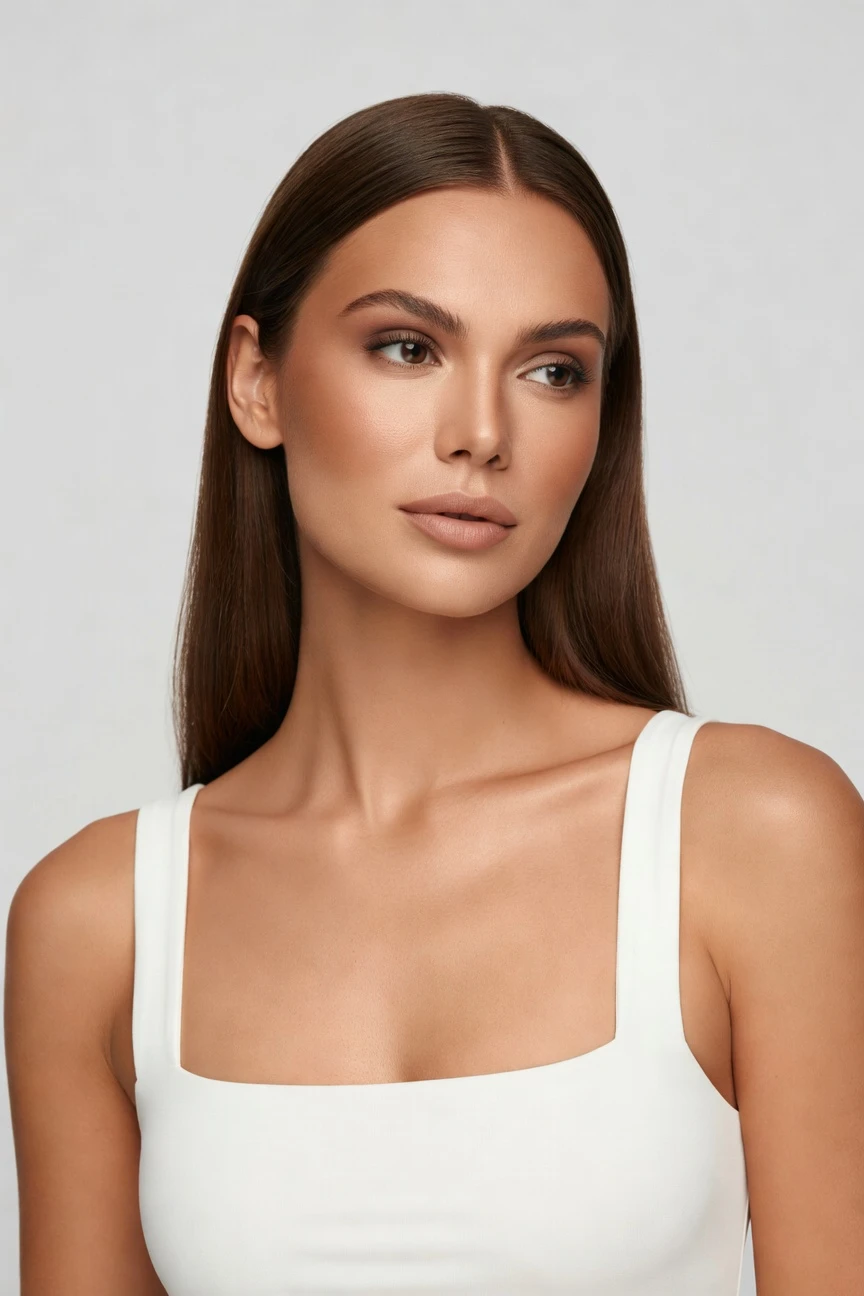
Saved model setup
Female · 26–35 · Dark brown · 175cm
Build a model. Zero prompts.
This setup starts with a copper skin tone and a clean influencer-ready profile for repeat brand use. You click the core identity traits once, save the model, and reuse the same face and body across campaign, social, and catalog imagery. 28 attributes · 10+ options each
- 5 clicks · 0 keystrokes
- app.rawshot.ai / build_model
How it works
Build Once, Reuse Across Every Drop
Set the model identity in clicks, save it to your library, and keep the same brand face consistent from one look to ten thousand SKUs.
- Step 01
Set the Core Identity
Choose the model's defining attributes with interface controls, not typed instructions. Skin tone, age range, body type, hair, and expression become a saved starting point for repeat brand use.
- Step 02
Save the Model to Your Library
Once the identity is right, save it as a reusable model asset. That gives your team one consistent face and body for campaigns, product launches, and catalog updates.
- Step 03
Reuse Across Every Shoot
Apply the saved model inside the browser app or through the API as you generate imagery and video. The result is a steady visual identity across platforms, aspect ratios, and SKU volumes.
Spec sheet
Proof for Consistent Influencer-Led Output
These twelve proofs show how RAWSHOT keeps identity, garments, rights, provenance, and scale operationally clear for fashion teams.
- 01
Built from Attribute Controls
Each model is constructed from 28 body attributes with 10+ options each. That composite approach is designed to avoid accidental real-person likeness and gives teams a controlled, reusable identity surface.
- 02
Every Setting Is a Click
You direct the model with buttons, sliders, and presets inside a real application. There is no empty text box between your team and a usable result.
- 03
Garment-Led Representation
RAWSHOT is engineered around the product, so cut, colour, pattern, logo, and drape stay central. The garment remains the brief while the model supports the styling context.
- 04
Diverse Synthetic Models
Build a wide range of model identities for different audiences, collections, and brand worlds. Diverse synthetic models are transparently labelled and ready for commercial fashion use.
- 05
Same Face Across SKUs
Save a model once and reuse it across your entire catalog. That keeps your influencer-style identity steady instead of shifting from image to image.
- 06
150+ Visual Styles
Move the same saved model through catalog, editorial, lifestyle, street, noir, vintage, Y2K, and campaign looks. Your brand keeps its face while the art direction changes around it.
- 07
Every Format You Need
Generate output for 2K or 4K stills and the aspect ratios your channels require. That makes one model useful across PDPs, social placements, emails, and launch assets.
- 08
Labelled and Compliant by Design
Outputs are AI-labelled, watermarked, and aligned with C2PA provenance practices, GDPR requirements, EU-hosting, EU AI Act Article 50, and California SB 942 expectations. Honesty is built into the product surface.
- 09
Signed Audit Trail per Image
Every output carries a traceable record for review and governance. That helps commerce teams manage approvals, attribution, and publishing standards without guesswork.
- 10
GUI to REST API
Use the browser GUI for one-off creative work or connect the same model system to catalog-scale pipelines through the REST API. The indie label and the enterprise team use the same engine.
- 11
Predictable Tokens and Speed
Model generations cost about $0.99 and take roughly 50–60 seconds. Tokens never expire, failed generations refund tokens, and teams can plan output without hidden expiry pressure.
- 12
Full Commercial Rights Included
Every output comes with permanent, worldwide commercial rights. That clarity matters when a saved model becomes part of your long-term brand system.
Outputs
Reusable Brand Faces, ready for every channel
Build a model once, then carry that identity through product pages, social crops, launch assets, and moving image. The same saved face can hold your brand together across formats and seasons.


Browse all 600+ models →
Comparison
RAWSHOT vs category tools vs DIY prompting
Three lenses on every dimension — what you optimize for in RAWSHOT versus typical category tools and blank-box AI workflows.
01
Interface
RAWSHOT
Click-driven model builder with saved attributes and reusable identity controlsCategory tools + DIY
Preset-heavy tools with narrower controls and less application-like direction. DIY prompting: Typed instructions, repeated retries, and no stable control surface for teams02
Model consistency
RAWSHOT
Same saved face and body reused across shoots, SKUs, and channelsCategory tools + DIY
Some consistency features, often limited across workflows or plans. DIY prompting: Faces drift between outputs and require constant rework to stay close03
Garment fidelity
RAWSHOT
Garment stays central with faithful cut, colour, pattern, and logo handlingCategory tools + DIY
Fashion-focused output, but garment detail can still soften under style changes. DIY prompting: Garment drift, invented logos, and altered proportions are common failure modes04
Provenance + labelling
RAWSHOT
C2PA-signed provenance, visible watermarking, cryptographic watermarking, AI labellingCategory tools + DIY
Labelling varies and provenance metadata is often less explicit. DIY prompting: Usually no provenance metadata, no signed record, and unclear disclosure workflow05
Commercial rights
RAWSHOT
Permanent worldwide commercial rights on every outputCategory tools + DIY
Rights can vary by plan, feature set, or terms depth. DIY prompting: Rights clarity is often unclear for commerce teams and agency handoff06
Pricing transparency
RAWSHOT
Per-model pricing, no per-seat gates, tokens never expire, one-click cancelCategory tools + DIY
Seats, bundles, or plan gates can shape access and scaling. DIY prompting: Low entry cost but high labor overhead and unpredictable retry volume07
Catalog scale
RAWSHOT
Same engine in browser GUI and REST API for single shoots or pipelinesCategory tools + DIY
Scale features may sit behind higher tiers or separate workflows. DIY prompting: Manual generation loops do not hold up for nightly catalog operations08
Operational auditability
RAWSHOT
Signed audit trail per image supports review and publishing governanceCategory tools + DIY
Basic history may exist, but audit detail is less standardized. DIY prompting: Scattered chat logs and downloaded files create weak approval records
Prompting does not scale
Stop writing essays. Direct the shoot.
Most AI photo tools start with a blank text box. Rawshot turns the shoot into repeatable controls, so creative teams can produce consistent fashion imagery without prompt syntax or one-off hacks.
Category norm
ManualCreate a premium editorial fashion photograph of a model wearing the exact navy oversized wool coat from SKU-1842, full-body crop, realistic hands, consistent facial identity, clean e-commerce lighting, subtle Paris street background, 85mm lens, no logo distortion, no fabric hallucination, same pose as last campaign, repeatable for all colorways...
A prompt can describe one image. It cannot become a shared production system for hundreds of products, models, angles and markets.
Rawshot
ClicksSaved shoot recipe
Apply to 1 SKU or 10,000 via GUI, CSV or REST API.
Rawshot makes creative direction visible: buttons, presets and sliders instead of hidden prompt craft. The result is easier to teach, faster to approve and built for repeat production.
Use cases
Who Builds Consistent Brand Faces With RAWSHOT
Operator archetypes and how click-directed, garment-first output fits the way they actually work.
- 01
Indie Fashion Founders
Build a copper-skin brand face once and use it across launch imagery, social posts, and preorder pages before a traditional shoot is even possible.
Confidence · high
- 02
DTC Womenswear Teams
Keep a consistent influencer-style model across every product update so returning shoppers recognize the brand immediately.
Confidence · high
- 03
Crowdfunded Apparel Creators
Present a polished model identity for campaign pages and stretch-goal updates without booking talent before demand is proven.
Confidence · high
- 04
Marketplace Sellers
Standardize a repeat model across mixed assortments so listings look coherent even when inventory arrives in waves.
Confidence · high
- 05
Resale and Vintage Operators
Use a saved copper-skin model to give one-off pieces a steady presentation style instead of a different face on every item.
Confidence · high
- 06
Factory-Direct Brands
Create reusable model identities for fast-turn launches, then push them through high-volume catalog generation as products change daily.
Confidence · high
- 07
Adaptive Fashion Labels
Test inclusive brand representation with synthetic models you can direct precisely and reuse across educational, campaign, and store imagery.
Confidence · high
- 08
Kidswear Marketing Teams
Build parent-facing brand worlds with consistent adult influencer-style talent for landing pages, bundles, and seasonal drops.
Confidence · high
- 09
Lingerie DTC Brands
Maintain the same confident model identity across fit stories, PDPs, and paid social while keeping outputs labelled and governed.
Confidence · high
- 10
Accessories and Jewelry Sellers
Pair handbags, watches, or sunglasses with a recognizable face so the brand carries through even when the product changes fast.
Confidence · high
- 11
Student Designers
Show a complete visual identity in portfolio launches or graduate collections without paying for a full production day.
Confidence · high
- 12
Enterprise Catalog Teams
Save approved model profiles once, then reuse them through API-driven pipelines to keep regional and seasonal catalogs visually aligned.
Confidence · high
— Principle
Honest is better than perfect.
Influencer-style fashion imagery needs trust as much as polish. RAWSHOT labels outputs, applies visible and cryptographic watermarking, and signs provenance metadata with C2PA so your team can publish with clarity, not vagueness. The models are synthetic composites by design, EU-hosted, and built for governance as well as brand consistency.
Rights & provenance
Full commercial rights. Forever.
- C2PA-signed on every image — EU AI Act Article 50 compliant
- 28-attribute synthetic models — real-person likeness statistically impossible
- Full commercial rights to every generation — no recurring licensing fees
- Tokens never expire · One-click cancel · Transparent pricing
EU AI Act
C2PA
Commercial use
Pricing
~$0.99 per model generation.
~50–60 seconds per generation. Save the model once, reuse it across your entire catalog.
- 01Tokens never expire. Cancel in one click.
- 02Same face, same body, every SKU — no drift between shoots.
- 03No per-seat gates. No 'contact sales' walls for core features.
- 04Failed generations refund their tokens.
FAQ
Practical answers on control, rights, pricing, scale, and compliant publishing.
Do I need to write prompts to use RAWSHOT?
Never—you direct every output with sliders, presets, and clicks on the garment, not typed prompts. That matters because fashion teams usually need repeatable decisions, not a guessing game around wording. In RAWSHOT, model identity, camera choices, framing, lighting, background, expression, and visual style live in a structured interface, so a buyer, marketer, or catalog operator can work inside the same system without learning chat syntax first.
For commerce teams, reliability matters more than novelty. RAWSHOT keeps token pricing, generation timings, refund rules, commercial rights, provenance signalling, watermarking, and reuse behavior explicit, so operations can plan launches without drift or hidden friction. The practical takeaway is simple: train your team on controls once, save approved settings, and reuse them across drops, channels, and SKU volumes with less rework.
What does an AI influencer model generator actually change for ecommerce teams?
It changes who gets access to consistent on-model brand imagery. Instead of booking talent, coordinating shoot days, and rebuilding a recognizable face for every campaign or catalog refresh, your team can save a synthetic model identity and reuse it across product pages, social formats, and launch assets. That is especially useful when you need one brand face to appear steady across many products, but you do not have the budget or operational room for frequent studio work.
RAWSHOT makes that useful in a commerce setting because the workflow is application-based, not conversational. You set model attributes with controls, then pair that saved identity with garments, styles, and aspect ratios as needed, while keeping outputs labelled, watermarked, and commercially usable. For teams managing calendars rather than experiments, the value is consistency you can operationalize, not a one-off image that looks good once.
Why skip reshooting every SKU when seasons, channels, and campaign themes change?
Because most seasonal updates do not require rebuilding your talent stack from zero. If the brand needs a new mood, crop, platform ratio, or visual style, you can keep the same saved model and change the art direction around it. That lets teams update collections for launches, paid social, emails, or marketplace needs without resetting continuity each time a color story or channel mix changes.
RAWSHOT supports that with reusable model identities, 150+ visual styles, multiple framing options, and output paths that work from browser GUI to REST API. The face and body remain consistent while the surrounding creative decisions shift, which is exactly what catalog and marketing teams need when product turnover is faster than production calendars. In practice, keep your approved model library stable and treat styling changes as controlled variants, not entirely new shoots.
How do we turn flat garments into catalogue-ready imagery without prompting?
You start by building or selecting the model identity, then direct the rest of the shoot with interface controls. Teams choose framing, camera feel, background, lighting approach, expression, and visual style through buttons and presets, then generate outputs around the real garment rather than around improvised text instructions. That makes the workflow far easier to hand from creative to ecommerce because each setting has a visible, repeatable place in the application.
RAWSHOT is built around garment representation, so cut, colour, pattern, logo, fabric behavior, and proportion stay central while the saved model provides consistent presentation. From there, you can generate stills or move into video workflows, keep outputs labelled and traceable, and reuse the same model across multiple SKUs. The operational takeaway is to standardize your approved model profiles first, then let teams swap products and styling variables inside a controlled interface.
Why does garment-led control beat DIY prompting in ChatGPT, Midjourney, or generic image tools for fashion PDPs?
Because PDP work is judged on repeatability and product accuracy, not on whether a single image looks impressive in isolation. Generic image systems ask users to steer outcomes through text and retries, which creates common fashion failures such as drifting garments, invented logos, changing faces, and inconsistent framing from one output to the next. That may be tolerable for loose ideation, but it creates cleanup costs when a commerce team needs many usable assets on schedule.
RAWSHOT replaces that roulette with a structured fashion workflow. You click through model attributes, camera logic, lighting, styling direction, and output settings in an application designed for apparel operations, then publish labelled, watermarked assets with provenance records and commercial rights clarity. If your team needs dependable product presentation, use generic tools for mood exploration and keep actual catalog or campaign production inside a system built around the garment.
Can we use these influencer-style outputs commercially, and are they clearly labelled?
Yes. RAWSHOT provides permanent, worldwide commercial rights for every output, which is essential when a saved model becomes part of an ongoing brand system rather than a one-time asset. Just as important, the platform does not hide what the work is: outputs are AI-labelled and carry visible plus cryptographic watermarking, so disclosure is treated as a product value rather than a buried legal note.
That transparency matters for internal governance, agency handoff, retailer relationships, and customer trust. RAWSHOT also supports C2PA-signed provenance metadata, maintains per-image auditability, and is built with EU-hosting, GDPR alignment, EU AI Act Article 50 expectations, and California SB 942 requirements in mind. The practical policy for teams is straightforward: publish with labels intact, keep audit records with the asset, and treat honest disclosure as part of brand quality.
What should a buyer or art director check before publishing a saved synthetic model across a campaign?
Review the same things you would review in any commerce image set, but do it systematically. Confirm that garment details such as cut, colour, pattern, logo placement, and proportion remain accurate; confirm that the saved face and body stay consistent across images; and confirm that the chosen framing and styling actually match the channel where the asset will appear. Those checks protect both conversion quality and brand coherence.
With RAWSHOT, teams should also verify that labelling, watermarking, and provenance records remain attached, especially when assets move through external editing or content pipelines. Because the platform provides a signed audit trail per image and supports labelled output by design, the governance layer is already there if your process respects it. In practice, make a publish checklist that covers garment fidelity, identity consistency, disclosure, and channel fit before assets leave your review queue.
How much does model creation cost, and what happens if a generation fails?
Model generation is about $0.99 per result and typically takes around 50–60 seconds. That pricing is useful for planning because the model can be saved once and reused across many future outputs, turning a one-time setup into an ongoing brand asset. Tokens never expire, which removes the pressure to generate on an artificial deadline when teams are still reviewing identity choices or waiting for merchandise approvals.
If a generation fails, the tokens are refunded. RAWSHOT also keeps cancellation simple with a one-click cancel flow and avoids per-seat gates for core features, so the cost model remains understandable as more team members participate. The sensible workflow is to treat model building as an approval stage: define the core identity carefully, save approved versions to the library, and then reuse them broadly instead of paying to reinvent the same face again and again.
Can we plug saved models into Shopify-scale or marketplace-scale pipelines through an API?
Yes. RAWSHOT is built for both browser-based creative work and programmatic catalog operations, so the same model system can move from one-off brand direction to high-volume production through the REST API. That matters when merchandising teams need approved identities reused across large assortments, regional storefronts, or frequent product refreshes without manually rebuilding each shoot in the interface.
Because the model is a saved asset rather than an unstable one-off result, API workflows can reference consistent identities while varying garments, formats, and creative settings around them. Combined with audit trails, rights clarity, and explicit token economics, that gives operations teams a cleaner handoff between creative approval and automated production. The best practice is to approve a small library of model identities in the GUI first, then connect those approved assets to your batch pipeline.
How do teams scale from a single saved model in the browser to thousands of outputs across channels?
They scale by keeping identity decisions stable and moving variable decisions into production logic. A marketer or creative lead can approve one or several saved models in the browser, then ecommerce and operations teams reuse those assets across PDPs, launch pages, emails, social crops, and video tasks without reopening the identity question every time. That gives each role a clear boundary: brand decides who the face is, production decides where and how it appears.
RAWSHOT supports that progression with the same engine in the GUI and the REST API, consistent pricing rules, refunded failed generations, no seat-based gatekeeping for core use, and labelled outputs with provenance signals. The result is not just faster production; it is a more governable system for visual consistency. If you want scale without chaos, lock approved model identities early, document channel presets, and let teams generate against those standards rather than improvising from scratch.
Keep exploring