
— Lookbook · Editorial · 150+ styles · 4K
Direct your next seasonal story with the AI Lookbook Model Generator.
Build a consistent synthetic model for lookbooks, campaign selects, and catalog crossover imagery. Adjust skin tone, age range, body type, hair, and expression with buttons, sliders, and presets, then save the result to your library for repeat use. No studio. No samples. No prompts.
- ~$0.99 per model
- ~50–60s per generation
- 150+ styles
- 28 attributes × 10+ options
- 2K or 4K
- Save and reuse
7-day free trial • 50 tokens (10 images) • Cancel anytime

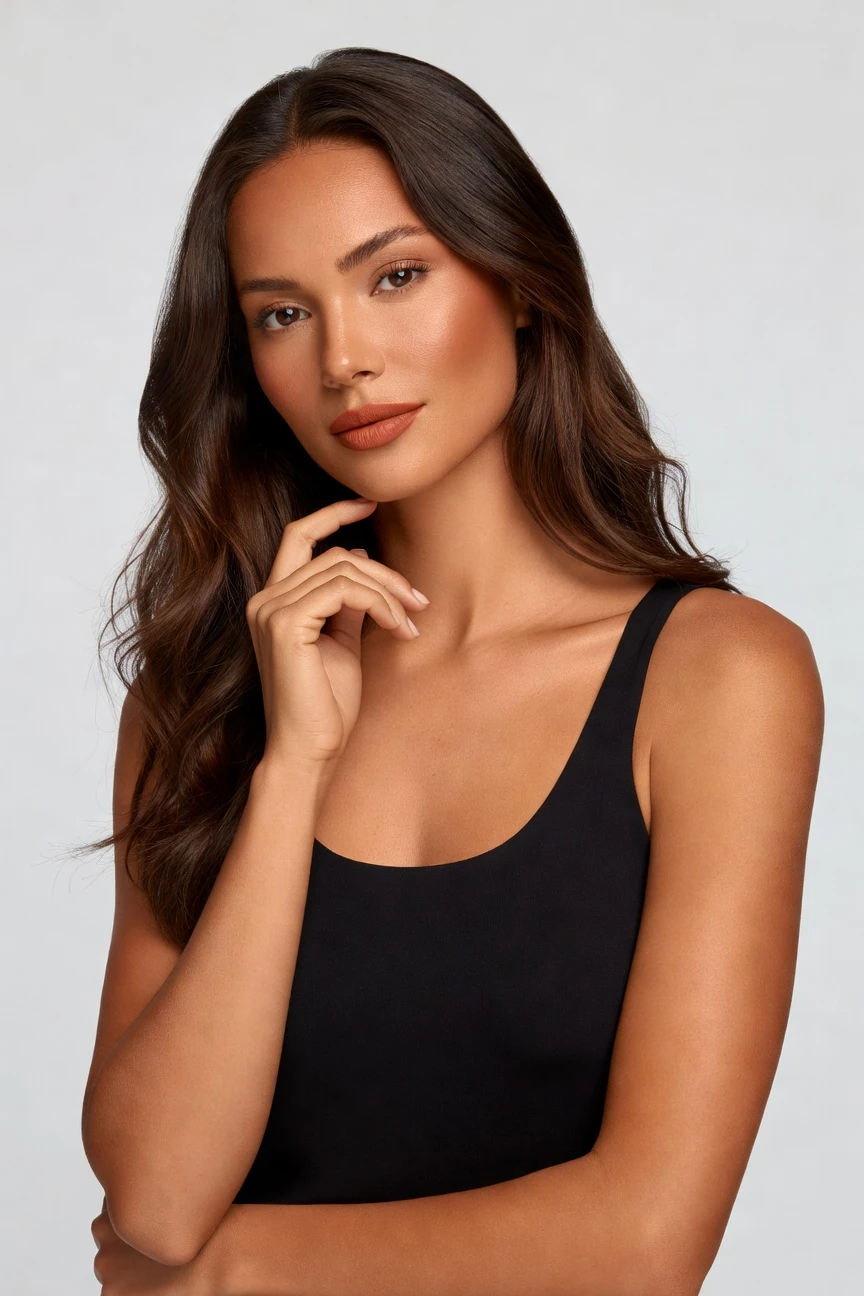
Saved model setup
Female · 26–35 · Dark brown · 175cm
Build a model. Zero prompts.
This setup starts from a copper skin tone and shapes a lookbook-ready model with a 26–35 age range, average body type, long wavy hair, and dark brown color. You click the attributes that define your brand's casting direction, save the model once, and reuse it across every story, drop, and SKU. 28 attributes · 10+ options each
- 5 clicks · 0 keystrokes
- app.rawshot.ai / build_model
How it works
Build a Reusable Cast for Every Story
Create the model once, direct the visual language with clicks, then keep the same face and proportions across drops, channels, and SKUs.
- Step 01
Set the Cast
Choose the body attributes that matter to your brand, then save a reusable synthetic model to your library. The cast stays consistent for seasonal stories, campaign variants, and catalog updates.
- Step 02
Direct the Lookbook
Apply framing, lighting, backgrounds, and visual style presets that match the mood of the collection. You control the shoot through the interface, not a text box.
- Step 03
Reuse Across Every Drop
Bring the same saved model into browser-based shoots or larger API workflows as your assortment grows. One creative decision can carry from a single launch to a full catalog pipeline.
Spec sheet
Proof for Lookbook Teams That Need Control
These twelve surfaces show how RAWSHOT keeps casting, garment representation, rights, provenance, and scale explicit for editorial and commerce work.
- 01
Built From Structured Attributes
Each model is assembled from 28 body attributes with 10+ options each, so identity is controlled by settings rather than chance resemblance.
- 02
Every Setting Is a Click
Skin tone, hair, age range, body type, expression, framing, and style live in buttons, sliders, and presets. You direct the result inside an application, not a chat box.
- 03
The Garment Stays the Brief
RAWSHOT is engineered around the product, so cut, color, pattern, logo, drape, and proportion are represented faithfully in on-model output.
- 04
Diverse Synthetic Casting
You can build a broad range of transparently labelled synthetic models for different brand worlds, audiences, and collection narratives.
- 05
Same Face Across SKUs
Save one model and reuse it throughout a whole range, so lookbooks and catalogs stay visually consistent without drift between outputs.
- 06
150+ Visual Styles
Move from clean editorial to campaign mood, studio minimalism, street energy, noir, vintage, or Y2K with preset visual systems.
- 07
2K, 4K, and Every Ratio
Generate assets for portrait, square, landscape, PDP crops, social formats, and lookbook spreads without rebuilding the creative setup.
- 08
Labelled and Compliance-Ready
Outputs are AI-labelled, watermarked, and aligned with EU AI Act Article 50, California SB 942, and GDPR-ready operating standards.
- 09
Per-Image Audit Trail
Every output carries provenance data and a signed record, giving teams a usable chain of custody for publishing and review.
- 10
GUI for One Shoot, API for Scale
Use the browser for creative direction and the REST API for larger catalog runs. The core product stays the same at any volume.
- 11
Fast, Clear Model Economics
Model generations run in about 50–60 seconds at roughly $0.99 each, tokens never expire, and failed generations refund tokens.
- 12
Permanent Worldwide Rights
Every output includes full commercial rights, so you can publish across ecommerce, paid media, marketplaces, and brand channels with clarity.
Outputs
Lookbook Models, Built to Repeat
Create a cast once, then carry that identity across seasonal mood, ecommerce crossover, and campaign variants. The point is not novelty for novelty's sake; it is creative continuity you can actually operate.


Browse all 600+ models →
Comparison
RAWSHOT vs category tools vs DIY prompting
Three lenses on every dimension — what you optimize for in RAWSHOT versus typical category tools and blank-box AI workflows.
01
Interface
RAWSHOT
Click-driven controls for casting, styling, framing, and output decisionsCategory tools + DIY
Often mix light controls with shallow model settings and limited workflow structure. DIY prompting: Typed instructions in a general image tool, with syntax guesswork and inconsistent repeats02
Garment fidelity
RAWSHOT
Built around the product, with faithful cut, color, logo, and drapeCategory tools + DIY
Can style attractively but often bend product details toward aesthetic presets. DIY prompting: Garments drift, logos mutate, trims disappear, and proportions change between tries03
Model consistency
RAWSHOT
Saved models stay stable across lookbooks, campaigns, and catalog batchesCategory tools + DIY
May offer reusable characters but consistency varies between outputs and updates. DIY prompting: Faces, body shape, and age cues shift from image to image without warning04
Provenance and labelling
RAWSHOT
C2PA-signed, AI-labelled, visibly and cryptographically watermarked outputCategory tools + DIY
Labelling and provenance are often partial, unclear, or absent in exported files. DIY prompting: No dependable provenance metadata, weak disclosure workflow, and unclear publishing trail05
Commercial rights
RAWSHOT
Permanent worldwide commercial rights stated clearly for every outputCategory tools + DIY
Rights language may depend on plan level or separate terms review. DIY prompting: Usage clarity varies by model, provider, and source assets, creating review friction06
Pricing transparency
RAWSHOT
Per-model pricing, refunded failures, non-expiring tokens, no seat gatesCategory tools + DIY
Packages, seats, or sales-led plans can complicate team forecasting. DIY prompting: Cheap to start, but time cost climbs through retries, fixes, and unusable outputs07
Catalog scale
RAWSHOT
Same engine works in browser GUI and REST API for large assortmentsCategory tools + DIY
Scale features are often separated into higher tiers or custom workflows. DIY prompting: No clean batch structure, weak reproducibility, and heavy manual cleanup for volume08
Operational reliability
RAWSHOT
Signed audit trail per image and PLM-integration-ready workflow surfacesCategory tools + DIY
Workflow support exists but is not always built for apparel governance. DIY prompting: Hard to trace who made what, with which settings, and why a result changed
Prompting does not scale
Stop writing essays. Direct the shoot.
Most AI photo tools start with a blank text box. Rawshot turns the shoot into repeatable controls, so creative teams can produce consistent fashion imagery without prompt syntax or one-off hacks.
Category norm
ManualCreate a premium editorial fashion photograph of a model wearing the exact navy oversized wool coat from SKU-1842, full-body crop, realistic hands, consistent facial identity, clean e-commerce lighting, subtle Paris street background, 85mm lens, no logo distortion, no fabric hallucination, same pose as last campaign, repeatable for all colorways...
A prompt can describe one image. It cannot become a shared production system for hundreds of products, models, angles and markets.
Rawshot
ClicksSaved shoot recipe
Apply to 1 SKU or 10,000 via GUI, CSV or REST API.
Rawshot makes creative direction visible: buttons, presets and sliders instead of hidden prompt craft. The result is easier to teach, faster to approve and built for repeat production.
Use cases
Where Consistent Casting Unlocks the Story
Operator archetypes and how click-directed, garment-first output fits the way they actually work.
- 01
Indie Lookbook Launches
A small label builds one copper-toned cast and carries it through every chapter of a debut collection without booking a studio day.
Confidence · high
- 02
Seasonal Drop Storytelling
DTC teams keep the same face and body across spring, resort, and pre-order edits so the brand world feels continuous instead of reset each month.
Confidence · high
- 03
Campaign-to-Catalog Handoffs
Marketing creates editorial story frames while ecommerce reuses the same saved model for clean product-led imagery on PDPs.
Confidence · high
- 04
Crowdfunded Fashion Pages
Creators show garments on a consistent synthetic model before large production runs, giving backers a clearer sense of fit and styling direction.
Confidence · high
- 05
Adaptive Fashion Releases
Teams test inclusive casting directions with controlled body attributes and then keep those choices stable across the whole launch set.
Confidence · high
- 06
Kidswear Concept Boards
Designers use lookbook-style compositions to pitch a collection direction early, then align later product pages to the same visual cast.
Confidence · high
- 07
Lingerie DTC Story Arcs
Brands build a respectful, repeatable model setup for intimate apparel and reuse it across campaign, email, and product imagery.
Confidence · high
- 08
Vintage Seller Edits
Resale curators group mixed one-off pieces under a coherent on-model look so collection pages feel intentional rather than assembled.
Confidence · high
- 09
Factory-Direct Range Tests
Manufacturers preview multiple assortments on a saved model before samples travel, helping merchants review line direction faster.
Confidence · high
- 10
Student Portfolio Lookbooks
Fashion students create polished collection stories with consistent casting and styling controls instead of hiring talent on a thesis budget.
Confidence · high
- 11
Marketplace Brand Stores
Sellers build a recognizable cast for storefront banners and listing visuals, making broad assortments feel like one brand.
Confidence · high
- 12
Editorial Concept Development
Creative teams explore mood, lens language, and pacing around a stable digital cast before committing to wider launch assets.
Confidence · high
— Principle
Honest is better than perfect.
Lookbook imagery shapes brand identity, so the publishing trail matters as much as the styling. Every RAWSHOT output is AI-labelled, watermarked, and C2PA-signed with a per-image audit trail, giving teams a clear record of what the asset is. We build for transparency on purpose: EU-hosted, GDPR-compliant, and designed for disclosure instead of ambiguity.
Rights & provenance
Full commercial rights. Forever.
- C2PA-signed on every image — EU AI Act Article 50 compliant
- 28-attribute synthetic models — real-person likeness statistically impossible
- Full commercial rights to every generation — no recurring licensing fees
- Tokens never expire · One-click cancel · Transparent pricing
EU AI Act
C2PA
Commercial use
Pricing
~$0.99 per model generation.
~50–60 seconds per generation. Save the model once, reuse it across your entire catalog.
- 01Tokens never expire. Cancel in one click.
- 02Same face, same body, every SKU — no drift between shoots.
- 03No per-seat gates. No 'contact sales' walls for core features.
- 04Failed generations refund their tokens.
FAQ
Practical answers on control, rights, pricing, scale, and compliant publishing.
Do I need to write prompts to use RAWSHOT?
Never—you direct every output with sliders, presets, and clicks on the garment, not typed prompts. That matters because fashion teams do not need another tool that turns buyers, merchandisers, or founders into syntax specialists before they can get a usable image. In RAWSHOT, model attributes, camera choices, framing, lighting, backgrounds, expression, and style are all product controls inside the interface, so the workflow reads like a shoot plan instead of a guessing exercise.
For catalog and campaign teams, reliability matters more than clever text interpretation. RAWSHOT keeps token pricing, timing, refund rules, commercial rights, provenance signalling, watermarking, and output settings explicit, whether you work in the browser GUI or through the REST API. That means teams can build repeatable processes around saved models and garment-led controls, then hand those processes from creative to ecommerce without rewriting anything as chat instructions.
What does an AI lookbook model generator actually change for a fashion team?
It changes who gets access to consistent on-model storytelling. Instead of treating lookbook imagery as something only a brand with studio budgets can commission a few times a year, RAWSHOT lets teams build a reusable synthetic cast and direct seasonal imagery around real garments whenever they need it. That is useful for small labels, DTC brands, and marketplace sellers that need editorial coherence and commercial speed at the same time.
Operationally, the difference is control and repeatability. You can set body attributes, save the model, switch visual styles, adjust framing, and carry the same identity from a campaign opener into PDP-supporting assets without face drift. Because outputs are AI-labelled, watermarked, and C2PA-signed, the work is also easier to review internally and publish responsibly. The result is not abstract efficiency talk; it is a practical way to give more teams access to fashion photography language they previously could not afford to maintain.
Why skip reshooting every SKU when the season or brand mood changes?
Because most seasonal updates do not require rebuilding the cast from zero; they require changing the story around a stable product and identity. In traditional workflows, a new angle on the collection often means rebooking talent, coordinating samples, rebuilding sets, and accepting inconsistency across shoots. RAWSHOT lets you preserve the same saved model while adjusting style presets, framing, backgrounds, and lighting for a new seasonal read.
That matters for both brand coherence and operations. A merchandiser can keep one recognizable face across a drop, a creative lead can test alternate editorial directions quickly, and ecommerce can still keep the garment central in the final output. Because the product remains the brief, the visual language can move without losing the item's core details. Teams end up with a cleaner bridge between collection storytelling and everyday selling surfaces, without resetting the entire production process each time the calendar changes.
How do we turn flat garments into catalogue-ready imagery without prompting?
You start with the product and a saved model, then direct the shoot inside the interface. Select the cast attributes you want, choose framing, lens feel, lighting, background, and style preset, and generate the output around the actual garment rather than around a vague text instruction. That workflow is easier for apparel teams because it mirrors visual decision-making they already understand from studio shoots and merchandising reviews.
RAWSHOT is designed so catalog teams can move from a flat asset or product reference into on-model imagery while keeping cut, color, pattern, logo, and proportion in focus. You can use the browser GUI for one-off creative work or connect larger flows through the REST API when volume grows. Since failed generations refund tokens and model generations are priced clearly, teams can test directions without hidden platform penalties. The practical takeaway is simple: build the cast once, direct the image with controls, and standardize that process for repeatable catalog output.
Why does garment-led control beat DIY prompting in ChatGPT, Midjourney, or generic image tools for fashion PDPs?
Because apparel teams need reproducibility, not roulette. General image tools can make attractive pictures, but they often change logos, smooth out construction details, alter silhouettes, or invent elements that were never on the garment. They also make it harder to keep the same face, body, and styling behavior across a run of related outputs, which is exactly what product pages and coordinated launches depend on.
RAWSHOT is built around the garment and around structured controls, so the workflow is easier to audit and repeat. You save a model, reuse it across SKUs, and work with explicit settings for body attributes, framing, style, and output surfaces rather than hoping a text instruction behaves the same way twice. Add C2PA provenance, visible and cryptographic watermarking, clear commercial rights, and a REST API for scale, and the difference becomes operational, not cosmetic. For fashion commerce, dependable control beats open-ended improvisation.
Can I publish RAWSHOT lookbook outputs commercially, and are they clearly labelled?
Yes. RAWSHOT outputs come with full commercial rights that are permanent and worldwide, so teams can use them across ecommerce, paid media, marketplaces, email, social, and brand storytelling without negotiating a separate rights layer for every asset. That clarity matters because publishing teams need to know not only what an image looks like, but also whether they can actually ship it into a live campaign or storefront.
Just as important, the outputs are transparently labelled rather than disguised. RAWSHOT applies AI labelling, multi-layer watermarking, and C2PA-signed provenance metadata so reviewers and downstream platforms have a clear record of what the file is. We treat disclosure as part of brand trust, not as a legal footnote. For operators, that means you can build with speed and scale while still maintaining a documented, reviewable publishing standard that respects current compliance expectations.
What should a buyer or ecommerce manager check before publishing on-model outputs?
Start with the garment itself. Confirm that cut, color, pattern placement, logo treatment, trims, and overall proportion match the source product, then review whether the saved model remains consistent with the intended casting direction. After that, check framing, crop suitability for the channel, and whether the selected style preset supports selling clarity instead of overwhelming the product. Those are the same practical checkpoints good commerce teams already use; RAWSHOT simply makes them easier to apply repeatedly.
You should also confirm provenance and publishing readiness. Review the output as an AI-labelled asset, keep the audit trail attached, and preserve watermarking and C2PA information in your workflow where relevant. If you are moving from browser tests into scaled production, validate the same standards in your API process so teams are not approving one logic for creative and another for catalog. The best practice is straightforward: approve product fidelity, approve cast consistency, approve disclosure, then publish with confidence.
How much does a lookbook model workflow cost, and what happens to tokens?
Model generation in RAWSHOT is about $0.99 per generation and typically completes in around 50–60 seconds. Tokens never expire, failed generations refund their tokens, and you can cancel in one click directly from the pricing page. That pricing model is useful for fashion teams because it keeps experimentation predictable; you are not forced into seat-gated planning just to test a cast direction or approve a new collection mood.
It also helps separate model creation from later production choices. You save the model once, then reuse that face and body setup across broader image work, which makes the cost of maintaining consistency far easier to manage than restarting a cast every time a drop evolves. There is no hidden jump to unlock core functionality, and no requirement to move into a sales-led plan just because your team grows. For operators, the takeaway is clean budgeting and fewer unpleasant surprises during rollout.
Can RAWSHOT plug into Shopify-scale or PLM-linked fashion pipelines?
Yes. RAWSHOT supports both browser-based creative work and REST API workflows, which means teams can move from single-shoot direction into larger catalog operations without switching products. That matters for brands managing many SKUs, because the same logic used to approve a lookbook cast in the GUI can be translated into repeatable API-driven production for broader assortments.
The platform is also built with operational governance in mind. Per-image audit trails, provenance metadata, and integration-ready workflow patterns make it easier to connect RAWSHOT to existing commerce systems, review queues, and product information processes. Instead of treating creative exploration and scale production as separate tools with separate rules, you can use one structured system across both. For teams running Shopify stores, PLM-connected assortments, or marketplace catalogs, that means less handoff friction and more consistent outputs.
How do small teams and large catalog teams use the same AI lookbook model generator without losing consistency?
They use the same saved model logic and the same product controls, just at different volumes. A small brand can build one cast in the browser, direct a seasonal story, and publish quickly without outside production overhead. A larger team can take that same casting decision, keep the same visual identity, and extend it into broader image programs through the API. The important part is that the product does not split into a lightweight version for creatives and a gated version for scale teams.
RAWSHOT keeps pricing structure, controls, output quality, and rights clarity consistent whether you are generating a handful of editorial frames or running a much larger assortment. There are no per-seat gates for core features, tokens do not expire, and the same compliance surfaces apply throughout. That consistency is what lets different roles—creative, ecommerce, merchandising, and operations—work from one system without losing the thread. In practice, the brand saves a model once and then scales that decision everywhere it matters.
Keep exploring