
— Accessories · 150+ styles · 4K
Direct accessory campaigns by clicks — with the AI Accessory Fashion Photo Generator.
Generate campaign-ready accessory imagery that keeps the product central, from close crop hero shots to clean catalogue frames. Select lens, framing, aspect ratio, resolution, and product focus with buttons and presets in a real application built for fashion teams. No studio. No samples shipped. No prompts.
- ~$0.55 per image
- ~30–40s per generation
- 150+ styles
- 2K or 4K
- Every aspect ratio
- Full commercial rights
7-day free trial • 50 tokens (10 images) • Cancel anytime

Direct the shoot. Zero prompts.
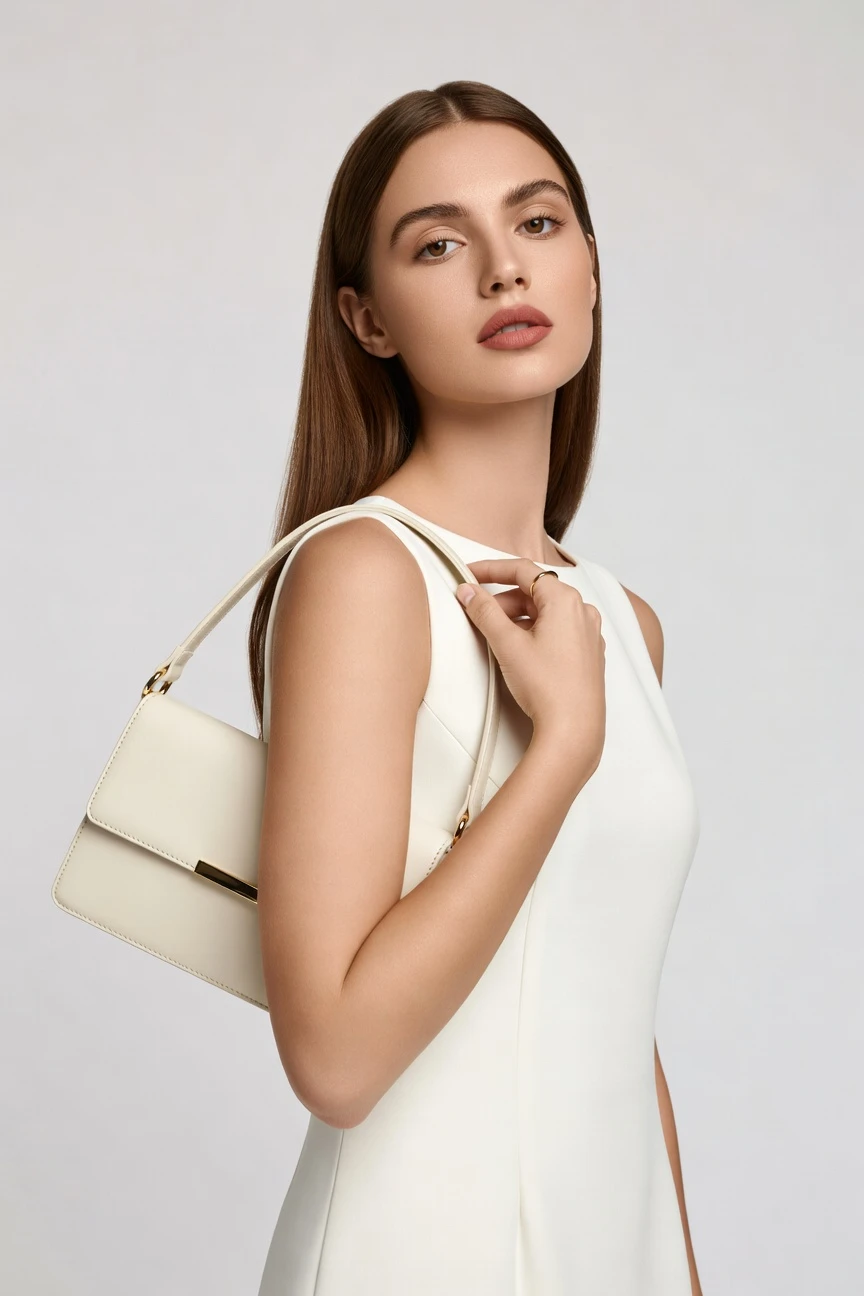
For accessory photography, the setup starts tight and product-led: an 85mm lens, half-body framing, 4:5 crop, 4K output, and accessory focus. You click into a clean campaign frame that keeps the bag, watch, jewelry, or sunglasses doing the work. ~$0.55 per image · ~30-40s
- 5 clicks · 0 keystrokes
- app.rawshot.ai / new_shoot
How it works
Build Accessory Shoots Like a Real App
Move from product file to catalogue, campaign, or social-ready frames with click-set controls that keep the accessory, not guesswork, in charge.
- Step 01
Upload the Product
Start with the real garment or accessory you need to sell. RAWSHOT is built around the item, so shape, material, hardware, colour, logo, and proportion stay central to the output.
- Step 02
Set the Shoot by Clicks
Choose lens, framing, crop, lighting, background, visual style, and product focus from controls. You direct the image in an application interface instead of improvising through text syntax.
- Step 03
Generate and Scale
Create a single hero image in the browser or run thousands of accessory variants through the REST API. The same engine, rights model, provenance labelling, and pricing apply at every volume.
Spec sheet
Proof for Accessory-First Image Production
These twelve points show how RAWSHOT handles product fidelity, control, scale, rights, and transparent labelling for fashion accessories.
- 01
Synthetic Models by Design
Every RAWSHOT model is a synthetic composite built from 28 body attributes with 10+ options each. Accidental real-person likeness is statistically negligible by design, not hope.
- 02
Every Setting Is a Click
Lens, framing, pose, angle, lighting, background, and visual style live in buttons, sliders, and presets. You direct the shoot without learning command syntax.
- 03
Accessory Detail Stays Central
RAWSHOT is engineered around the real product, so colour, shape, hardware, logo placement, pattern, and proportion are represented faithfully. The garment is the brief.
- 04
Diverse Synthetic Models
Cast across a broad range of body attributes for bags, jewelry, watches, sunglasses, and other accessories. Build inclusive visuals without model booking bottlenecks.
- 05
Consistency Across SKU Families
Keep the same face, framing logic, and visual direction across product lines. That makes cross-sell grids, category pages, and drop-based campaigns feel coherent.
- 06
150+ Styles for Fashion Teams
Switch from clean catalogue output to editorial, campaign, street, vintage, noir, or glossy brand imagery in a few clicks. The accessory stays constant while the art direction changes.
- 07
2K, 4K, and Every Ratio
Generate square, portrait, landscape, marketplace, social, and campaign formats from the same workflow. Output in 2K or 4K depending on where the image needs to land.
- 08
Labelled and Compliance-Ready
Outputs are AI-labelled, watermarked, and supported by C2PA provenance metadata. RAWSHOT is built for EU-hosted, GDPR-conscious operations and transparent disclosure standards.
- 09
Signed Audit Trail per Image
Each output carries a traceable record tied to its generation context. That gives commerce and compliance teams a usable chain of accountability, not a black box file drop.
- 10
GUI for One Shoot, API for Scale
Use the browser for hands-on art direction or connect the REST API for nightly catalogue runs. Indie labels and enterprise teams work on the same product surface.
- 11
Clear Pricing and Fast Turnaround
Still images run at about $0.55 each and usually generate in 30–40 seconds. Tokens never expire, and failed generations refund their tokens.
- 12
Full Commercial Rights Included
Every output comes with permanent, worldwide commercial rights. You can publish across PDPs, marketplaces, lookbooks, ads, and social without extra licensing layers.
Outputs
Accessory Outputs, directed by clicks
From clean product-led catalogue frames to sharper campaign crops, the accessory stays readable and brand-ready. Build close-ups, half-body styling shots, and editorial variations from the same product source.


Browse 150+ visual styles →
Comparison
RAWSHOT vs category tools vs DIY prompting
Three lenses on every dimension — what you optimize for in RAWSHOT versus typical category tools and blank-box AI workflows.
01
Interface
RAWSHOT
Click-driven controls for lens, framing, light, style, and product focusCategory tools + DIY
Usually mix light controls with shorter text-led creative inputs. DIY prompting: You type everything manually and keep rewriting directions to chase usable outputs02
Garment fidelity
RAWSHOT
Built around the real accessory so shape, hardware, logos, and colour holdCategory tools + DIY
Often stylize fast but may soften exact product details under aesthetic presets. DIY prompting: Generic models commonly drift hardware, invent logos, and bend product proportions03
Model consistency across SKUs
RAWSHOT
Reuse consistent models and direction across large accessory cataloguesCategory tools + DIY
Can vary faces and styling logic between batches or projects. DIY prompting: Face continuity is unreliable, so adjacent PDPs often look like different campaigns04
Provenance + labelling
RAWSHOT
C2PA-signed, AI-labelled, and watermarked with visible and cryptographic layersCategory tools + DIY
Transparency signals vary and are not always embedded per output. DIY prompting: Usually no provenance metadata, no signed record, and inconsistent disclosure workflow05
Commercial rights
RAWSHOT
Full commercial rights to every output, permanent and worldwideCategory tools + DIY
Rights are often explained across plan pages and exceptions. DIY prompting: Rights clarity depends on model terms, platform rules, and unclear source workflows06
Pricing transparency
RAWSHOT
Same per-image pricing, no per-seat gates, tokens never expireCategory tools + DIY
May gate core workflows behind seats, tiers, or sales conversations. DIY prompting: Cheap entry can hide heavy iteration time and unpredictable usable yield07
Iteration speed per variant
RAWSHOT
Accessory variants generate in about 30–40 seconds with repeatable controlsCategory tools + DIY
Fast variation exists but often with less product-led control. DIY prompting: Each new angle or correction means another typed round with uncertain carryover08
Catalog scale
RAWSHOT
Browser GUI and REST API use the same engine for one or 10000Category tools + DIY
Scale features are more often separated into higher plans or enterprise layers. DIY prompting: No dependable SKU pipeline, audit trail, or repeatable batch logic for commerce teams
Prompting does not scale
Stop writing essays. Direct the shoot.
Most AI photo tools start with a blank text box. Rawshot turns the shoot into repeatable controls, so creative teams can produce consistent fashion imagery without prompt syntax or one-off hacks.
Category norm
ManualCreate a premium editorial fashion photograph of a model wearing the exact navy oversized wool coat from SKU-1842, full-body crop, realistic hands, consistent facial identity, clean e-commerce lighting, subtle Paris street background, 85mm lens, no logo distortion, no fabric hallucination, same pose as last campaign, repeatable for all colorways...
A prompt can describe one image. It cannot become a shared production system for hundreds of products, models, angles and markets.
Rawshot
ClicksSaved shoot recipe
Apply to 1 SKU or 10,000 via GUI, CSV or REST API.
Rawshot makes creative direction visible: buttons, presets and sliders instead of hidden prompt craft. The result is easier to teach, faster to approve and built for repeat production.
Use cases
Where Accessory Teams Need More Images
Operator archetypes and how click-directed, garment-first output fits the way they actually work.
- 01
Handbag DTC Launches
A small brand can build campaign and PDP imagery for a new bag line before booking a physical shoot.
Confidence · high
- 02
Jewelry Product Pages
Fine and fashion jewelry teams can create clean close-ups and styled frames that keep metal tone, stone placement, and silhouette readable.
Confidence · high
- 03
Watch Catalogue Refreshes
Merchandising teams can update seasonal watch grids with consistent model styling and repeatable crops across collections.
Confidence · high
- 04
Sunglasses Social Drops
Eyewear brands can generate 4:5 and 9:16-ready accessory imagery that keeps frame shape and lens tint central.
Confidence · high
- 05
Marketplace Accessory Sellers
High-SKU sellers can standardize cover images across marketplaces without rebuilding the visual logic by hand each time.
Confidence · high
- 06
Vintage and Resale Shops
Single-item sellers can give rare bags, belts, scarves, and jewelry a polished on-model presentation without a studio day.
Confidence · high
- 07
Crowdfunded Accessories
Founders can show campaign-ready imagery before large-scale production, helping pre-orders land with clearer product storytelling.
Confidence · high
- 08
Factory-Direct Manufacturers
Suppliers can present private-label accessory ranges in buyer-friendly imagery before samples move internationally.
Confidence · high
- 09
Boutique Styling Edits
Retail teams can assemble editorial-feeling accessory stories around a product family for homepage and email placements.
Confidence · high
- 10
Adaptive Accessory Brands
Brands designing practical closures, straps, or wearable supports can highlight utility details without sacrificing visual polish.
Confidence · high
- 11
Student Portfolio Projects
Fashion students can direct accessory campaigns through interface controls and build credible presentation work on limited budgets.
Confidence · high
- 12
Agency Test Concepts
Creative teams can mock up accessory campaign directions quickly, then decide which routes deserve full production later.
Confidence · high
— Principle
Honest is better than perfect.
Accessory imagery sits close to trust: buyers inspect logos, hardware, materials, and claim signals carefully. That is why every RAWSHOT output is AI-labelled, watermarked, and backed by C2PA provenance metadata, with EU-hosted operations, GDPR compliance, and disclosure-first product design built in.
Rights & provenance
Full commercial rights. Forever.
- C2PA-signed on every image — EU AI Act Article 50 compliant
- 28-attribute synthetic models — real-person likeness statistically impossible
- Full commercial rights to every generation — no recurring licensing fees
- Tokens never expire · One-click cancel · Transparent pricing
EU AI Act
C2PA
Commercial use
Pricing
~$0.55 per image.
~30–40 seconds per generation. Tokens never expire. Cancel in one click.
- 01The cancel button is on the pricing page.
- 02No per-seat gates. No 'contact sales' walls for core features.
- 03Failed generations refund their tokens.
- 04Full commercial rights to every output, permanent, worldwide.
FAQ
Practical answers on control, rights, pricing, scale, and compliant publishing.
Do I need to write prompts to use RAWSHOT?
Never—you direct every output with sliders, presets, and clicks on the garment, not typed prompts. That matters because fashion teams do not need another layer of syntax between the product and the image; they need a dependable interface that maps to real shoot decisions like lens choice, framing, lighting, crop, style, and product focus. In RAWSHOT, those decisions are explicit controls, so buyers, merchandisers, and founders can work in the browser without translating their intent into chatbot language.
For catalogue and campaign operations, that click-driven structure makes handoff cleaner and results more repeatable. The same logic carries from single-image work in the GUI to SKU-scale runs in the REST API, so teams can keep settings, timings, refund rules, rights, and provenance handling consistent across workflows. You are not guessing how to ask for a usable image; you are selecting how the accessory should be shown and generating from there.
What does an ai accessory fashion photo generator actually change for ecommerce teams?
It changes who gets access to accessory imagery in the first place. Instead of waiting for samples, studio calendars, model bookings, and post-production cycles, ecommerce teams can create product-led images around the real accessory in a browser workflow and publish faster across PDPs, category pages, marketplaces, and launch assets. That is especially useful for bags, jewelry, watches, sunglasses, and small leather goods, where visual coverage often decides whether a shopper understands the product quickly enough to convert.
RAWSHOT adds structure that generic image tools usually do not. You control framing, lens, aspect ratio, style, and product focus through the interface, generate stills in roughly 30–40 seconds, and pay about $0.55 per image with tokens that never expire. Each output includes commercial rights, and the platform is built around labelled, watermarked, provenance-aware output, which gives commerce teams a more operationally usable system than ad hoc image generation.
Why skip reshooting every accessory SKU for each season or merch drop?
Because seasonal updates often require more visual coverage than small and mid-sized teams can realistically afford through traditional production. A new colourway, a new strap finish, a holiday capsule, or a marketplace expansion can trigger the need for dozens or hundreds of fresh accessory images, even when the underlying product family is already defined. If every update requires a new physical shoot, imagery becomes the bottleneck instead of the selling tool.
RAWSHOT gives teams a way to extend existing product lines with controlled visual variation rather than restarting production from zero. You can keep the same model logic, crop system, and visual direction while updating the accessory shown, then deliver outputs in 2K or 4K for catalogue, campaign, or social use. That helps operators plan launches around product readiness and merchandising needs, not around whether a studio day can be justified for every SKU change.
How do we turn flat accessory assets into catalogue-ready imagery without prompting?
You start from the product and direct the presentation through the interface. In practice, that means selecting the lens, framing, aspect ratio, resolution, visual style, and product focus that suit the accessory and the channel you are producing for. A watch can be directed into a tighter, product-led crop, while a handbag might benefit from a half-body composition that shows scale and carry position. The workflow is operationally simple because every decision is exposed as a control rather than hidden behind chat-style guesswork.
RAWSHOT is designed so the accessory remains the brief. Teams can represent shape, hardware, colour, logo placement, and proportion more reliably, then export outputs with permanent worldwide commercial rights. Because failed generations refund tokens and pricing stays transparent, teams can test catalogue routes, campaign variants, and merchandising crops without having to re-budget a shoot every time they need one more usable frame.
Why does garment-led control beat ChatGPT, Midjourney, or generic image tools for fashion PDPs?
Because product pages punish ambiguity. Generic tools are good at making images; they are not inherently built to protect exact accessory details across repeated commercial use. When a seller needs the same bag shape, clasp, logo placement, strap width, or lens tint to remain stable from one output to the next, typed image workflows often become a loop of correction and compromise. The result may look striking, but it is harder to operationalize across a real catalogue.
RAWSHOT approaches the problem from the product outward. The interface gives teams direct control over the visual decisions they actually make in commerce production, while the system is built around garment and accessory fidelity, repeatability, provenance, and rights clarity. That matters more than novelty when the image has to survive QA, legal review, and merchandising review before it ever reaches a shopper.
Can we use RAWSHOT accessory images in ads, PDPs, and marketplaces with clear rights and labelling?
Yes. RAWSHOT includes full commercial rights to every output, permanent and worldwide, which means teams can use images across product pages, paid media, marketplaces, email, social, and campaign surfaces without adding extra licensing layers. That clarity matters for accessory businesses because images move across many channels quickly, and the operational risk often comes from unclear usage terms rather than from the image file itself.
RAWSHOT also treats disclosure as part of the product, not a footnote. Outputs are AI-labelled, watermarked with visible and cryptographic layers, and backed by C2PA provenance metadata, which gives teams a transparent record of what the asset is. For brands that care about compliance, trust, and internal approval flow, the takeaway is simple: publish labelled assets with a documented chain of origin instead of relying on ambiguous files from generic generation tools.
What should our team check before publishing AI-assisted accessory imagery?
Start with the product itself. Review whether the accessory shape, hardware, logo treatment, colour, material impression, and scale read correctly for the specific SKU, then confirm that the framing and crop support the intended use on PDP, marketplace, or campaign placements. For accessories, small visual errors matter disproportionately because shoppers are often buying from close inspection rather than from full-outfit context.
Then check the operational layer. Make sure the output is the intended aspect ratio and resolution, that the commercial use context is covered by the platform rights, and that provenance and labelling signals are present in the workflow your team uses. With RAWSHOT, those checks are easier to standardize because the system is designed around C2PA-backed provenance, watermarking, AI labelling, repeatable controls, and SKU-scale consistency rather than one-off image experiments.
How much does accessory image generation cost, and what happens if a run fails?
For stills, RAWSHOT runs at about $0.55 per image, and most generations complete in roughly 30–40 seconds. Tokens never expire, which is useful for seasonal businesses and smaller brands that generate in bursts rather than on a fixed monthly production rhythm. That pricing model is deliberately straightforward, so teams can estimate catalogue expansion, launch support, and creative testing without translating through seat fees or hidden volume gates.
If a generation fails, the tokens are refunded. That matters in real operations because failed runs are not a theoretical edge case; they affect planning, especially when teams are producing many accessory variants under launch deadlines. RAWSHOT also keeps cancellation simple with one-click cancel on the pricing page, which means finance and production leads can treat image generation as an accessible operating tool rather than a contract trap.
Can RAWSHOT plug into our Shopify-scale or marketplace accessory workflow through an API?
Yes. RAWSHOT supports both a browser GUI for hands-on image direction and a REST API for catalogue-scale production, so teams can choose the mode that fits their workflow instead of switching platforms when volume increases. That is important for accessory businesses because production often starts with a few hero SKUs and expands into broad collections, variant testing, or recurring marketplace refreshes.
The key point is that RAWSHOT does not split smaller teams and larger operations into different products. The same engine, model logic, pricing structure, rights framework, and provenance approach apply whether you are generating one campaign image manually or orchestrating high-volume runs programmatically. For operations teams, that means the path from experimentation to repeatable pipeline work is direct and does not require rebuilding the image process later.
Can one team use the browser while another scales accessory imagery through the API?
Yes, and that is one of the practical strengths of the platform. Creative and merchandising teams can direct hero images, test framing, and choose visual styles in the browser, while operations or engineering teams can take the approved logic and run larger batches through the REST API. That split mirrors how many fashion businesses actually work: a few people define the visual system, then another team applies it across the catalogue.
RAWSHOT supports that model without changing the underlying product or forcing teams into separate editions. There are no per-seat gates for core features, the pricing logic stays consistent, tokens do not expire, and the same labelled, watermarked, provenance-aware output model applies across both modes. The practical takeaway is that one team can art-direct the standard and another can scale it, without losing consistency between the first image and the thousandth.
Keep exploring