
— 28 attributes · 10+ options each · Save once
AI Avatar Image Generator — with click-driven control over every attribute.
Build a reusable brand face when consistency matters more than improvisation. You set skin tone, age range, body type, hair, height, and expression through buttons and sliders, then save that model to reuse across every SKU. Each model is a synthetic composite designed to avoid real-person likeness, with labelled outputs and C2PA-signed provenance.
- ~$0.99 per model
- ~50–60s per generation
- 150+ styles
- 28 attributes × 10+ options
- Save once, reuse across catalog
- EU-hosted
7-day free trial • 50 tokens (10 images) • Cancel anytime

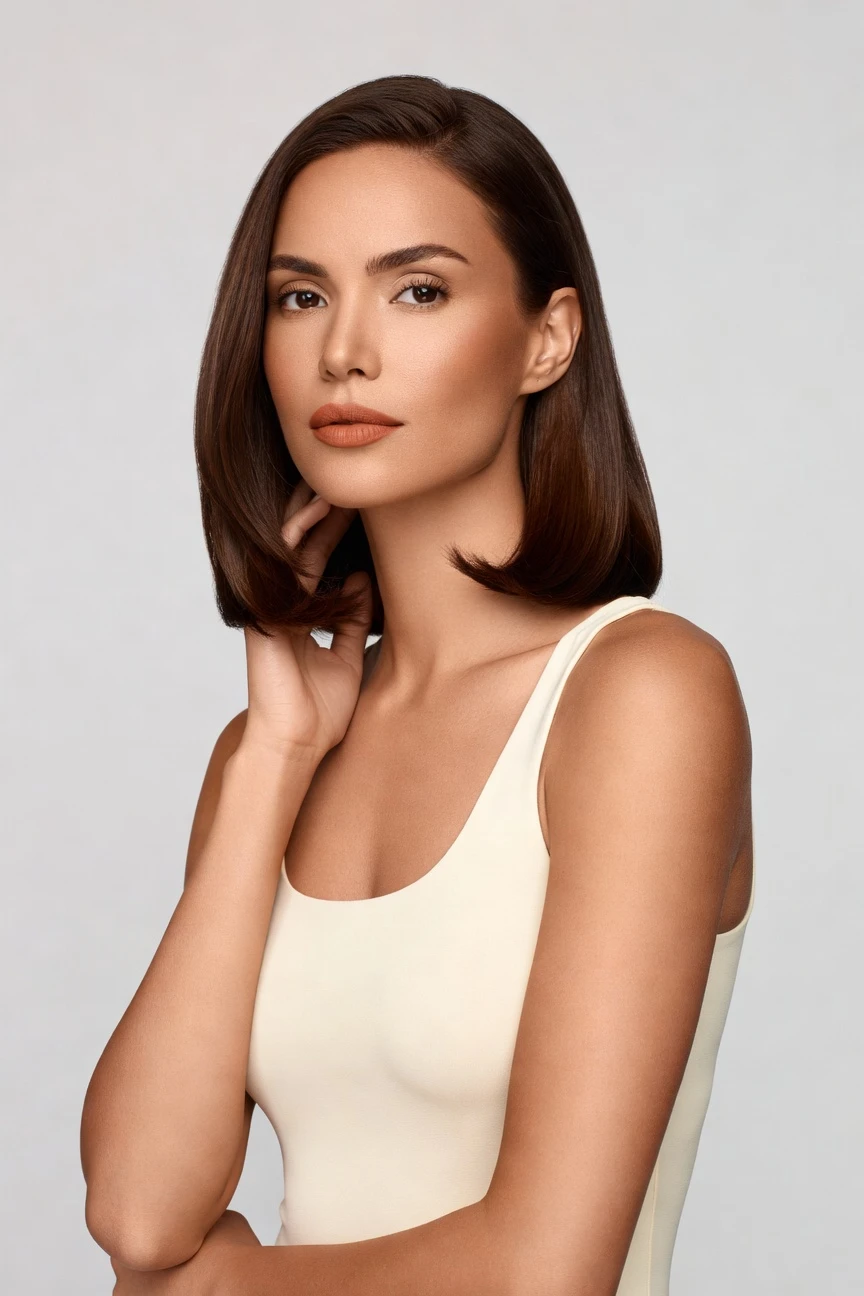
Saved model setup
Female · 26–35 · Dark brown · 175cm
Build a model. Zero prompts.
For this page, the model starts from Copper skin tone and a commerce-ready base profile, then adds a few precise adjustments for age, height, hair, and body shape. The result is a saved synthetic model you can reuse across product pages, campaigns, and seasonal refreshes without face drift. 28 attributes · 10+ options each
- 5 clicks · 0 keystrokes
- app.rawshot.ai / build_model
How it works
Build Once, Reuse Across Every SKU
The model builder turns attribute choices into a saved asset your team can direct consistently in GUI or API workflows.
- Step 01
Set the Core Attributes
Choose the reusable identity first: skin tone, age range, body type, height, hair, and expression. Every setting is visual, so the model starts from clear structure instead of guesswork.
- Step 02
Save the Model to Your Library
Once the face and body are right, save the model as a reusable asset. That same model can then appear across lookbooks, PDPs, ads, and catalog updates without drifting between shoots.
- Step 03
Apply It Across Every Garment
Use the saved model in the browser for single looks or through the API for large assortments. The workflow stays the same whether you style one outfit or a nightly SKU pipeline.
Spec sheet
Proof for Reusable Fashion Model Workflows
These twelve details show how RAWSHOT keeps model building controlled, labelled, and ready for single shoots or catalog-scale reuse.
- 01
Attribute-Based by Design
Each model is assembled from 28 body attributes with 10+ options each. That structure gives you precise control while keeping accidental real-person likeness statistically negligible by design.
- 02
Every Setting Is a Click
You direct the model with buttons, sliders, and presets instead of an empty text box. The interface behaves like a real fashion application, not a chat workflow.
- 03
Built Around the Garment
The product stays central when you place a saved model into shoots. Cut, colour, pattern, logo, fabric, and proportion stay tied to the garment instead of being bent around vague instructions.
- 04
Diverse Synthetic Models
Build models across a wide range of body traits and visual identities for different assortments and audiences. The system is designed for representation with transparent labelling, not ambiguity.
- 05
Consistency Across the Catalog
Save one approved face and body, then reuse it across tops, dresses, outerwear, accessories, and more. That means fewer retakes, cleaner grids, and no catalog drift.
- 06
150+ Visual Styles
Once the model is saved, you can place it into catalog, studio, lifestyle, campaign, street, vintage, noir, and other visual systems. Brand direction changes without rebuilding identity from scratch.
- 07
2K, 4K, and Every Ratio
Generate outputs for PDPs, marketplaces, social crops, paid media, and lookbooks in the formats your channels actually need. Resolution and framing flex without changing the saved model.
- 08
Labelled and Compliance-Ready
Outputs are AI-labelled, watermarked, and C2PA-signed, with support aligned to EU AI Act Article 50, California SB 942, and GDPR expectations. Honesty is built into the product surface.
- 09
Signed Audit Trail per Image
Every output carries provenance metadata that records what it is. That makes internal review, partner handoff, and marketplace documentation more dependable.
- 10
GUI for One Look, API for 10,000
Creative teams can build and approve models in the browser, then operations teams can scale the same assets through REST API pipelines. One product covers single shoots and enterprise throughput.
- 11
Predictable Speed and Spend
Model generations run in about 50–60 seconds at roughly $0.99 each, with tokens that never expire. Failed generations refund tokens, so testing does not punish iteration.
- 12
Full Commercial Rights Included
Every approved output comes with permanent, worldwide commercial rights. You do not need a separate enterprise negotiation to use the work in commerce, campaigns, or marketplaces.
Outputs
Saved Models, Reusable Everywhere
The same synthetic model can anchor a full collection, a seasonal drop, or a marketplace rollout. Build once, then keep identity stable across channels, crops, and garments.


Browse all 600+ models →
Comparison
RAWSHOT vs category tools vs DIY prompting
Three lenses on every dimension — what you optimize for in RAWSHOT versus typical category tools and blank-box AI workflows.
01
Interface
RAWSHOT
Buttons, sliders, presets, and saved model controls in a fashion-native appCategory tools + DIY
Often mix lightweight controls with abstract generation steps and less direct model reuse. DIY prompting: Typed instructions in generic AI tools, with repeated rewrites to steer face and body02
Model consistency across SKUs
RAWSHOT
Save one approved model and reuse it across the full catalogCategory tools + DIY
Can vary identity between sessions or require extra setup to stay close. DIY prompting: Faces drift between outputs, so the same brand model rarely stays stable03
Garment fidelity
RAWSHOT
Garment-led system built to respect cut, colour, pattern, and logoCategory tools + DIY
May prioritize mood and styling over strict product representation. DIY prompting: Garments drift, logos get invented, and product details change from image to image04
Provenance and labelling
RAWSHOT
C2PA-signed, visibly watermarked, cryptographically watermarked, and AI-labelled outputsCategory tools + DIY
Labelling and provenance support can be partial or absent. DIY prompting: Usually no provenance metadata, no structured labelling, and weak auditability05
Commercial rights
RAWSHOT
Permanent worldwide commercial rights included in the core productCategory tools + DIY
Rights terms can vary by plan, seat, or negotiated contract. DIY prompting: Rights clarity depends on tool terms and can stay unclear for commerce teams06
Pricing transparency
RAWSHOT
Same per-model price, no per-seat gates, tokens never expire, one-click cancelCategory tools + DIY
May gate scale features, teams, or workflows behind higher tiers. DIY prompting: Low entry cost, but heavy manual iteration time and unpredictable reruns add hidden spend07
Catalog scale
RAWSHOT
Browser GUI for creative work and REST API for nightly SKU pipelinesCategory tools + DIY
Some tools lean either studio interface or enterprise workflow, not both equally. DIY prompting: No reliable batch production pattern for consistent fashion catalogs at scale08
Iteration overhead
RAWSHOT
Adjust attributes directly and regenerate with clear, repeatable controlsCategory tools + DIY
Can require more trial-and-error to hold identity across variants. DIY prompting: Prompt-engineering overhead slows approval, and each revision can break earlier progress
Prompting does not scale
Stop writing essays. Direct the shoot.
Most AI photo tools start with a blank text box. Rawshot turns the shoot into repeatable controls, so creative teams can produce consistent fashion imagery without prompt syntax or one-off hacks.
Category norm
ManualCreate a premium editorial fashion photograph of a model wearing the exact navy oversized wool coat from SKU-1842, full-body crop, realistic hands, consistent facial identity, clean e-commerce lighting, subtle Paris street background, 85mm lens, no logo distortion, no fabric hallucination, same pose as last campaign, repeatable for all colorways...
A prompt can describe one image. It cannot become a shared production system for hundreds of products, models, angles and markets.
Rawshot
ClicksSaved shoot recipe
Apply to 1 SKU or 10,000 via GUI, CSV or REST API.
Rawshot makes creative direction visible: buttons, presets and sliders instead of hidden prompt craft. The result is easier to teach, faster to approve and built for repeat production.
Use cases
Who Builds Reusable Brand Faces With RAWSHOT
Operator archetypes and how click-directed, garment-first output fits the way they actually work.
- 01
Indie Designers on Pre-Order Drops
Build a Copper-toned model once, then present unreleased garments consistently across crowdfunding pages, lookbooks, and product launches before samples travel anywhere.
Confidence · high
- 02
DTC Apparel Teams With Lean Crews
Create a reusable avatar for weekly collection updates so one small team can keep PDP imagery coherent without booking repeated shoot days.
Confidence · high
- 03
Marketplace Sellers Expanding Fast
Use the same saved model across a growing assortment to make listings feel like a brand system instead of a patchwork of unrelated uploads.
Confidence · high
- 04
Adaptive Fashion Labels
Define a model identity that fits the audience you serve, then reuse it across core products, educational pages, and seasonal updates with stable representation.
Confidence · high
- 05
Kidswear Brand Builders Planning Ahead
Use the model workflow to establish a repeatable visual direction for adult companion products, accessories, and brand storytelling while keeping approval cycles tight.
Confidence · high
- 06
Lingerie and Intimates Operators
Set a consistent face, body shape, and expression for sensitive categories where trust, continuity, and respectful presentation matter on every product page.
Confidence · high
- 07
Resale and Vintage Curators
Apply one saved model style across mixed inventory so archival pieces feel editorially coherent even when each item comes from a different source.
Confidence · high
- 08
Factory-Direct Manufacturers
Standardize on-model output for wholesale previews and direct storefronts by reusing the same approved identity across large product runs.
Confidence · high
- 09
Students Building First Collections
Get access to an AI avatar image generator workflow without needing studio budgets, then present your first line with a clear and reusable model system.
Confidence · high
- 10
Crowdfunded Footwear Startups
Anchor launch visuals around one saved face and body so product pages, social crops, and campaign assets all look like the same brand.
Confidence · high
- 11
Catalog Teams Managing Seasonal Refreshes
Swap styling, framing, and visual presets around the same model identity instead of reshooting every garment each time the season changes.
Confidence · high
- 12
Agencies Serving Smaller Fashion Clients
Build reusable avatars for multiple brands so each client gets a stable visual identity without forcing the agency into costly production logistics.
Confidence · high
— Principle
Honest is better than perfect.
When teams use a reusable model builder, trust matters as much as consistency. RAWSHOT labels outputs, applies visible and cryptographic watermarking, and signs provenance with C2PA so partners and customers can see what they are looking at. The models are synthetic composites, EU-hosted, and designed to avoid accidental real-person likeness rather than pretending ambiguity is a feature.
Rights & provenance
Full commercial rights. Forever.
- C2PA-signed on every image — EU AI Act Article 50 compliant
- 28-attribute synthetic models — real-person likeness statistically impossible
- Full commercial rights to every generation — no recurring licensing fees
- Tokens never expire · One-click cancel · Transparent pricing
EU AI Act
C2PA
Commercial use
Pricing
~$0.99 per model generation.
~50–60 seconds per generation. Save the model once, reuse it across your entire catalog.
- 01Tokens never expire. Cancel in one click.
- 02Same face, same body, every SKU — no drift between shoots.
- 03No per-seat gates. No 'contact sales' walls for core features.
- 04Failed generations refund their tokens.
FAQ
Practical answers on control, rights, pricing, scale, and compliant publishing.
Do I need to write prompts to use RAWSHOT?
Never—you direct every output with sliders, presets, and clicks on the garment, not typed prompts. That matters because fashion teams need repeatable decisions they can hand from buyer to designer to operator without translating visual intent into chat syntax. In RAWSHOT, model attributes, camera choices, framing, lighting, background, and style are all structured controls, so the workflow feels like using production software instead of negotiating with a text box.
For catalog teams, reliability beats novelty. The same control logic carries from the browser GUI into REST API workflows, which means approvals are easier to standardize and batch jobs are easier to reproduce. You can save a synthetic model, reuse it across SKUs, and keep timing, token usage, refunds on failed generations, provenance signals, and commercial-rights coverage explicit from the start. The practical takeaway is simple: train your team on a visual interface once, then scale the same process from one lookbook image to a full assortment.
What does an AI avatar image generator actually change for fashion catalog teams?
It changes who gets access to consistent on-model imagery. Instead of treating model creation as a one-off creative experiment, RAWSHOT turns it into a reusable production asset that catalog teams can save, approve, and deploy across many garments. That is useful when you need continuity across PDP grids, seasonal edits, marketplace listings, and regional storefronts, because the face and body stop shifting from one generation cycle to the next.
In practice, your team defines the synthetic model through 28 body attributes with 10+ options each, then reuses that identity across stills and broader production workflows. You keep the same engine whether you are running in the browser or through the API, the same price per model generation, and the same transparency around labelling, watermarking, and C2PA provenance. For operations, that means approvals become about garment fit, framing, and brand direction rather than repeatedly rebuilding human identity from scratch.
Why skip reshooting every SKU when the season changes?
Because seasonal updates usually change styling, context, and channel needs more often than they change the approved model identity. If your brand already knows the face, body shape, and presentation it wants, rebuilding that from zero for each collection creates avoidable delay and inconsistency. RAWSHOT lets you preserve the approved synthetic model, then change visual style, framing, lighting, and output ratios around it so launches stay coherent without another full production cycle.
That is especially useful for commerce teams managing carryover stock, color refreshes, capsule drops, and channel-specific crops. You can keep one saved model consistent across new assortments while updating the surrounding treatment for campaign, catalog, marketplace, or social use. Since outputs are labelled, watermarked, and C2PA-signed, governance does not disappear when production gets faster. The operational benefit is that your team refreshes presentation where it matters and keeps identity stable where customers notice drift immediately.
How do we turn flat garments into catalogue-ready imagery without prompting?
You start by building or selecting a saved synthetic model, then place the garment into a controlled shoot setup using direct UI controls. Framing, camera distance, pose, lighting, background, expression, and style are all selected through the interface, which makes the process predictable for buyers and ecommerce operators who need repeatable output rather than open-ended experimentation. The garment remains the brief, so the system is built to preserve product information such as cut, colour, pattern, logo placement, fabric behavior, and proportion.
From there, teams can generate outputs in the browser for one-off looks or push the same logic into API workflows for larger catalogs. Stills support 2K and 4K resolution and every aspect ratio, so the same approved model can feed PDPs, marketplaces, ads, and lookbooks. Because failed generations refund tokens and tokens never expire, teams can refine setup without creating planning headaches. The best practice is to approve the model once, lock the style system, and then scale garment application across the range.
Why does garment-led control beat DIY prompting in ChatGPT, Midjourney, or generic image tools for fashion PDPs?
Because fashion PDPs are judged on consistency and product truth, not on whether a system can improvise attractively once. Generic image tools ask teams to steer outcomes through typed instructions, which makes each revision vulnerable to drift in the garment, the face, the pose, or the logo. That is where invented details, altered silhouettes, and unstable model identity start to appear. RAWSHOT avoids that pattern by giving teams direct controls built for fashion production rather than a general-purpose text workflow.
The difference is not abstract. In RAWSHOT, you save a synthetic model, reuse it across SKUs, choose styles from preset systems, and keep provenance, watermarking, and auditability attached to the output. In DIY tools, rights framing, labelling, and metadata can stay unclear, and reproducibility becomes a manual craft. For commerce teams, garment-led control wins because it turns approval into an operational process instead of a sequence of lucky accidents that cannot be repeated at scale.
Can we use RAWSHOT outputs commercially, and how are they labelled?
Yes. RAWSHOT includes permanent, worldwide commercial rights to every output, which matters for brands that need assets to move across ecommerce, paid media, marketplaces, wholesale decks, and campaign surfaces without separate negotiation for routine use. Just as important, the outputs are not presented ambiguously. They are AI-labelled and protected with visible plus cryptographic watermarking so your team is not forced to choose between utility and honesty.
RAWSHOT also signs provenance with C2PA and keeps a per-image audit trail, giving internal teams and external partners a clearer record of what the asset is. The platform is EU-hosted, GDPR-compliant, and designed around transparent synthetic composites rather than implied real-person sourcing. For operators, that means commercial usage and disclosure are handled as product features, not as afterthoughts. The practical move is to treat labelling and provenance as part of your brand standard from the first published asset.
What should our team check before publishing synthetic model imagery to product pages?
Start with the garment itself. Confirm that cut, colour, pattern, logo placement, fabric behavior, and fit representation match the source product, because product truth is the first job of commerce imagery. Then review whether the saved synthetic model remains consistent with your approved brand identity across the set, especially if the assets will appear side by side in catalog grids or collection pages. After that, confirm framing, channel crop, and visual style are aligned to the destination surface.
You should also verify trust signals before publishing. Check that the output is AI-labelled, carries watermarking as expected, and retains C2PA provenance metadata in your asset workflow. If your team works across agencies or marketplaces, keep the per-image audit trail with the delivered files so governance is preserved beyond the creative team. The useful operating habit is to make quality review a short checklist that covers both garment fidelity and disclosure, since both affect conversion and brand trust.
How much does this cost if we use RAWSHOT mainly as an ai avatar image generator?
Model generation is about $0.99 per model and usually takes around 50–60 seconds per generation. That pricing works well when your first step is to create a reusable synthetic identity and then apply it across a broader catalog workflow, because you are not paying a separate premium just to unlock the model builder. Tokens never expire, failed generations refund their tokens, and the cancel control is available in one click on the pricing page, so budgeting stays straightforward.
For teams comparing workloads, still images are about $0.55 each and video is about $0.22 per second, with video costing more because it uses more tokens per second than stills. There are no per-seat gates and no sales wall around core features, which matters for small brands and growing catalog teams alike. The practical takeaway is to budget model creation as a reusable foundation asset, then plan imagery and video volume on top of that without hidden expiry pressure.
Can we plug saved models into Shopify-scale or PLM-linked workflows through the API?
Yes. RAWSHOT is built for both browser-based creative work and REST API production, so teams can approve a model in the GUI and then use that same saved identity in larger operational pipelines. That is useful when merchandising, ecommerce, and production teams work in different systems but still need a single visual standard across hundreds or thousands of SKUs. The platform is also PLM-integration ready, which helps connect product data to downstream asset generation without rebuilding the workflow around a new tool.
What matters operationally is consistency. The same saved model, the same control logic, and the same pricing approach carry from one-off use to batch use, so scaling does not require a separate enterprise-only product. Combined with per-image audit trails and C2PA provenance, that makes handoff easier across internal systems and external partners. The sensible implementation is to approve the reusable model centrally, then let your pipeline call it repeatedly where catalog updates already happen.
How do teams scale from one saved avatar to thousands of consistent outputs without losing control?
You scale by standardizing the parts that should stay fixed and only varying the parts that should change. In RAWSHOT, the saved synthetic model becomes the stable identity layer, while garments, styling presets, framing, channel ratios, and campaign context can change around it in a controlled way. That structure is what allows a small creative team to approve once and an operations team to produce at much larger volume without constant identity drift or repeated manual correction.
RAWSHOT supports that approach in both the browser and the API, with the same per-model economics, transparent token rules, and no per-seat gatekeeping for core use. Provenance, watermarking, AI labelling, and audit trails remain attached as the workload grows, which is important when more people and more systems touch the files. For teams, the best pattern is clear: lock the reusable model, define channel templates, and let production scale around that stable core rather than improvising identity every time.
Keep exploring