
— 28 attributes · 10+ options each · Save once
AI Portrait Photo Generator — with click-driven control over every attribute.
Build the exact portrait foundation your brand needs, then reuse it across lookbooks, PDPs, and seasonal launches without face drift. You select skin tone, age range, hair, body type, expression, and more through buttons, sliders, and presets, then save the model once for the whole catalog. Every model is a synthetic composite, transparently labelled and ready for C2PA-signed outputs.
- ~$0.99 per model
- ~50–60s per generation
- 28 attributes × 10+ options each
- Save once, reuse across catalog
- Synthetic composite
- EU-hosted
7-day free trial • 50 tokens (10 images) • Cancel anytime

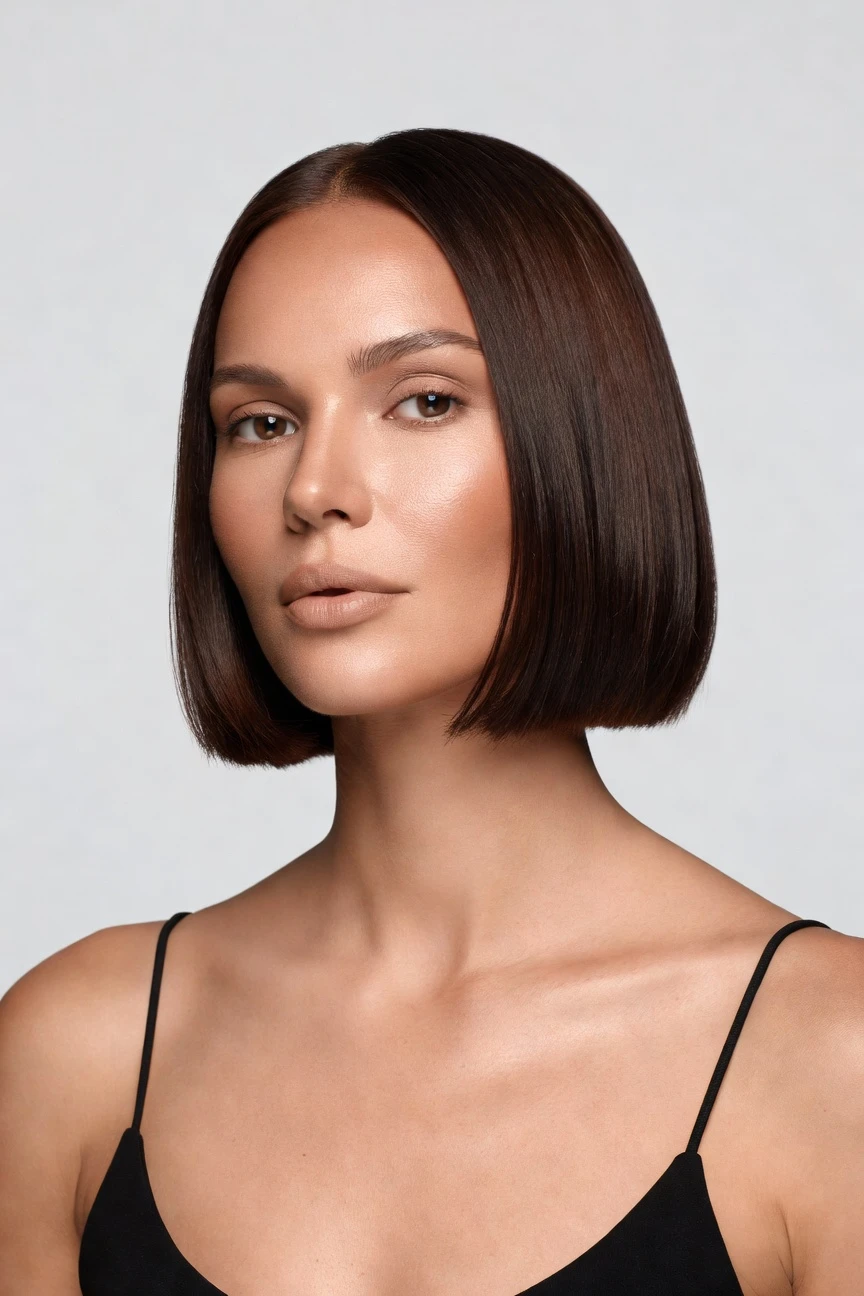
Saved model setup
Female · 26–35 · Dark brown · 175cm
Build a model. Zero prompts.
This setup starts from a copper skin tone and shapes a clean, reusable portrait base for fashion brands that need consistency across shoots. You click the defining attributes once, save the model to your library, and use the same face and body across every collection. 28 attributes · 10+ options each
- 5 clicks · 0 keystrokes
- app.rawshot.ai / build_model
How it works
Build Once, Reuse Across Every Shoot
Start with the portrait attributes that define your brand, save the model, then keep that identity stable across every garment and channel.
- Step 01
Set the Portrait Foundation
Choose the defining attributes that matter to your brand, starting from skin tone and moving through age, body type, hair, and expression. Every decision is made in the interface with visual controls, not typed instructions.
- Step 02
Save the Model to Your Library
Generate the model, review the result, and save it as a reusable asset for future shoots. That gives your team one consistent face and body to carry across collections, channels, and markets.
- Step 03
Reuse Across Every Garment Shoot
Apply the saved model in browser-based shoots or catalog pipelines through the API. The same portrait identity stays stable while you change garments, framing, lighting, and visual style.
Spec sheet
Proof That the Portrait Stays Usable
These twelve proof points show why reusable fashion portraits need control, consistency, provenance, and scale rather than chat-style guesswork.
- 01
Attribute-Driven by Design
Each model is built from 28 body attributes with 10+ options each, so you direct the portrait through structured controls. The synthetic composite approach is designed to make accidental real-person likeness statistically negligible.
- 02
Every Setting Is a Click
You choose the portrait with buttons, sliders, and presets inside a real application. No empty text field stands between your team and a usable fashion model.
- 03
Built Around the Garment
Portrait consistency matters because garments need a stable wearer. RAWSHOT keeps cut, colour, pattern, logo, and drape central instead of bending the product around generic image behavior.
- 04
Diverse Synthetic Models
Build models across a broad range of skin tones, body types, age ranges, and presentations. That gives smaller brands access to representation they often could not organize through traditional casting.
- 05
Consistent Across SKUs
Save the model once and reuse it throughout the catalog. The same face and body remain stable across tops, dresses, outerwear, accessories, and seasonal drops.
- 06
150+ Visual Styles
Once the portrait model is saved, you can place it into catalog, editorial, campaign, street, vintage, noir, or studio looks without rebuilding identity from scratch. Style changes, the model stays recognizable.
- 07
Ready for Every Format
Generate imagery in 2K or 4K and use every aspect ratio your channels require. That makes one saved portrait model workable for PDPs, marketplaces, social crops, and brand presentations.
- 08
Labelled and Compliant
Outputs are C2PA-signed, AI-labelled, and protected with visible and cryptographic watermarking. RAWSHOT is built for EU-hosted compliance expectations, including EU AI Act Article 50 and California SB 942 requirements.
- 09
Audit Trail Per Image
Each image carries signed provenance metadata tied to how it was produced. That gives fashion teams a clearer record for review, publishing, and internal governance.
- 10
GUI and API, Same Product
Build a single portrait in the browser or run reuse at catalog scale through the REST API. The indie label and the enterprise team work on the same engine without feature walls.
- 11
Fast, Transparent Economics
Model generations run in about 50–60 seconds at roughly $0.99 each, with tokens that never expire. Failed generations refund their tokens, so testing identities does not punish iteration.
- 12
Commercial Rights Included
Every output comes with full commercial rights, permanent and worldwide. That gives brands clarity when they publish portraits across ecommerce, ads, email, and wholesale materials.
Outputs
Saved Portraits, ready for the whole catalog
Build a reusable model once, then carry the same identity through different garments, crops, lighting setups, and brand moods. The portrait stays consistent while the creative direction changes around it.


Browse all 600+ models →
Comparison
RAWSHOT vs category tools vs DIY prompting
Three lenses on every dimension — what you optimize for in RAWSHOT versus typical category tools and blank-box AI workflows.
01
Interface
RAWSHOT
Buttons, sliders, and presets built for fashion model directionCategory tools + DIY
Often mix simple controls with vague text-led steps and lighter workflow structure. DIY prompting: Typed instructions in a chat box with inconsistent interpretation from run to run02
Model consistency
RAWSHOT
Save one model and reuse the same face and body across SKUsCategory tools + DIY
May keep partial continuity, but identity drift appears between outputs. DIY prompting: Faces shift constantly, so continuity across a catalog becomes manual guesswork03
Garment fidelity
RAWSHOT
Portrait workflows stay centered on the real product and its detailsCategory tools + DIY
Garment handling is better than generic tools, but can still smooth or alter details. DIY prompting: Common failure mode is garment drift, invented trims, or changed logos04
Provenance
RAWSHOT
C2PA-signed outputs with visible and cryptographic watermarking by defaultCategory tools + DIY
Labelling and provenance support vary widely across tools and plans. DIY prompting: Usually no signed provenance metadata and no structured disclosure trail05
Commercial rights
RAWSHOT
Permanent worldwide commercial rights included with every outputCategory tools + DIY
Rights are often described briefly and tied to plan terms. DIY prompting: Rights clarity depends on changing model policies and external asset terms06
Pricing transparency
RAWSHOT
Same per-model price, no per-seat gates, tokens never expireCategory tools + DIY
Feature access can depend on seats, tiers, or sales-led packaging. DIY prompting: Cheap entry looks simple until retries, failures, and manual cleanup stack up07
Iteration workflow
RAWSHOT
Change portrait attributes directly and regenerate in a predictable interfaceCategory tools + DIY
Iteration can be faster than DIY, but less explicit across every model variable. DIY prompting: Prompt-engineering overhead slows teams before they even review usable outputs08
Catalog scale
RAWSHOT
Browser GUI and REST API use the same engine for one shoot or ten thousandCategory tools + DIY
Scale features may sit behind enterprise packaging or separate workflows. DIY prompting: No dependable batch pipeline for stable fashion identities across large assortments
Prompting does not scale
Stop writing essays. Direct the shoot.
Most AI photo tools start with a blank text box. Rawshot turns the shoot into repeatable controls, so creative teams can produce consistent fashion imagery without prompt syntax or one-off hacks.
Category norm
ManualCreate a premium editorial fashion photograph of a model wearing the exact navy oversized wool coat from SKU-1842, full-body crop, realistic hands, consistent facial identity, clean e-commerce lighting, subtle Paris street background, 85mm lens, no logo distortion, no fabric hallucination, same pose as last campaign, repeatable for all colorways...
A prompt can describe one image. It cannot become a shared production system for hundreds of products, models, angles and markets.
Rawshot
ClicksSaved shoot recipe
Apply to 1 SKU or 10,000 via GUI, CSV or REST API.
Rawshot makes creative direction visible: buttons, presets and sliders instead of hidden prompt craft. The result is easier to teach, faster to approve and built for repeat production.
Use cases
Where Reusable Portrait Models Unlock Access
Operator archetypes and how click-directed, garment-first output fits the way they actually work.
- 01
Indie Designer Launching a First Drop
You build a copper-tone portrait model once, then reuse it across your debut collection without organizing a cast, studio day, or reshoot budget.
Confidence · high
- 02
DTC Label Refreshing PDP Imagery
Your team keeps one consistent portrait identity while updating garments, crops, and lighting for a cleaner ecommerce presentation.
Confidence · high
- 03
Crowdfunding Brand Testing Concepts
You can present a believable portrait direction around pre-production garments before committing to expensive physical shoot logistics.
Confidence · high
- 04
Adaptive Fashion Team Expanding Representation
A saved copper-skin portrait lets you show the collection on a repeatable identity while planning broader representation across future model libraries.
Confidence · high
- 05
Marketplace Seller Standardizing Listings
You turn inconsistent product uploads into a cleaner portrait-led catalog that feels unified across dozens or hundreds of SKUs.
Confidence · high
- 06
Resale Curator Building a Brand Look
You place different one-off garments on the same portrait foundation so the storefront feels coherent even when inventory is mixed.
Confidence · high
- 07
Kidswear Buyer Preparing Parent-Facing Campaigns
You define an on-brand portrait direction early, then move into styled outputs with the same visual identity across seasonal edits.
Confidence · high
- 08
Lingerie DTC Team Protecting Visual Consistency
You keep face, body, and expression stable while changing sets, colors, and framing, which matters when trust and fit cues drive conversion.
Confidence · high
- 09
Factory-Direct Manufacturer Pitching Buyers
You save portrait models to present upcoming lines in a polished way before wholesale meetings, line sheets, and retailer review cycles.
Confidence · high
- 10
Student Label Building a Graduate Collection
You get access to portrait-based fashion imagery without needing the budget, contacts, or production calendar of an established brand.
Confidence · high
- 11
Editorial Team Planning Seasonal Moodboards
You test portrait identities across different style systems before deciding which direction should carry the campaign or lookbook.
Confidence · high
- 12
Catalog Ops Team Running Batch Production
You save approved portrait models to the library and reuse them through the API, so large assortments keep a stable on-model identity.
Confidence · high
— Principle
Honest is better than perfect.
Portrait-based fashion imagery needs trust as much as control. RAWSHOT labels outputs, signs them with C2PA provenance, and applies visible plus cryptographic watermarking so teams can publish with a clear record of what the asset is. The models are synthetic composites rather than captured people, which supports safer reuse across catalogs, campaigns, and internal review.
Rights & provenance
Full commercial rights. Forever.
- C2PA-signed on every image — EU AI Act Article 50 compliant
- 28-attribute synthetic models — real-person likeness statistically impossible
- Full commercial rights to every generation — no recurring licensing fees
- Tokens never expire · One-click cancel · Transparent pricing
EU AI Act
C2PA
Commercial use
Pricing
~$0.99 per model generation.
~50–60 seconds per generation. Save the model once, reuse it across your entire catalog.
- 01Tokens never expire. Cancel in one click.
- 02Same face, same body, every SKU — no drift between shoots.
- 03No per-seat gates. No 'contact sales' walls for core features.
- 04Failed generations refund their tokens.
FAQ
Practical answers on control, rights, pricing, scale, and compliant publishing.
Do I need to write prompts to use RAWSHOT?
Never—you direct every output with sliders, presets, and clicks on the garment, not typed prompts. That UI control is consistent across GUI and REST API payloads, which is why ecommerce teams onboard buyers without rewriting creative briefs as chat threads. Instead of asking staff to become syntax specialists, RAWSHOT lets them make concrete choices about model attributes, framing, lighting, visual style, and product focus inside a structured application built for fashion work.
For catalog teams, reliability matters more than model cleverness; RAWSHOT keeps tokens, timings, refund rules, commercial rights framing, provenance signalling, watermarking cues, REST surface, and SKU-scale batch patterns explicit so operations can rehearse PDP launches without hallucinated garment inventions. In practice, that means the only writing your team needs is brand copy and merchandising notes, while creative direction stays in buttons, sliders, and saved presets.
What does an ai portrait photo generator actually change for fashion catalog teams?
It changes who can build a consistent model identity at all. Traditional portrait production depends on casting, scheduling, locations, transport, coordination, and repeat bookings when the same face is needed again. For smaller apparel teams, that means portrait continuity often gets dropped before the shoot even starts, not because it lacks value but because it is operationally out of reach.
RAWSHOT gives catalog teams a way to build a reusable synthetic model once and apply that identity across many garments, formats, and seasonal updates. You choose from 28 body attributes with 10+ options each, save the approved model to your library, and keep using it across browser-based shoots or API workflows. Because outputs are labelled, C2PA-signed, and covered by full commercial rights, the result is not just a nice image generator but a repeatable production system teams can actually run.
Why skip reshooting every SKU when the season changes?
Because most seasonal updates do not require rebuilding the human side of the image from zero. Brands often need new garments, new lighting, new ratios, or a different campaign mood while still keeping the same recognizable face and body across the assortment. If that consistency depends on another production day, teams either overspend or accept visual drift that makes the catalog feel fragmented.
With RAWSHOT, you save the approved model once and reuse it as the stable portrait foundation while garments and styling change around it. That is especially useful for drops, color refreshes, marketplace updates, and regional merchandising where speed matters but brand continuity matters more. The practical takeaway is simple: lock the model identity early, then iterate the creative surfaces around it instead of rebuilding the cast every time the assortment moves.
How do we turn flat garments into catalogue-ready imagery without prompting?
You start with the product and the reusable model, then direct the rest through the interface. Inside RAWSHOT, teams select model attributes, choose framing, set lighting, pick backgrounds, and apply visual styles through controls rather than typed instructions. That keeps the workflow understandable for buyers, merchandisers, creatives, and operations staff who need predictable results, not chat-style interpretation.
Once the model is saved, the same identity can be applied across upper-body, lower-body, full-outfit, footwear, jewelry, handbags, and accessories, with support for up to four products in one composition. Outputs are available in 2K or 4K and every aspect ratio, so the result can move from PDP to marketplace to campaign crop without rebuilding the shoot logic. For apparel teams, the operational rule is to treat the model as a reusable asset and the garment as the brief.
Why does garment-led control beat ChatGPT, Midjourney, or generic image tools for fashion PDPs?
Because fashion product pages fail when the garment changes between attempts. Generic image tools are built to infer from broad instructions, which means they can alter logos, simplify trims, shift colors, or change the face from one image to the next. That may be acceptable for loose concept work, but it creates risk for commerce teams that need the product and the model identity to stay stable across many assets.
RAWSHOT is engineered around apparel workflows rather than general image exploration. You direct the model through structured controls, keep the same face and body across SKUs, and publish outputs that are labelled, C2PA-signed, and tied to a clearer audit trail. The practical advantage is not novelty; it is reproducibility, which is what lets a fashion team move from one-off experiments to reliable PDP production.
Can we use RAWSHOT outputs commercially, and are they clearly labelled as AI?
Yes. RAWSHOT provides full commercial rights to every output, permanent and worldwide, so teams can use assets across ecommerce, paid media, email, social, wholesale, and other brand channels without separate negotiation for ordinary usage. Just as important, the platform does not hide what the asset is: outputs are AI-labelled and supported with visible and cryptographic watermarking, which keeps disclosure aligned with brand governance rather than treating it as an afterthought.
That transparency is reinforced with C2PA-signed provenance metadata and an EU-hosted compliance posture shaped around requirements such as EU AI Act Article 50 and California SB 942. For fashion operators, that means the asset is not only commercially usable but also easier to review, approve, and archive with a documented record. The practical policy is straightforward: publish confidently, but publish honestly.
What should our team check before publishing portrait-based fashion images?
Start with the garment, then verify the model, then verify the record. Teams should review whether cut, colour, pattern, logo placement, fabric behavior, and proportion remain faithful to the source product, then confirm that the saved model identity stays consistent across the selected images. After that, check that the chosen framing, lighting, and visual style still serve the commerce goal, whether that is a clean PDP, a campaign crop, or a seasonal edit.
RAWSHOT also makes it sensible to include provenance and disclosure in your QA routine. Because outputs are AI-labelled, C2PA-signed, and watermarked with visible plus cryptographic methods, teams can review both the asset and its attached trust signals before publishing. A solid operating habit is to make those checks part of standard content approval, so visual consistency and disclosure discipline scale together rather than being handled separately.
How much does the model workflow cost, and what happens to unused tokens?
Model generation in RAWSHOT runs at about $0.99 per model and usually takes around 50–60 seconds per generation. Tokens never expire, so teams are not forced into artificial deadlines just to preserve credit value, and failed generations refund their tokens. That matters for fashion operators because building a reusable portrait identity often involves deliberate testing of age range, body type, skin tone, hair, and expression before the team approves the version that becomes standard.
The platform also avoids common friction around packaging. There are no per-seat gates for core features, and the cancel option is available directly on the pricing page in one click. In practical terms, that means buyers, creatives, and operations leads can budget portrait model creation as a controllable production input rather than a contract negotiation or a use-it-or-lose-it token scramble.
Can RAWSHOT plug into Shopify-scale or ERP-driven catalog pipelines?
Yes. RAWSHOT supports both a browser GUI for single-shoot work and a REST API for catalog-scale production, so teams do not need to switch platforms when they move from a handful of looks to a large assortment. That matters for fashion operations because portrait consistency only becomes useful when it survives the jump from creative testing to live commerce workflows.
The same engine that lets a small team save a model in the interface can also support broader batch patterns through API-driven processes, with per-image audit trails and integration readiness for PLM-connected environments. For a Shopify-scale or ERP-linked stack, the sensible implementation is to approve model identities centrally, store them as reusable assets, and then let downstream teams apply them consistently across launches, refreshes, and overnight catalog runs.
Can one saved portrait model really scale from a browser shoot to thousands of SKUs?
Yes, and that is the point of building the model first instead of rebuilding identity on every shot. A saved portrait model gives the team one stable face and body that can move from manual creative work in the browser to high-volume production patterns without changing the underlying logic. That continuity is what keeps a catalog recognizable when different teams, timelines, and garment types are involved.
RAWSHOT is designed so the indie designer and the enterprise catalog team use the same core product rather than separate editions with different quality assumptions. The browser interface handles one-off direction quickly, while the REST API supports larger-volume reuse with the same saved model library, pricing logic, and provenance approach. Operationally, teams should treat portrait models as durable production infrastructure, not disposable one-shoot outputs.
Keep exploring