
— 28 attributes · 10+ options each · Save once
AI Bikini Model Generator — with click-driven control over every attribute.
Build the body profile you need for swimwear fit, coverage, and brand consistency, then reuse it across every colourway and drop. You select skin tone, body type, age range, height, hair, and expression through buttons and sliders, save the model once, and keep the same identity across the whole catalog. Every model is a synthetic composite, transparently labelled and C2PA-signed.
- ~$0.99 per model
- ~50–60s per generation
- 150+ styles
- 28 attributes × 10+ options
- Save once, reuse across catalog
- C2PA-signed
7-day free trial • 50 tokens (10 images) • Cancel anytime

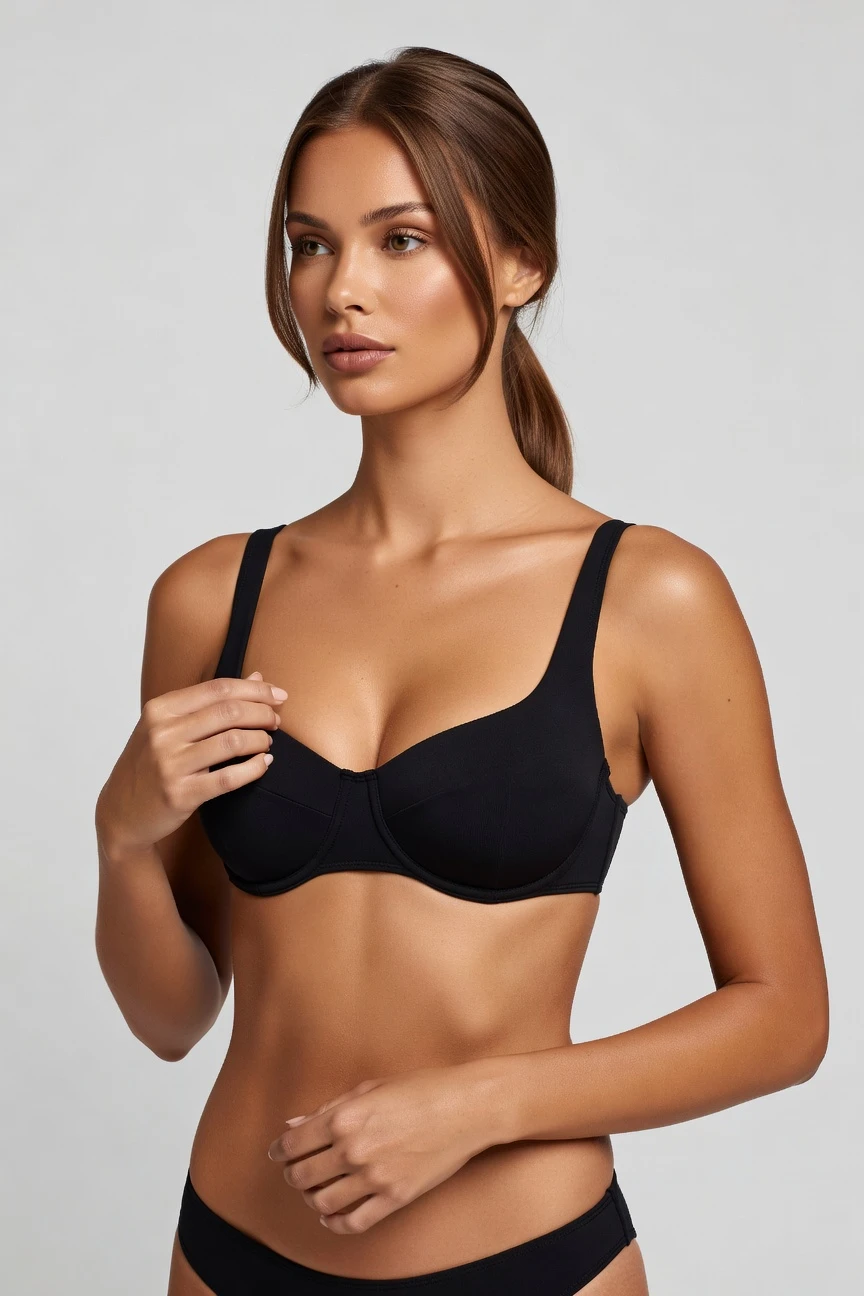
Saved model setup
Female · 26–35 · Dark brown · 175cm
Build a model. Zero prompts.
This setup starts from a copper skin tone for swimwear casting, then adjusts age range, height, hair style, and hair colour for a confident reusable catalog model. You save the profile once and apply it across bikini launches without rebuilding the face and body each time. 28 attributes · 10+ options each
- 5 clicks · 0 keystrokes
- app.rawshot.ai / build_model
How it works
Build Once, Reuse Across Every Swim SKU
This workflow starts with the model profile, then turns that saved identity into repeatable swimwear imagery at any catalog scale.
- Step 01
Set the Model Attributes
Choose the body profile for your swimwear line with sliders and option sets, not a text box. Skin tone, age range, body type, height, hair, and expression are all direct controls.
- Step 02
Save the Identity Once
Generate the model, review the composite, and save it to your library. That same face and body can then carry every bikini style, print, and colourway in the range.
- Step 03
Reuse Across the Catalog
Apply the saved model in the browser for one-off shoots or through the API for SKU-scale work. The result is consistent casting across launches, PDPs, and seasonal updates.
Spec sheet
Proof for Reusable Swimwear Model Workflows
These twelve proof points show how RAWSHOT keeps model creation controlled, transparent, and usable from one launch to catalog scale.
- 01
Composite by Design
Each model is built from 28 body attributes with 10+ options each, so you direct specific traits without relying on a real person likeness.
- 02
Every Setting Is a Click
You adjust the model through buttons, sliders, and presets in a real interface. No text-box guesswork sits between you and the result.
- 03
Built Around the Garment
Once the model is saved, the garment stays the brief. Bikini shape, colour, trim, print, and proportion remain the focus across outputs.
- 04
Diverse Synthetic Casting
Create broad representation across skin tones, body shapes, ages, and styling directions with transparently labelled synthetic models.
- 05
Same Model, Many SKUs
Reuse one saved identity across your whole swim assortment. That means fewer recasts, no face drift, and cleaner brand continuity.
- 06
150+ Visual Styles
Move from clean catalog light to editorial poolside mood using style presets made for fashion teams, not generic image experiments.
- 07
2K, 4K, Any Ratio
Generate assets for PDPs, marketplaces, social crops, and campaign layouts with high-resolution output in the framing you need.
- 08
Labelled and Compliant
Outputs are AI-labelled, watermarked, and C2PA-signed, with compliance aligned to EU AI Act Article 50, California SB 942, and GDPR requirements.
- 09
Audit Trail per Image
Every output carries a signed provenance record, giving teams a clear paper trail for review, approval, and downstream publishing.
- 10
GUI and REST API
Build one model in the browser or push the same logic into catalog pipelines through the API. Small brands and enterprise teams use the same engine.
- 11
Fast, Refundable Generations
Model generations run in about 50–60 seconds, tokens never expire, and failed generations refund their tokens automatically.
- 12
Clear Commercial Rights
Every output comes with full commercial rights, permanent and worldwide, so teams can publish across ecommerce, marketing, and wholesale channels.
Outputs
One Saved Model, many swimwear outcomes
Start with a reusable synthetic model, then direct the styling, framing, and mood around the collection. The identity stays stable while the brand expression changes.


Browse all 600+ models →
Comparison
RAWSHOT vs category tools vs DIY prompting
Three lenses on every dimension — what you optimize for in RAWSHOT versus typical category tools and blank-box AI workflows.
01
Interface
RAWSHOT
Click-driven model builder with sliders, presets, and saved reusable identitiesCategory tools + DIY
Mixed UI plus lighter control sets that often stop at surface styling. DIY prompting: Typed instructions in a chat flow, with inconsistent interpretation on every run02
Model consistency across SKUs
RAWSHOT
Save one face and body, then reuse across the full swim catalogCategory tools + DIY
Some continuity tools exist, but identity drift still appears across batches. DIY prompting: Faces change between outputs, making product lines look recast each time03
Garment fidelity
RAWSHOT
Engineered around real garments, with product detail kept central in outputCategory tools + DIY
Can look strong at first glance but may soften fit and trim accuracy. DIY prompting: Garments drift, prints mutate, logos get invented, and cut details change unpredictably04
Provenance + labelling
RAWSHOT
C2PA-signed, visibly watermarked, cryptographically watermarked, and AI-labelledCategory tools + DIY
Labelling varies by vendor and provenance metadata is often absent. DIY prompting: No built-in provenance record, weak disclosure handling, and unclear downstream traceability05
Commercial rights
RAWSHOT
Permanent worldwide commercial rights on every output, stated upfrontCategory tools + DIY
Rights can be narrower, plan-dependent, or buried in legal pages. DIY prompting: Usage terms depend on model source and remain unclear for commercial apparel use06
Pricing transparency
RAWSHOT
~$0.99 per model, tokens never expire, one-click cancel, refunds on failuresCategory tools + DIY
Credits, seat gates, or plan tiers can obscure real production cost. DIY prompting: Low entry price hides retake time, manual retries, and uncontrolled output waste07
Catalog scale
RAWSHOT
Same product in GUI and API, ready for nightly SKU pipelinesCategory tools + DIY
Scale features may sit behind separate enterprise packaging or sales gates. DIY prompting: No reliable batch workflow for repeatable catalog operations at volume08
Operational overhead
RAWSHOT
Teams click, save, and reuse structured settings with predictable outputsCategory tools + DIY
Some setup is simplified, but repeatability still depends on operator workarounds. DIY prompting: Prompt-engineering overhead slows buyers, marketers, and merch teams before production even starts
Prompting does not scale
Stop writing essays. Direct the shoot.
Most AI photo tools start with a blank text box. Rawshot turns the shoot into repeatable controls, so creative teams can produce consistent fashion imagery without prompt syntax or one-off hacks.
Category norm
ManualCreate a premium editorial fashion photograph of a model wearing the exact navy oversized wool coat from SKU-1842, full-body crop, realistic hands, consistent facial identity, clean e-commerce lighting, subtle Paris street background, 85mm lens, no logo distortion, no fabric hallucination, same pose as last campaign, repeatable for all colorways...
A prompt can describe one image. It cannot become a shared production system for hundreds of products, models, angles and markets.
Rawshot
ClicksSaved shoot recipe
Apply to 1 SKU or 10,000 via GUI, CSV or REST API.
Rawshot makes creative direction visible: buttons, presets and sliders instead of hidden prompt craft. The result is easier to teach, faster to approve and built for repeat production.
Use cases
Where Reusable Swimwear Models Unlock Access
Operator archetypes and how click-directed, garment-first output fits the way they actually work.
- 01
Indie Bikini Labels
Launch a first collection with a saved swimwear model and keep your PDPs consistent without funding a studio day.
Confidence · high
- 02
DTC Swim Startups
Test cuts, prints, and colourways on the same reusable model before you commit budget to broader campaign production.
Confidence · high
- 03
Resortwear Brands
Keep bikini, cover-up, and accessory stories visually coherent by reusing one approved identity across the whole capsule.
Confidence · high
- 04
Marketplace Sellers
Generate clean on-model swim listings in repeatable formats for every SKU, ratio, and storefront requirement.
Confidence · high
- 05
Crowdfunded Swim Launches
Show backers what the line looks like on-body before large production runs or location shoots are even planned.
Confidence · high
- 06
Adaptive Swim Teams
Build representation into your model library and present fit, coverage, and product function with more control.
Confidence · high
- 07
Inclusive Sizing Brands
Create multiple saved body profiles for the same collection so shoppers see the range on more than one silhouette.
Confidence · high
- 08
Private Label Operators
Standardise model identity across supplier drops so each new bikini line enters the catalog with the same casting logic.
Confidence · high
- 09
Merchandising Teams
Refresh hero images for sale events, seasonal edits, or bundle pages without recasting the same swim model again.
Confidence · high
- 10
Editorial Swim Shoots
Start from a reusable model, then shift styles, framing, and lighting for campaign assets that still match the catalog face.
Confidence · high
- 11
Students and Makers
Present a bikini concept with on-model imagery that feels production-ready even when there is no shoot budget at all.
Confidence · high
- 12
Wholesale Lookbook Teams
Build line sheets and buyer presentations around one stable swimwear identity to keep the range legible across assortments.
Confidence · high
— Principle
Honest is better than perfect.
Swimwear imagery sits close to the body, so transparency matters more, not less. Every RAWSHOT output is AI-labelled, watermarked, and C2PA-signed, and every model is a synthetic composite built to avoid accidental real-person likeness. That gives brand, legal, and marketplace teams a clearer basis for publication than unlabeled synthetic imagery.
Rights & provenance
Full commercial rights. Forever.
- C2PA-signed on every image — EU AI Act Article 50 compliant
- 28-attribute synthetic models — real-person likeness statistically impossible
- Full commercial rights to every generation — no recurring licensing fees
- Tokens never expire · One-click cancel · Transparent pricing
EU AI Act
C2PA
Commercial use
Pricing
~$0.99 per model generation.
~50–60 seconds per generation. Save the model once, reuse it across your entire catalog.
- 01Tokens never expire. Cancel in one click.
- 02Same face, same body, every SKU — no drift between shoots.
- 03No per-seat gates. No 'contact sales' walls for core features.
- 04Failed generations refund their tokens.
FAQ
Practical answers on control, rights, pricing, scale, and compliant publishing.
Do I need to write prompts to use RAWSHOT?
Never—you direct every output with sliders, presets, and clicks on the garment, not typed prompts. That UI control is consistent across GUI and REST API payloads, which is why ecommerce teams onboard buyers without rewriting creative briefs as chat threads. For swimwear and other fit-sensitive categories, that matters because the work depends on repeatable settings, not wording experiments.
For catalog teams, reliability matters more than model cleverness; RAWSHOT keeps tokens, timings, refund rules, commercial rights framing, provenance signalling, watermarking cues, REST surface, and SKU-scale batch patterns explicit so operations can rehearse PDP launches without hallucinated garment inventions. In practice, your team selects the model attributes, saves the identity, and reuses it across the range, which is faster to train, easier to review, and simpler to govern than chat-based image tools.
What does an AI bikini model generator actually change for ecommerce swim catalogs?
It changes who gets access to on-model imagery and how consistently a team can produce it. Instead of booking a cast, studio, and reshoots for every swim drop, you build a reusable synthetic model once and apply that identity across bikinis, colourways, and updates. That gives smaller brands a way to publish structured product imagery they otherwise would not have had at all.
For commerce teams, the practical win is consistency. The same face, body profile, and presentation can carry a full assortment, while you still change framing, style, and lighting around the garment. RAWSHOT also keeps the operational side clear with model pricing around $0.99, model generation in roughly 50–60 seconds, non-expiring tokens, refunds on failed generations, and labelled outputs with C2PA provenance. The result is not just speed; it is a more controllable catalog workflow.
Why skip reshooting every SKU when a swim line gets new colours or prints?
Because reshooting every variation makes minor assortment changes behave like major productions. Swimwear brands often update colours, trims, or print stories without changing the underlying fit block, and that does not always justify a new casting and studio cycle. A reusable model lets you preserve identity while the garment changes, which keeps your product pages coherent across the season.
RAWSHOT is designed for exactly that operational pattern. You save the model once, then generate the new asset set around the approved identity with the same click-driven controls used for the original work. That reduces internal review friction because the team is checking the new garment presentation, not re-litigating a new face every time. It also gives merchandisers and marketers a practical way to update campaigns and PDPs without opening a full production project.
How do we turn flat garments into catalogue-ready bikini imagery without prompting?
You start by creating or selecting the model profile, then direct the shoot through interface controls for framing, camera distance, angle, pose, expression, light, background, and style. The garment remains the brief, so the software is organised around representing the actual product rather than interpreting a free-form request. That is important for swimwear, where cut, placement, and proportion are the selling points.
From there, teams can generate clean catalog frames, close detail crops, or broader editorial treatments in 2K or 4K and in the aspect ratio required for the destination channel. RAWSHOT supports browser-based single-shoot work as well as API workflows for larger catalogs, so the exact same model logic can move from one launch page to batch production. The operational takeaway is simple: build the model, apply the garment, select the view, and publish from a repeatable system.
Why does garment-led control beat ChatGPT, Midjourney, or generic image models for fashion PDPs?
Because product detail has to survive the process. Generic image systems are built to produce plausible pictures from text, which means garments often drift, logos get invented, trims change, and the same model identity fails to hold across a range. That can look acceptable in a social post concept, but it breaks down fast on a PDP where shoppers compare fit, colour, and construction.
RAWSHOT takes the opposite approach: the interface is built for apparel teams, the garment is the organising logic, and the controls are explicit rather than conversational. You click through repeatable settings, save reusable model profiles, and keep outputs labelled, watermarked, and C2PA-signed for clearer downstream handling. For product commerce, that beats prompt roulette because the review process stays anchored to merchandise accuracy, not to how well someone can phrase instructions in a chat window.
Are RAWSHOT swimwear model outputs labelled, watermarked, and safe for commercial use?
Yes. Every output is AI-labelled, carries visible and cryptographic watermarking, and includes C2PA-signed provenance metadata. RAWSHOT also grants full commercial rights to every output on a permanent, worldwide basis, which gives teams a clear publishing position for ecommerce, marketing, wholesale, and marketplace use.
The trust layer matters especially in body-adjacent categories like swimwear, where brands need clarity about what the image is and how it was made. RAWSHOT’s models are synthetic composites built from structured attributes, not scraped real individuals, and the design goal is to make accidental real-person likeness statistically negligible. For teams working with legal, compliance, or marketplace review, the practical move is to keep those labels and provenance records attached throughout the content workflow rather than treating them as afterthoughts.
What should our team check before publishing on-model bikini imagery from RAWSHOT?
Check the same things a disciplined commerce team would check in any apparel workflow: garment accuracy, fit presentation, colour consistency, cropping, and whether the selected model profile matches the brand brief. For swimwear, pay extra attention to strap placement, coverage lines, hardware, print integrity, and whether the framing supports the selling detail. The goal is to confirm that the garment, not the novelty of the image, is doing the work.
You should also confirm the trust signals remain intact. RAWSHOT outputs are AI-labelled, watermarked, and C2PA-signed, so those indicators should stay attached through review and export. If a generation fails, the tokens are refunded, which makes rejection and rerun decisions cleaner from an operations standpoint. A strong publishing practice is to pair visual QA with provenance QA, so brand and marketplace teams approve both the image and its disclosure status together.
How much does model creation cost, and do tokens expire if we are building multiple swimwear casts?
Model generation is about $0.99 per model, and a result typically arrives in roughly 50–60 seconds. Tokens never expire, failed generations refund their tokens, and cancellation is available in one click on the pricing page. That makes it easier to budget experiments across multiple swimwear body profiles without racing an expiry clock.
For teams comparing stills, video, and model setup, it helps to separate the jobs. A model generation establishes the reusable identity; still images and motion assets then build on that identity as needed for catalog or campaign work. Because RAWSHOT does not gate core features behind seat limits or a sales wall, the workflow scales more like infrastructure than a temporary trial. In practice, brands can build a library of approved models over time and deploy them when collections are ready.
Can we connect saved models to Shopify-scale or ERP-driven catalog workflows through the API?
Yes. RAWSHOT supports both a browser GUI for single-shoot work and a REST API for catalog-scale pipelines. That means a team can create and approve reusable model identities in the interface, then pass those structured selections into downstream systems for repeatable generation runs tied to SKUs, assortments, or launch calendars.
This matters when ecommerce operations need more than a creative sandbox. A saved model can become a stable production asset referenced across batches, which is far more useful than starting from scratch for every product. Because the same engine serves both browser and API use, smaller teams do not need to switch platforms as they grow. The operational best practice is to treat approved model profiles as reusable catalog building blocks, then link them to your merchandising data and output rules.
How do small teams and larger catalog operations use the same model workflow without separate tools?
They use the same underlying system at different volumes. A designer or merchandiser can build a model in the browser, save it to the library, and apply it to a handful of launch assets. A larger commerce team can take that same approved identity and run it through REST-driven batches for hundreds or thousands of products without changing the logic or moving to a different edition.
That consistency is part of the product design. There are no per-seat gates for core features, no separate enterprise-only engine, and no need to retrain teams on a second workflow when volume grows. The same pricing logic, rights framework, provenance handling, and control structure carry from one-off use to pipeline use. For operations leaders, that means the transition from early brand experimentation to full catalog production is a scale question, not a re-platforming question.
Keep exploring