
— Swimwear imagery · 150+ styles · 4K
Launch swimwear visuals faster with the AI Bikini Photo Generator.
Generate clean campaign, catalog, or social-ready bikini imagery around the actual garment. Direct framing, lens, aspect ratio, and visual style with buttons, sliders, and presets in a real application for fashion teams. No studio. No sample shipping. No prompts.
- ~$0.55 per image
- ~30–40s per generation
- 150+ styles
- 2K or 4K
- Every aspect ratio
- Full commercial rights
7-day free trial • 50 tokens (10 images) • Cancel anytime

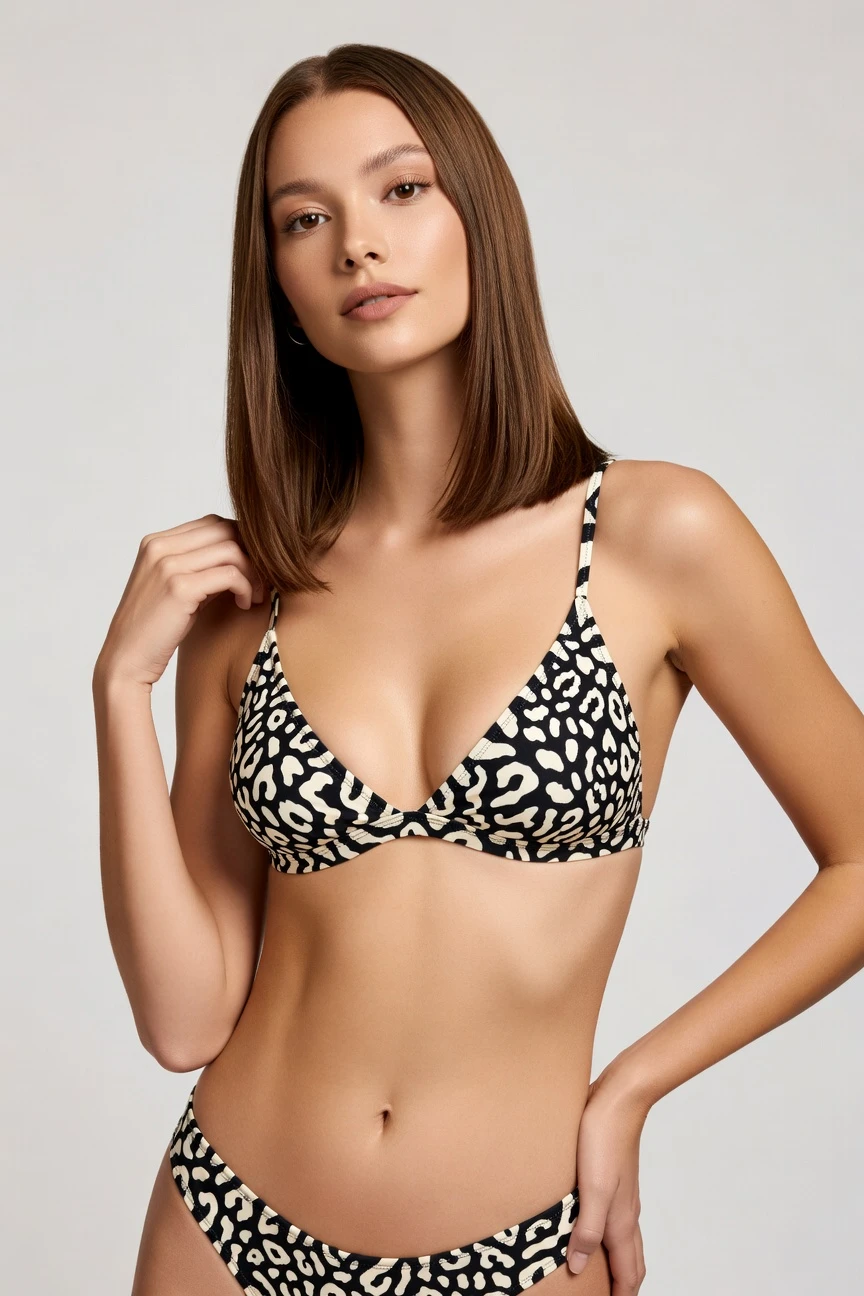
Direct the shoot. Zero prompts.
For bikini imagery, the setup starts with a half-body crop, an 85mm lens, a 4:5 frame, and 4K output so the fit, straps, and print stay central. You click the look you want, then generate without writing a single line. ~$0.55 per image · ~30-40s
- 4 clicks · 0 keystrokes
- app.rawshot.ai / new_shoot
How it works
Direct Swimwear Shoots Without the Shoot
Move from garment file to campaign-ready bikini imagery with fixed controls, repeatable settings, and outputs built for commerce teams.
- Step 01
Upload the Bikini
Start with the garment you need to show. RAWSHOT builds the image around the product, so cut, colour, print, straps, and proportion stay central.
- Step 02
Set the Shot by Clicks
Choose lens, framing, aspect ratio, lighting, background, and visual style from UI controls. You direct the output like a shoot plan, not a chat thread.
- Step 03
Generate and Scale
Create one hero image or roll the same logic across a full swimwear line. Use the browser for hands-on work or the REST API for larger catalog runs.
Spec sheet
Proof for Bikini Imagery at Scale
These twelve points show how RAWSHOT keeps swimwear visuals controllable, faithful to the garment, and operationally usable beyond a single hero image.
- 01
Built on Synthetic Model Logic
Every model is a synthetic composite across 28 body attributes with 10+ options each, designed to keep accidental real-person likeness statistically negligible.
- 02
Every Setting Is a Click
Lens, framing, pose, angle, light, background, and style are controlled in the interface. You direct the shot without an empty text box.
- 03
The Garment Leads the Image
Bikini tops, bottoms, ties, hardware, colour blocking, and prints are represented around the actual product so the garment stays the brief.
- 04
Diverse Models, Transparently Labelled
Work with a wide range of synthetic models for different swimwear presentations while keeping outputs clearly labelled and provenance-aware.
- 05
Consistency Across the Range
Keep the same face, framing logic, and visual system across multiple bikini colours, prints, or sets instead of retuning every image from scratch.
- 06
150+ Swimwear-Ready Styles
Shift from catalog clean to glossy campaign, resort lifestyle, street flash, or editorial treatments using visual presets built for fashion output.
- 07
2K, 4K, and Every Ratio
Generate square, portrait, landscape, PDP-friendly, or social-ready images in 2K or 4K, depending on where the collection needs to land.
- 08
Labelled and Compliance-Ready
Outputs are C2PA-signed, AI-labelled, and watermarked with visible and cryptographic layers, aligned with EU and California disclosure requirements.
- 09
Per-Image Audit Trail
Each output carries a signed record so teams can trace what was generated, keep internal approvals cleaner, and document image provenance.
- 10
GUI for One-Offs, API for Catalogs
Style a single swim campaign image in the browser or push large SKU volumes through the REST API with the same core engine and pricing logic.
- 11
Fast, Flat, and Transparent
Images run at about $0.55 each in roughly 30–40 seconds, tokens never expire, and failed generations refund their tokens automatically.
- 12
Rights That Stay Clear
Every output includes full commercial rights, permanent and worldwide, so marketing, ecommerce, and marketplace teams can publish with confidence.
Outputs
From Clean PDP to Resort Campaign
Show the same bikini line as catalog, editorial, social, or launch creative without changing tools. The controls stay consistent while the visual treatment changes.


Browse 150+ visual styles →
Comparison
RAWSHOT vs category tools vs DIY prompting
Three lenses on every dimension — what you optimize for in RAWSHOT versus typical category tools and blank-box AI workflows.
01
Interface
RAWSHOT
Click-driven controls for lens, framing, light, style, and output formatCategory tools + DIY
Often mix simple presets with lighter control depth and less production-style structure. DIY prompting: You type instructions, revise wording, and chase consistency across repeated generations02
Garment fidelity
RAWSHOT
Engineered around the uploaded bikini so cut, print, and proportion stay centralCategory tools + DIY
May stylise attractively but can smooth over product-specific details. DIY prompting: Garments drift, logos mutate, straps move, and prints get invented or simplified03
Model consistency across SKUs
RAWSHOT
Keep the same synthetic model logic across colourways, sets, and collection pagesCategory tools + DIY
Consistency can vary between sessions or require extra manual setup. DIY prompting: Faces and body presentation change from image to image with little reproducibility04
Provenance and labelling
RAWSHOT
C2PA-signed, AI-labelled, with visible and cryptographic watermark layersCategory tools + DIY
Labelling and provenance support vary widely across tools. DIY prompting: No dependable provenance metadata and no signed audit record per output05
Commercial rights
RAWSHOT
Full commercial rights to every output, permanent and worldwideCategory tools + DIY
Rights terms may be plan-dependent or explained less clearly. DIY prompting: Rights clarity can be murky across model providers, tools, and source assets06
Pricing transparency
RAWSHOT
Flat per-image pricing, tokens never expire, failed generations refund tokensCategory tools + DIY
Plans can introduce seat limits, tiers, or sales-gated feature access. DIY prompting: Usage costs vary by tool, add-ons, retries, and manual rework time07
Iteration speed per variant
RAWSHOT
Generate new bikini angles and styles in about 30–40 secondsCategory tools + DIY
Reasonably fast for single images but less clear for repeatable production workflows. DIY prompting: Iteration includes rewording, regenerating, and manually sorting through drift08
Catalog scale
RAWSHOT
Same engine works in browser GUI and REST API for large SKU pipelinesCategory tools + DIY
Scale features may sit behind separate enterprise packaging or custom onboarding. DIY prompting: No clean apparel pipeline, weak batch reproducibility, and heavy human supervision
Prompting does not scale
Stop writing essays. Direct the shoot.
Most AI photo tools start with a blank text box. Rawshot turns the shoot into repeatable controls, so creative teams can produce consistent fashion imagery without prompt syntax or one-off hacks.
Category norm
ManualCreate a premium editorial fashion photograph of a model wearing the exact navy oversized wool coat from SKU-1842, full-body crop, realistic hands, consistent facial identity, clean e-commerce lighting, subtle Paris street background, 85mm lens, no logo distortion, no fabric hallucination, same pose as last campaign, repeatable for all colorways...
A prompt can describe one image. It cannot become a shared production system for hundreds of products, models, angles and markets.
Rawshot
ClicksSaved shoot recipe
Apply to 1 SKU or 10,000 via GUI, CSV or REST API.
Rawshot makes creative direction visible: buttons, presets and sliders instead of hidden prompt craft. The result is easier to teach, faster to approve and built for repeat production.
Use cases
Where Swimwear Teams Need More Images
Operator archetypes and how click-directed, garment-first output fits the way they actually work.
- 01
Indie Swimwear Labels
Launch a first bikini drop with clean on-model imagery before a traditional shoot budget exists.
Confidence · high
- 02
DTC Resort Brands
Build campaign and PDP visuals for seasonal swim capsules without shipping samples across countries.
Confidence · high
- 03
Marketplace Sellers
Turn bikini sets into clearer listing imagery that fits platform ratios and faster assortment updates.
Confidence · high
- 04
Print Variant Merchants
Keep one visual system across many bikini colourways and patterns so shoppers compare styles cleanly.
Confidence · high
- 05
Preorder Campaign Teams
Photograph garments before bulk production to test demand and launch pages earlier.
Confidence · high
- 06
Crowdfunded Fashion Projects
Show backers a full swim collection with on-model presentation before a costly physical shoot is realistic.
Confidence · high
- 07
Boutique Ecommerce Teams
Refresh bikini product pages with seasonal backgrounds, crops, and campaign looks from the same source garment.
Confidence · high
- 08
Social Launch Marketers
Generate portrait, square, and vertical swimwear assets for paid social, email, and landing pages in one workflow.
Confidence · high
- 09
Resale and Vintage Sellers
Present bikini pieces in a cleaner branded format when one-off inventory makes studio coordination impractical.
Confidence · high
- 10
Factory-Direct Manufacturers
Show buyers and wholesale partners garment-faithful swimwear imagery for fast line reviews and export catalogs.
Confidence · high
- 11
Lookbook Creators on Tight Deadlines
Move from clean catalog frames to warmer resort storytelling without rebuilding the whole shoot logic.
Confidence · high
- 12
Small Teams Running Large Catalogs
Use the browser for hero selects and the API for repeatable swimwear batches when SKU counts climb fast.
Confidence · high
— Principle
Honest is better than perfect.
Swimwear imagery sits close to identity, body presentation, and brand trust, so labelled output matters. Every RAWSHOT image is AI-labelled, C2PA-signed, and watermarked with visible and cryptographic layers. We treat provenance as part of the product, not a disclaimer hidden after the fact.
Rights & provenance
Full commercial rights. Forever.
- C2PA-signed on every image — EU AI Act Article 50 compliant
- 28-attribute synthetic models — real-person likeness statistically impossible
- Full commercial rights to every generation — no recurring licensing fees
- Tokens never expire · One-click cancel · Transparent pricing
EU AI Act
C2PA
Commercial use
Pricing
~$0.55 per image.
~30–40 seconds per generation. Tokens never expire. Cancel in one click.
- 01The cancel button is on the pricing page.
- 02No per-seat gates. No 'contact sales' walls for core features.
- 03Failed generations refund their tokens.
- 04Full commercial rights to every output, permanent, worldwide.
FAQ
Practical answers on control, rights, pricing, scale, and compliant publishing.
Do I need to write prompts to use RAWSHOT?
Never—you direct every output with sliders, presets, and clicks on the garment, not typed prompts. That matters for fashion teams because swimwear imagery depends on controlled framing, product focus, and consistent styling decisions, not on rewriting instructions until a model happens to cooperate. In RAWSHOT, lens, crop, lighting, background, visual style, aspect ratio, and output resolution are explicit controls, so a buyer, marketer, or ecommerce manager can work inside a real application instead of translating product needs into chat syntax.
For catalog teams, reliability matters more than clever wording; RAWSHOT keeps timings, token rules, refund logic, rights, provenance, and batch behavior explicit. You generate stills at about $0.55 per image in roughly 30–40 seconds, failed generations refund tokens, and tokens never expire. That makes the workflow usable for day-to-day commerce operations, whether you are styling a single bikini launch image in the browser or preparing a larger assortment through the REST API.
What does AI-assisted fashion photography change for swimwear catalogs and campaign teams?
It changes who gets to make polished imagery in the first place. Traditional fashion shoots ask for budgets, scheduling, sample logistics, talent coordination, and retakes, which leaves many swimwear operators with no on-model content at all or with inconsistent content made under pressure. RAWSHOT gives those teams directorial control through interface controls, so they can turn real garments into campaign, catalog, and social assets without building a physical production around every update.
For commerce teams, the practical gain is repeatability. You can keep the same visual system across bikini sets, colourways, and launch windows, switch between 1:1, 4:5, 9:16, and other ratios, and output in 2K or 4K without rebuilding the process from scratch. Because each image is labelled, C2PA-signed, and commercially usable worldwide, the workflow supports publishing discipline as well as creative speed.
Why skip reshooting every bikini SKU when the season, background, or campaign angle changes?
Because most changes are visual direction problems, not garment problems. If the bikini itself is already defined, you should be able to change crop, mood, backdrop, or style treatment without booking a new day, moving samples again, and rebuilding production from zero. RAWSHOT lets teams restage the same product through click-set controls, which is especially useful for swimwear lines that need frequent refreshes across PDPs, paid social, email, and marketplace formats.
Operationally, that means you preserve continuity instead of introducing noise. The same synthetic model logic, aspect ratios, and styling presets can carry through a collection while you adjust campaign tone for different channels. You also keep pricing predictable at about $0.55 per image, with failed generations refunded and no token expiry, so refresh cycles become a normal part of merchandising rather than a budget event.
How do we turn flat garments into catalogue-ready bikini imagery without prompting?
You start with the garment and then set the shot in the interface. In practice, a team uploads the bikini, chooses the framing that best shows the category, selects the lens, background, lighting system, aspect ratio, and visual style, and then generates the image. That order matters because RAWSHOT is engineered around the product, so the cut, colour, print, proportion, and hardware stay central instead of being bent around a chat instruction.
For catalogue work, the best approach is to standardise a handful of reusable setups. One setup might cover clean PDP imagery in 4:5, another square social crops, and another editorial launch frames. Because the controls are explicit and repeatable, merchandising and creative teams can approve a visual recipe once and then apply it consistently across the bikini range in the browser or through the API.
Why does garment-led control beat ChatGPT, Midjourney, or generic image AI for fashion PDPs?
Because product detail is the job, not decoration. Generic image systems are built to infer from typed instructions, which often leads to drifting silhouettes, altered ties, softened prints, invented logos, or a model presentation that changes unpredictably between generations. For fashion PDPs, especially in swimwear, those errors are not cosmetic; they create confusion about what the customer is actually buying and force extra rounds of manual checking and regeneration.
RAWSHOT approaches the problem from the garment outward. You set production-style controls directly, keep outputs in commerce-ready aspect ratios, and receive images with clear provenance, visible and cryptographic watermarking, and full commercial rights. The result is a workflow that buyers and ecommerce managers can repeat reliably instead of a trial-and-error loop driven by wording changes and subjective rescue work.
Can I use an ai bikini photo generator for paid ads and product pages with clear rights and labelling?
Yes, if the system is built for commercial publishing and not just casual image creation. RAWSHOT gives full commercial rights to every output, permanent and worldwide, which is the baseline teams need before using imagery across product pages, ads, email, marketplaces, and lookbooks. Just as important, every output is AI-labelled, C2PA-signed, and watermarked with visible and cryptographic layers, so disclosure and provenance are handled as part of the asset itself.
That matters for brand trust as much as for compliance. Swimwear visuals sit in a sensitive zone of body presentation and identity cues, so teams should not rely on vague labelling or unclear chain-of-origin records. With RAWSHOT, legal, marketing, and ecommerce stakeholders can work from the same asset standard and publish with a documented trail rather than assumptions.
What should a team check before publishing AI swimwear imagery on a storefront?
Check the product first, then the publication signals. A good review process confirms that the bikini cut, print, colour, strap placement, hardware, and overall proportion match the garment being sold, and that the chosen crop supports the page goal without obscuring important details. Teams should also verify that the style treatment fits the channel, whether that is a clean PDP frame, a campaign hero, or a vertical social asset.
After that, confirm provenance and rights handling. With RAWSHOT, each image is AI-labelled, C2PA-signed, and watermarked with visible and cryptographic layers, and every output includes full commercial rights. In operational terms, that means your QA checklist should include both product fidelity and asset governance, so publishing decisions remain consistent across ecommerce, marketing, and marketplace teams.
How much does an ai bikini photo generator cost per image, and what happens to unused tokens?
For RAWSHOT photo output, pricing is about $0.55 per image, and a generation usually completes in around 30–40 seconds. Tokens never expire, which matters for fashion teams that work in bursts around collection deadlines rather than on a fixed daily production rhythm. If a generation fails, the tokens are refunded, so teams are not paying for broken output while testing different visual directions.
The wider pricing model stays simple on purpose. There are no per-seat gates and no core features hidden behind a sales call, and the cancel button is on the pricing page for one-click cancellation. For a swimwear team, that means budget planning can happen at the level of image volume and merchandising needs, not at the level of platform politics or sunk subscription waste.
Can RAWSHOT plug into Shopify-scale catalog workflows or do we have to work image by image?
It can do both. The browser interface is useful when a creative or merchandising lead wants to direct a specific swimwear shot by hand, approve a visual system, or test a few styles quickly. When the work moves beyond one hero image into larger catalog operations, the same core engine is available through the REST API, so teams can connect generation into broader ecommerce pipelines without switching products or retraining staff on a different logic.
That matters for operators managing many bikini SKUs, colour updates, or retailer-specific exports. You keep the same pricing model, the same model system, the same provenance standard, and the same garment-led approach whether the job is small or large. In practice, that lets teams move from experimentation to repeatable production without rebuilding the process midway through the season.
How do small creative teams and larger catalog ops teams share the same swimwear workflow?
They share it by using the same controls, output rules, and asset standards at different scales. A small creative team might define the approved lens, crop, style preset, and background for a bikini launch in the browser, while a larger operations team applies that same visual recipe across the wider assortment through the API. Because the system does not split core capability into separate versions, the handoff from creative direction to production is cleaner and easier to document.
That unified workflow also reduces drift between channels. The campaign image, PDP variant, marketplace crop, and social ratio can all come from the same garment-led setup, with 2K or 4K output and clear provenance attached to each file. For fashion operators, that means fewer one-off exceptions and a more durable process for producing more images without losing control.
Keep exploring