
— Campaign · Editorial · 150+ styles · 4K
Direct your next drop with the AI Campaign Fashion Model Generator.
Build a campaign-ready synthetic model your brand can return to across every launch, lookbook, and paid social cut. Adjust skin tone, age range, body type, hair, and expression with buttons, sliders, and saved presets, then reuse the same face across browser shoots or API workflows. No studio. No samples. No prompts.
- ~$0.99 per model
- ~50–60s per generation
- 150+ styles
- 28 attributes × 10+ options
- 2K or 4K
- Reuse across catalog
7-day free trial • 50 tokens (10 images) • Cancel anytime

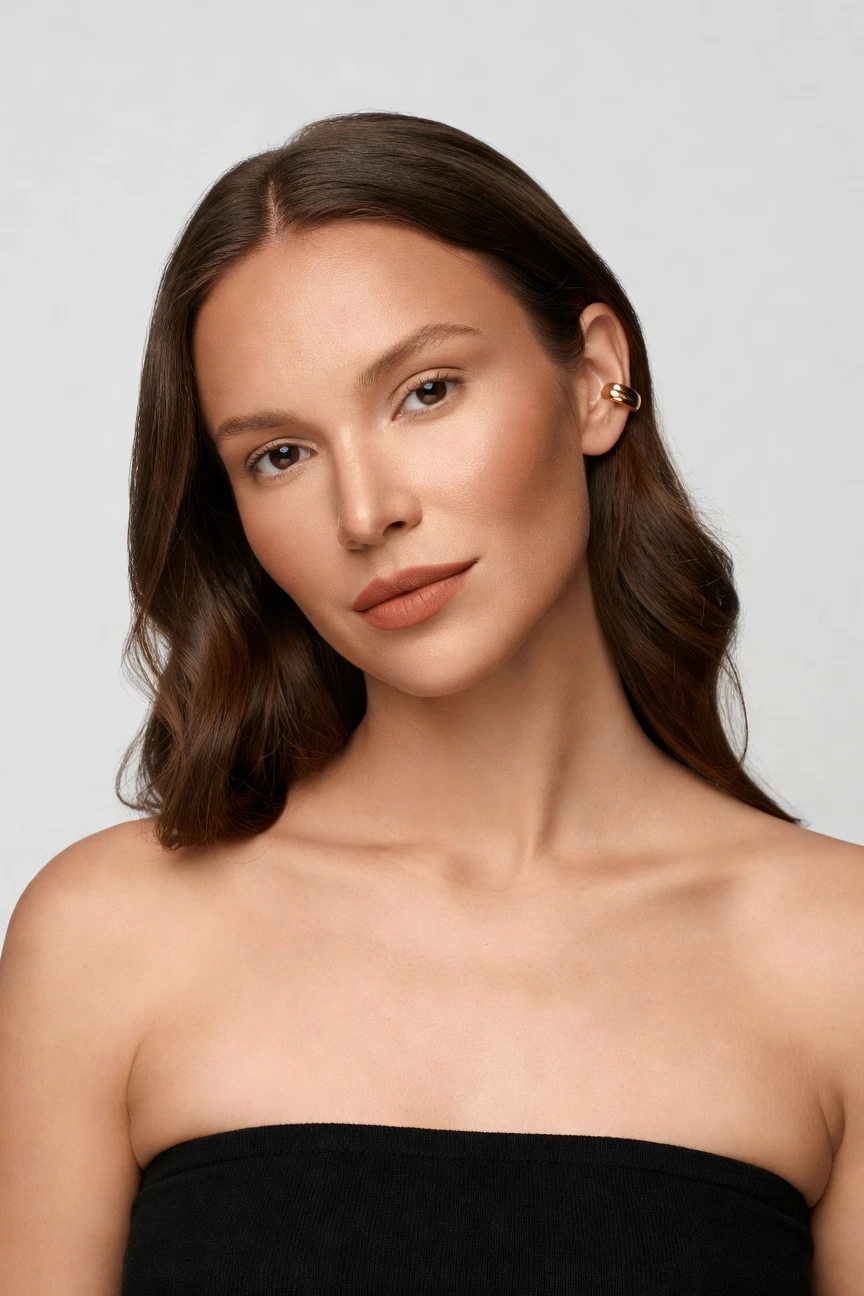
Saved model setup
Female · 26–35 · Dark brown · 175cm
Build a model. Zero prompts.
This setup starts from a Copper skin tone and shapes a campaign-ready face for editorial launches: female presentation, age 26–35, average build, long wavy dark-brown hair. You click five decisions, save once, and reuse that identity across every collection story. 28 attributes · 10+ options each
- 5 clicks · 0 keystrokes
- app.rawshot.ai / build_model
How it works
Build Once, Direct Every Campaign
Create a reusable campaign model, style it with visual controls, and deploy it from single launches to catalog-scale production.
- Step 01
Build the Brand Face
Select the model attributes that matter to your brand campaign, from skin tone and body type to hair and expression. Save that identity once so the same face can carry every launch.
- Step 02
Direct the Visual System
Choose framing, lighting, background, aspect ratio, and one of 150+ visual style presets for campaign output. You art-direct with controls, not a blank text field.
- Step 03
Reuse Across Every Drop
Apply the saved model in the browser for one-off creative or through the REST API for catalog-scale runs. The same model stays consistent from hero image to paid social crop.
Spec sheet
Proof for Campaign Model Workflows
These twelve proof points show how RAWSHOT keeps campaign model creation controlled, reusable, labelled, and ready for commerce teams.
- 01
Built From Structured Attributes
Each model is composed through 28 body attributes with 10+ options each, reducing accidental real-person likeness by design and giving teams repeatable control.
- 02
Every Setting Is a Click
Skin tone, pose direction, camera choices, lighting, and style live in the interface as controls and presets. You direct the result without syntax work.
- 03
Garment-Led Representation
RAWSHOT is engineered around the product, so cut, colour, pattern, logo, fabric, and proportion stay central when you place garments on model.
- 04
Diverse Synthetic Casts
Build campaign faces across a wide range of tones, body shapes, ages, and presentations, then keep them transparently labelled as synthetic output.
- 05
Consistency Across Drops
Save one brand face and reuse it across launch waves, ad sets, and seasonal edits. No drift between one SKU story and the next.
- 06
150+ Campaign Visual Styles
Move from clean studio campaigns to street, noir, vintage, Y2K, editorial, or lifestyle treatments with preset visual systems built for fashion teams.
- 07
Every Frame, Every Ratio
Generate in 2K or 4K and crop for the formats your team actually ships, from full-length hero frames to social-first aspect ratios.
- 08
Labelled and Compliance-Ready
Outputs carry C2PA provenance, visible and cryptographic watermarking, and AI labelling aligned with EU hosting and current disclosure requirements.
- 09
Signed Audit Trail per Image
Every output can carry a signed record for internal review, partner handoff, and publishing workflows where traceability matters as much as aesthetics.
- 10
GUI for Creatives, API for Scale
Use the browser app for campaign concepting, then shift the same system into REST pipelines for larger assortments and repeated brand programs.
- 11
Fast, Transparent Production
Model generations run in about 50–60 seconds, tokens never expire, and failed generations refund tokens so teams can test without hidden penalties.
- 12
Permanent Worldwide Rights
Every output includes full commercial rights for ongoing brand use, from PDP imagery to paid campaign assets, without separate licensing layers.
Outputs
One Brand Face, many campaign directions
Keep the same saved model and shift only the visual system. That is how campaign teams move from launch concept to channel-ready output without losing identity.


Browse all 600+ models →
Comparison
RAWSHOT vs category tools vs DIY prompting
Three lenses on every dimension — what you optimize for in RAWSHOT versus typical category tools and blank-box AI workflows.
01
Interface
RAWSHOT
Click-driven controls for model attributes, styling, framing, and lightingCategory tools + DIY
Usually mix preset selectors with lighter text-driven steering and fewer garment-specific controls. DIY prompting: Starts from a blank chat or image box, so direction depends on typed trial and error02
Garment fidelity
RAWSHOT
Engineered around real garments so cut, colour, logos, and drape stay centralCategory tools + DIY
Often prioritize mood and styling over strict product representation in edge cases. DIY prompting: Garments drift, logos get invented, and proportions change between attempts03
Model consistency
RAWSHOT
Save one synthetic face and reuse it across campaign sets and catalogsCategory tools + DIY
Can vary identity between generations unless workflows are tightly constrained. DIY prompting: Faces shift from image to image, making repeatable brand casting hard04
Provenance + labelling
RAWSHOT
C2PA-signed, watermarked, and AI-labelled output by defaultCategory tools + DIY
Disclosure and provenance support vary and are not always signed per output. DIY prompting: Usually no built-in provenance metadata and no dependable disclosure layer05
Commercial rights
RAWSHOT
Permanent worldwide commercial rights included with every outputCategory tools + DIY
Rights are often platform-specific and can require closer policy reading. DIY prompting: Rights clarity depends on model terms, third-party sources, and changing platform rules06
Pricing transparency
RAWSHOT
Flat per-model pricing, tokens never expire, failed generations refundCategory tools + DIY
Often bundle credits, seat limits, or higher-volume plan jumps. DIY prompting: Usage costs can look cheap at first but rise through retries and unusable outputs07
Catalog scale
RAWSHOT
Same engine works in browser GUI and REST API for large pipelinesCategory tools + DIY
Some tools separate creative UI from enterprise workflows or gated integrations. DIY prompting: No reliable SKU pipeline, no stable payload structure, and weak batch reproducibility08
Prompt overhead
RAWSHOT
Creative direction lives in buttons, sliders, and presetsCategory tools + DIY
May still rely on shorter text instructions for precise outcomes. DIY prompting: Teams spend time learning syntax, revising phrasing, and debugging failed interpretations
Prompting does not scale
Stop writing essays. Direct the shoot.
Most AI photo tools start with a blank text box. Rawshot turns the shoot into repeatable controls, so creative teams can produce consistent fashion imagery without prompt syntax or one-off hacks.
Category norm
ManualCreate a premium editorial fashion photograph of a model wearing the exact navy oversized wool coat from SKU-1842, full-body crop, realistic hands, consistent facial identity, clean e-commerce lighting, subtle Paris street background, 85mm lens, no logo distortion, no fabric hallucination, same pose as last campaign, repeatable for all colorways...
A prompt can describe one image. It cannot become a shared production system for hundreds of products, models, angles and markets.
Rawshot
ClicksSaved shoot recipe
Apply to 1 SKU or 10,000 via GUI, CSV or REST API.
Rawshot makes creative direction visible: buttons, presets and sliders instead of hidden prompt craft. The result is easier to teach, faster to approve and built for repeat production.
Use cases
Who Uses Campaign Model Workflows
Operator archetypes and how click-directed, garment-first output fits the way they actually work.
- 01
Indie Designer Launching a First Drop
Build a Copper-toned campaign face once, then reuse it across homepage, preorder, and lookbook assets without booking a studio day.
Confidence · high
- 02
DTC Apparel Team Refreshing Paid Social
Keep one recognizable model identity across prospecting ads, retargeting cuts, and landing-page hero visuals for cleaner brand memory.
Confidence · high
- 03
Crowdfunded Fashion Brand Pre-Sample
Photograph garments before production samples travel, using a saved campaign model to tell the launch story early and clearly.
Confidence · high
- 04
Marketplace Seller Building Premium Brand Assets
Upgrade beyond plain packshots by pairing one reusable model with controlled campaign styling that still keeps the product readable.
Confidence · high
- 05
Resale Curator Creating Editorial Merch Drops
Use a consistent synthetic face to tie mixed inventory into one campaign narrative, even when every garment comes from a different source.
Confidence · high
- 06
Adaptive Fashion Label Testing Representation
Shape campaign casting with deliberate body and age choices, then carry that identity across launch imagery without recasting every shoot.
Confidence · high
- 07
Lingerie DTC Team Needing Controlled Art Direction
Direct expression, framing, and lighting in a click-driven interface so campaign visuals stay brand-safe and product-led.
Confidence · high
- 08
Kidswear Founder Planning Future Marketing
Prototype campaign direction around adult synthetic model workflows first, then align visual systems and ratios before broader rollout.
Confidence · high
- 09
Agency Team Mocking Up a Brand Pitch
Create campaign-ready fashion model concepts fast, then present multiple style directions while keeping the same saved face throughout the deck.
Confidence · high
- 10
Catalog Manager Adding Campaign Layers
Start from consistent commerce imagery and extend the same model into higher-impact campaign frames for launch-week merchandising.
Confidence · high
- 11
Factory-Direct Manufacturer Building White-Label Creative
Offer retail partners repeatable campaign imagery with neutral, reusable synthetic casting that can scale across many assortments.
Confidence · high
- 12
Student Designer Building a Graduate Collection Story
Use an AI campaign fashion model generator workflow to create polished launch imagery when budgets do not stretch to a traditional set.
Confidence · high
— Principle
Honest is better than perfect.
Campaign imagery shapes trust as much as conversion, so we label what the work is instead of hiding it. RAWSHOT outputs are C2PA-signed, watermarked, AI-labelled, and backed by signed audit records, which gives brand, legal, and marketplace teams a clean provenance trail for every saved model and published image.
Rights & provenance
Full commercial rights. Forever.
- C2PA-signed on every image — EU AI Act Article 50 compliant
- 28-attribute synthetic models — real-person likeness statistically impossible
- Full commercial rights to every generation — no recurring licensing fees
- Tokens never expire · One-click cancel · Transparent pricing
EU AI Act
C2PA
Commercial use
Pricing
~$0.99 per model generation.
~50–60 seconds per generation. Save the model once, reuse it across your entire catalog.
- 01Tokens never expire. Cancel in one click.
- 02Same face, same body, every SKU — no drift between shoots.
- 03No per-seat gates. No 'contact sales' walls for core features.
- 04Failed generations refund their tokens.
FAQ
Practical answers on control, rights, pricing, scale, and compliant publishing.
Do I need to write prompts to use RAWSHOT?
Never—you direct every output with sliders, presets, and clicks on the garment, not typed prompts. That matters because fashion teams do not need another tool that turns buyers, merchandisers, or founders into syntax specialists before they can ship a launch. In RAWSHOT, model attributes, camera choices, framing, lighting, backgrounds, and visual styles live as interface controls, so the workflow behaves like a real production application instead of a chat experiment.
For commerce teams, reliability beats novelty. RAWSHOT keeps token pricing, timings, refund rules, commercial rights, provenance signals, and model reuse explicit, which makes the workflow easier to hand off across design, ecommerce, and performance marketing. You can build a reusable campaign face in the browser, save it to your library, and then keep that same identity across future outputs without rewriting anything. The practical takeaway is simple: your team clicks decisions, checks garment accuracy, and publishes with a cleaner review process.
What does an AI campaign fashion model generator actually change for campaign and catalog teams?
It changes who gets access to directed fashion imagery. Traditional campaign production asks for castings, samples, a set, crew, scheduling, and a budget many operators never had in the first place. RAWSHOT gives those teams a way to build a reusable synthetic model, apply garments to that model, and direct the visual treatment through controls they can understand immediately. That means a founder, art director, and ecommerce manager can all work from the same saved identity instead of rebuilding the creative setup from scratch for every drop.
Operationally, the advantage is consistency. One saved model can move through launch assets, PDP support imagery, ad cuts, and collection pages while keeping the same face, body, and overall casting logic. Because RAWSHOT also provides 150+ visual styles, 2K and 4K output options, and browser plus REST API workflows, teams can move from concepting to scaled production without switching systems. In practice, that means fewer recasts, cleaner brand memory, and a much shorter path from garment-ready files to campaign-ready publishing.
Why skip reshooting every SKU when the season, mood, or campaign angle changes?
Because the expensive part of many fashion refreshes is not creative judgment, it is production reset. When a team wants a new seasonal mood, different editorial lighting, or a paid-social crop set, the usual answer is another booking, another sample handoff, and another round of approvals. RAWSHOT separates those visual decisions from the need to physically rebuild the shoot each time. You keep the model identity stable, keep the garment central, and adjust the campaign system through style presets, framing controls, and lighting choices.
That matters across launch calendars. A spring editorial direction, a cleaner PDP support frame, and a paid-social version can all come from the same saved model and product source while preserving a recognizable cast. For operators managing many garments, this is less about chasing speed for its own sake and more about staying visible between major shoots. The useful habit is to save your core brand faces, define approved visual systems, and refresh campaign output when merchandising needs change rather than when a studio date finally opens up.
How do we turn flat garments into catalogue-ready imagery without prompting?
You start with the product and the model library, not a text box. In RAWSHOT, teams upload the garment, select or build the synthetic model they want to use, and then direct framing, camera distance, background, light, and visual style through interface controls. That keeps the workflow understandable for buyers and content operators who think in product terms rather than image-model syntax. The garment remains the brief, which is why the platform is designed to respect cut, colour, logo placement, fabric behaviour, and proportion as closely as the source allows.
Once the model is saved, the process becomes repeatable. A catalog manager can apply the same face across multiple looks, an art director can shift the visual style to match the campaign, and an operations team can route the same setup through the GUI or the REST API depending on volume. Because outputs are labelled and carry provenance support, the publishing step is cleaner too. The practical move is to standardize approved model profiles first, then build channel-specific visual presets around them.
Why does RAWSHOT beat DIY prompting in ChatGPT, Midjourney, or generic image tools for fashion PDPs and campaigns?
The short answer is control over the things fashion teams actually care about. Generic image tools are built to interpret broad creative requests, which is why they often drift on garment details, invent logos, change proportions, or swap faces between outputs. That can be acceptable for loose concept art, but it breaks down when a product page, launch deck, or paid ad needs a stable cast and a faithful garment. RAWSHOT is designed around apparel workflows, so the interface starts from product representation, reusable synthetic models, and explicit creative controls instead of improvisation.
There is also a trust and operations difference. RAWSHOT includes C2PA-signed provenance support, visible and cryptographic watermarking, AI labelling, transparent pricing, refunded failed generations, and permanent worldwide commercial rights. DIY image workflows usually leave teams to piece those answers together across changing platform policies and repeated retries. For a commerce team, the practical takeaway is not just better output quality; it is fewer approval bottlenecks, fewer unusable variations, and a system that can be repeated by more than one person.
Can we use RAWSHOT campaign outputs commercially, and are they clearly labelled as AI?
Yes. RAWSHOT gives full commercial rights to every output on a permanent, worldwide basis, which is critical when campaign imagery moves across PDPs, paid media, email, marketplaces, and wholesale materials. Just as important, the platform does not hide what the outputs are. Campaign images are AI-labelled and supported with provenance and watermarking measures so teams can be honest with partners, platforms, and customers instead of treating disclosure like an afterthought.
That transparency is part of the product, not a legal footnote. RAWSHOT uses C2PA-signed provenance metadata, visible plus cryptographic watermarking, and synthetic composite model construction designed to make accidental real-person likeness statistically negligible by design. For brand and legal teams, that means the review conversation becomes clearer: you know what the image is, you know where it came from, and you know how it can be used. The right operating practice is to publish with those labels intact and keep the audit trail with the asset record.
What should our team check before publishing a saved synthetic model across a campaign?
Start with product truth. Review whether the garment’s cut, colour, pattern, logo placement, fabric character, and proportion are represented the way your merchandising and brand teams expect before the image goes live. Then review casting consistency: the saved face, body attributes, hair, and expression should match the intended brand identity across all assets in the set. This is especially important when one model is being reused across homepage imagery, social crops, and collection pages, because small inconsistencies become obvious once assets appear side by side.
After the visual check, confirm the compliance layer. Make sure AI labelling remains present, provenance support is retained, and any visible watermarking or internal audit references are handled according to your publishing workflow. RAWSHOT is built to make those checks straightforward with saved models, signed audit trails, and explicit output handling, but teams still need a review habit. The strongest practice is a simple pre-publish checklist shared by brand, ecommerce, and legal so the output is both on-brand and clearly attributable.
How much does RAWSHOT cost for model creation, and what happens to tokens if a generation fails?
Model creation is about $0.99 per generation, and each model generation usually completes in around 50–60 seconds. That price is useful because it lets teams estimate experimentation without entering a negotiation just to test a workflow. Tokens never expire, which means a founder or catalog team can build a model library over time rather than forcing all usage into one billing window. If a generation fails, the tokens for that failed generation are refunded, so retries do not quietly become a penalty for normal production work.
The commercial structure is intentionally plain. There are no per-seat gates for core features, and there is no need to ask sales for basic access to the model-building workflow. You can cancel in one click, with the cancel control available on the pricing page. For operators comparing options, the practical takeaway is to budget by actual output volume: build the campaign faces you want to keep, save them, and reuse them across as many future garments and channel variants as your brand needs.
Can we connect saved campaign models to Shopify-scale or ERP-driven image pipelines through an API?
Yes. RAWSHOT offers a REST API alongside the browser interface, so teams can move from creative testing to structured production without switching platforms. That matters when your model library is not just a design asset but an operational one tied to product data, launch calendars, or merchandising rules. A saved campaign face can become part of a repeatable workflow where products are queued, outputs are generated in the required ratios, and assets are routed into downstream systems with less manual rework.
For teams working at scale, the real advantage is product parity. The same engine, the same model logic, and the same output principles apply whether you are building one launch in the GUI or running much larger batches via API. RAWSHOT is also PLM-integration ready and supports signed audit records per image, which helps when asset provenance has to travel with the file. The best implementation pattern is to approve model profiles in the browser first, then operationalize those approved identities in your pipeline.
Can a small team use the browser while larger teams run the same model system at catalog scale?
Yes, and that is one of the main reasons the product is structured the way it is. RAWSHOT does not split small operators and larger catalog teams into different creative systems with different quality or pricing rules. A founder can build a campaign face in the browser, save it, and use it for a single launch, while a larger content operation can use that same model logic across thousands of products through the API. The consistency matters because brand identity should not change just because the workload grows.
That shared system also improves collaboration. Creative teams can define approved model profiles, visual styles, and framing rules in the GUI, while operations teams take those decisions into batch workflows without reinventing them. Because there are no per-seat gates for core features, cross-functional teams can review and use the same product more easily. The practical takeaway is to treat saved models like part of your brand infrastructure: define them once, govern them clearly, and let different teams deploy them at the scale they actually need.
Keep exploring