
— 28 attributes · 10+ options each · Save once
AI Glamour Model Generator — with click-driven control over every attribute.
Build polished beauty-led talent for fashion, lingerie, jewelry, and campaign work without turning your team into syntax specialists. Set 28 body attributes with 10+ options each, save the model once, and reuse the same face and body across every launch. Each model is a synthetic composite, transparently labelled, and ready for C2PA-signed output.
- ~$0.99 per model
- ~50–60s per generation
- 150+ styles
- 28 attributes × 10+ options each
- Save once, reuse across catalog
- EU-hosted
7-day free trial • 50 tokens (10 images) • Cancel anytime

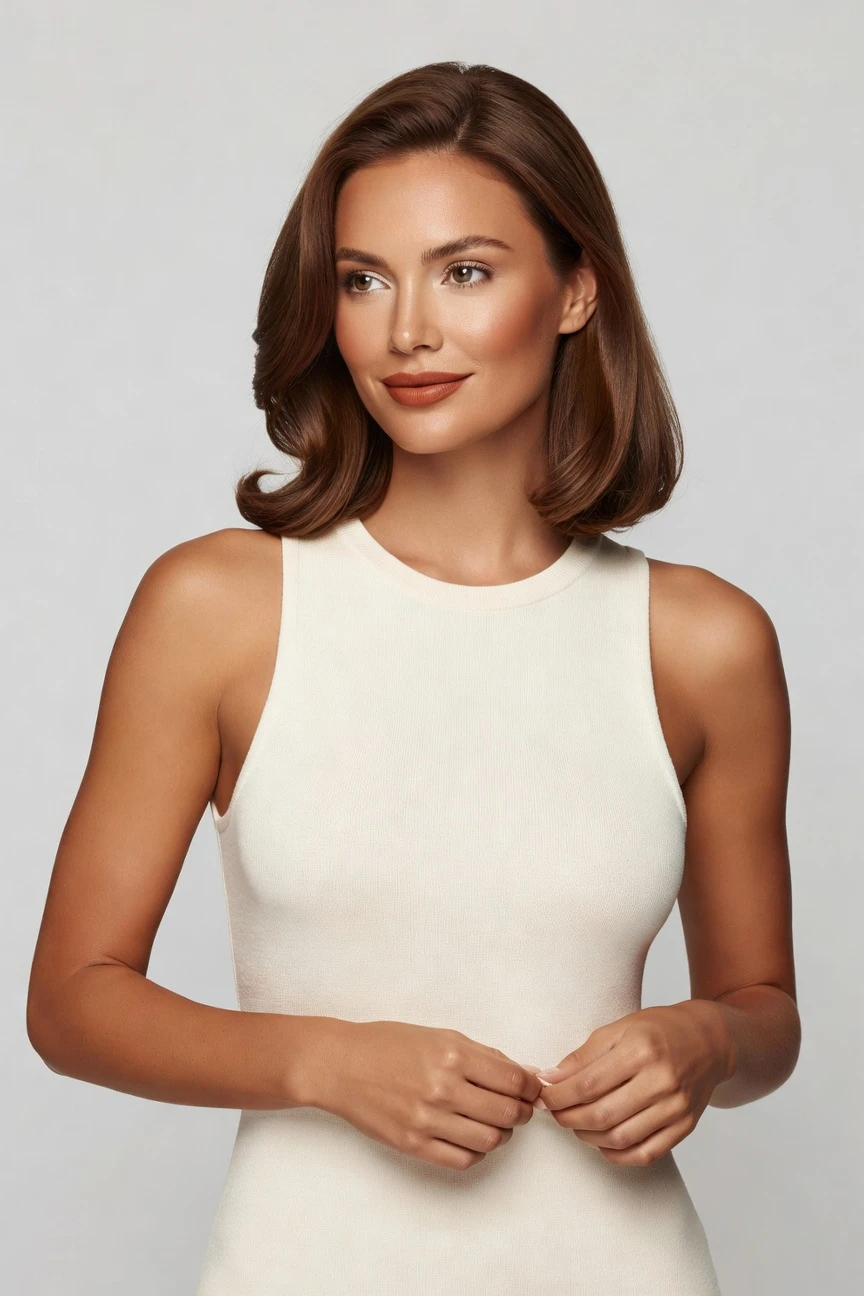
Saved model setup
Female · 26–35 · Dark brown · 175cm
Build a model. Zero prompts.
For glamour-led fashion work, we preselect a warm copper skin tone, adult age range, balanced proportions, and polished hair settings you can refine with clicks. The setup is built to save a consistent model identity for repeat campaign, beauty, and catalog use. 28 attributes · 10+ options each
- 5 clicks · 0 keystrokes
- app.rawshot.ai / build_model
How it works
Build Once, Reuse Across Every Shoot
For glamour-led fashion work, the model becomes a stable brand asset instead of a one-off output.
- Step 01
Set the Face and Body
Choose the attributes that define the model identity, from skin tone and age range to hair, height, and body type. Every decision is a visible control, so the build stays consistent and repeatable.
- Step 02
Save the Model to Your Library
Once the model looks right for your brand, save it as a reusable asset. That gives you the same face and body across launches, reshoots, and large SKU runs.
- Step 03
Apply It Across Every Shoot
Use the saved model in the browser for one-off work or through the API for scale. The identity stays stable while you change garments, framing, styling, and channels.
Spec sheet
Proof for Beauty-Led Fashion Teams
These twelve proof points show how RAWSHOT keeps model identity controlled, garment-first, and operationally usable at any scale.
- 01
Attribute Control, Not Guesswork
Build from 28 body attributes with 10+ options each, then save the result as a reusable synthetic composite. The system is designed to avoid accidental real-person likeness by construction.
- 02
Every Setting Is a Click
You direct the model with buttons, sliders, and presets instead of an empty text box. That makes the workflow easier to train, review, and repeat across teams.
- 03
The Garment Stays the Brief
RAWSHOT is engineered around the product, so cut, colour, pattern, logo, fabric, and drape stay central. Glamour styling does not get to bend the clothing out of shape.
- 04
Diverse Synthetic Models, Transparently Labelled
Build a wide range of beauty-led model identities for different brand worlds and customer audiences. Every output is labelled as synthetic rather than passed off as something else.
- 05
Same Model Across Every SKU
Save the face and body once, then reuse them across tops, dresses, lingerie, accessories, and more. That removes the drift that makes catalogs look pieced together.
- 06
150+ Visual Styles
Move from clean catalog to glossy editorial, campaign polish, noir, vintage, or studio beauty looks with presets. Your saved model identity carries through the style changes.
- 07
2K, 4K, and Every Frame
Generate assets for PDPs, social crops, lookbooks, paid media, and marketplace formats without rebuilding the model. The same source identity works across aspect ratios and output needs.
- 08
Labelled, Signed, and Compliant
Outputs carry C2PA provenance, visible and cryptographic watermarking, and AI labelling. RAWSHOT is built for EU-hosted compliance expectations, including EU AI Act Article 50 and California SB 942.
- 09
Signed Audit Trail per Image
Each output can carry a record of what it is and how it was produced. That matters when legal, compliance, marketplace, or brand teams need proof instead of assumption.
- 10
GUI for One Shoot, API for Scale
Build a single glamour model in the browser or push the same identity through REST workflows for large assortments. The indie brand and the catalog team use the same engine.
- 11
Fast, Clear Model Economics
Model generations run in about 50–60 seconds at roughly $0.99 each, with tokens that never expire. Failed generations refund tokens, so testing new model directions stays practical.
- 12
Permanent Worldwide Commercial Rights
Every approved output comes with full commercial rights for ongoing use. That gives brand teams a clear path from generation to launch without rights confusion.
Outputs
Saved Model, many directions
One glamour-led model identity can move across campaign polish, clean commerce, accessory detail, and beauty-focused framing without losing consistency. That is the point: direct once, reuse everywhere.


Browse all 600+ models →
Comparison
RAWSHOT vs category tools vs DIY prompting
Three lenses on every dimension — what you optimize for in RAWSHOT versus typical category tools and blank-box AI workflows.
01
Interface
RAWSHOT
Buttons, sliders, and presets built for fashion model controlCategory tools + DIY
Often mix limited UI controls with vague text-led instructions. DIY prompting: Typed instructions in generic chat or image tools, hard to standardize02
Garment fidelity
RAWSHOT
Product-led rendering keeps cut, colour, logo, and drape centralCategory tools + DIY
May stylize aggressively and soften product-specific details. DIY prompting: Garments drift, logos mutate, and trims get invented between tries03
Model consistency
RAWSHOT
Save one synthetic model and reuse it across the full catalogCategory tools + DIY
Consistency can vary between sessions or tool modes. DIY prompting: Faces shift from image to image, so series cohesion breaks fast04
Provenance
RAWSHOT
C2PA-signed outputs with visible and cryptographic watermarkingCategory tools + DIY
Labelling and provenance support are often partial or absent. DIY prompting: No reliable provenance metadata, making downstream trust harder05
Commercial rights
RAWSHOT
Permanent worldwide commercial rights included with outputsCategory tools + DIY
Rights terms vary by plan, workflow, or provider language. DIY prompting: Usage clarity is often unclear, especially across mixed-source workflows06
Pricing transparency
RAWSHOT
Same per-model price, no seat gates, tokens never expireCategory tools + DIY
Plans may add seats, sales gates, or tiered access. DIY prompting: Low entry cost, but iteration time and failed attempts stack up07
Scale path
RAWSHOT
Browser GUI and REST API use the same underlying systemCategory tools + DIY
Different tiers or enterprise tracks can split workflows. DIY prompting: No stable catalog pipeline, no structured batch control for assortments08
Operational repeatability
RAWSHOT
Saved model library supports repeat launches and audit-ready workflowsCategory tools + DIY
Repeatability depends on tool memory and manual operator habits. DIY prompting: Teams spend time re-explaining the same look without dependable outputs
Prompting does not scale
Stop writing essays. Direct the shoot.
Most AI photo tools start with a blank text box. Rawshot turns the shoot into repeatable controls, so creative teams can produce consistent fashion imagery without prompt syntax or one-off hacks.
Category norm
ManualCreate a premium editorial fashion photograph of a model wearing the exact navy oversized wool coat from SKU-1842, full-body crop, realistic hands, consistent facial identity, clean e-commerce lighting, subtle Paris street background, 85mm lens, no logo distortion, no fabric hallucination, same pose as last campaign, repeatable for all colorways...
A prompt can describe one image. It cannot become a shared production system for hundreds of products, models, angles and markets.
Rawshot
ClicksSaved shoot recipe
Apply to 1 SKU or 10,000 via GUI, CSV or REST API.
Rawshot makes creative direction visible: buttons, presets and sliders instead of hidden prompt craft. The result is easier to teach, faster to approve and built for repeat production.
Use cases
Where Glamour-Led Model Control Pays Off
Operator archetypes and how click-directed, garment-first output fits the way they actually work.
- 01
Lingerie DTC Launches
Build a confident glamour-led model once, then reuse that identity across full sets, colourways, and seasonal drops.
Confidence · high
- 02
Jewelry and Watches
Use beauty-focused faces and close framing to support earrings, necklaces, watches, and rings without changing talent between shots.
Confidence · high
- 03
Beauty-Coded Fashion Campaigns
Create polished campaign talent for satin, eveningwear, shapewear, and occasion pieces where face, posture, and finish matter.
Confidence · high
- 04
Small Editorial Lookbooks
Indie labels can direct a more glamorous visual language without booking a studio, a glam team, and a full-day shoot.
Confidence · high
- 05
Marketplace Seller Upgrades
Sellers moving beyond flat product listings can add model-led polish while keeping the same face across the assortment.
Confidence · high
- 06
Accessory Brands
Handbags, sunglasses, belts, and small leather goods gain stronger brand context when the same model identity carries the range.
Confidence · high
- 07
Lingerie Fit Storytelling
Use one saved model to present coordinated sets, size narratives, and styling variations with cleaner visual continuity.
Confidence · high
- 08
Crowdfunded Fashion Drops
Show polished on-model concepts before large production commitments, then keep the model identity stable through launch assets.
Confidence · high
- 09
Resale and Vintage Curation
Vintage sellers can give mixed inventory a consistent model presentation instead of relying on whatever imagery arrives with the stock.
Confidence · high
- 10
Factory-Direct Brand Building
Manufacturers launching direct can establish a recognisable glamour aesthetic without hiring recurring model talent for every collection.
Confidence · high
- 11
Social and PDP Alignment
Use the same saved model across site imagery, paid social, and launch edits so the brand face stays coherent everywhere.
Confidence · high
- 12
Agency Prototyping for Clients
Creative teams can test beauty-led fashion directions fast, then hand clients consistent, labelled assets with clear provenance.
Confidence · high
— Principle
Honest is better than perfect.
Glamour-led imagery needs trust as much as polish. RAWSHOT labels outputs, signs them with C2PA metadata, and adds visible plus cryptographic watermarking so teams can publish with proof, not ambiguity. The models are synthetic composites built from structured attributes, which keeps accidental real-person likeness statistically negligible by design.
Rights & provenance
Full commercial rights. Forever.
- C2PA-signed on every image — EU AI Act Article 50 compliant
- 28-attribute synthetic models — real-person likeness statistically impossible
- Full commercial rights to every generation — no recurring licensing fees
- Tokens never expire · One-click cancel · Transparent pricing
EU AI Act
C2PA
Commercial use
Pricing
~$0.99 per model generation.
~50–60 seconds per generation. Save the model once, reuse it across your entire catalog.
- 01Tokens never expire. Cancel in one click.
- 02Same face, same body, every SKU — no drift between shoots.
- 03No per-seat gates. No 'contact sales' walls for core features.
- 04Failed generations refund their tokens.
FAQ
Practical answers on control, rights, pricing, scale, and compliant publishing.
Do I need to write prompts to use RAWSHOT?
Never—you direct every output with sliders, presets, and clicks on the garment, not typed prompts. That matters because fashion teams do not need another tool that turns buyers, stylists, or ecommerce managers into syntax operators before they can get usable imagery. In RAWSHOT, camera, framing, model attributes, expression, lighting, background, and visual style are all product controls, so the workflow feels like an application built for commerce rather than a chat box dressed up for fashion.
For catalog teams, reliability beats improvisation. The same control logic carries from single-model work in the browser to larger operational workflows, so you can save a model, reuse it across shoots, and keep outputs consistent without rewriting instructions every time. Tokens, timings, refund rules, commercial rights, provenance signalling, and compliance features stay explicit, which makes launch planning easier for teams that need repeatable process rather than one lucky result.
What does an AI glamour model generator actually change for ecommerce and campaign teams?
It changes who gets access to polished on-model imagery and how consistently they can produce it. Instead of booking talent, studio time, glam teams, and reshoots just to maintain one visual direction, your team can build a synthetic model identity once and reuse it across campaigns, PDPs, social crops, and seasonal updates. That gives smaller brands and leaner teams a way to present beauty-led fashion with continuity that would otherwise sit behind traditional shoot budgets.
In RAWSHOT, that shift is operational, not abstract. You set 28 body attributes with 10+ options each, save the model to your library, and apply that same identity across garments and channels while keeping outputs labelled and C2PA-signed. The practical takeaway is simple: treat the model as a reusable brand asset, then let styling, framing, and product assortment change around it instead of rebuilding talent every time.
Why skip reshooting every SKU when the season changes?
Because most seasonal updates do not require rebuilding the human layer of the image from scratch. If your brand already knows the face, body, and general beauty direction it wants, the expensive part of repeated production is not creative discovery; it is operational repetition. Traditional reshoots bring scheduling delays, sample movement, model availability issues, and visual inconsistency that can ripple through a launch calendar.
RAWSHOT lets you save a glamour-oriented model identity and carry it into new garments, new crops, and new channels without losing continuity. That makes seasonal adaptation faster while preserving the brand memory customers build around a consistent presentation. Teams should use that stability where it matters most: collection refreshes, launch extensions, size or colour updates, and cross-channel asset production where the product changes but the visual identity should not.
How do we turn flat garments into catalogue-ready imagery without prompting?
You start with the real garment and direct the rest through controls. In practice, that means selecting or saving the model identity, choosing framing, style, lighting, expression, and output format, then generating assets around the product rather than around a typed instruction. That approach matters for fashion because the product is the commercial brief; the tool should help you preserve it, not force you to over-explain it.
RAWSHOT is built around garment fidelity, so cut, colour, pattern, logo, proportion, and drape stay central while you decide how polished or editorial the presentation should feel. You can work in the browser for one-off catalogue needs or carry the same logic into API workflows when the assortment grows. The right operating habit is to save approved model identities early, then reuse them across categories so your catalogue stays coherent as volume increases.
Why does RAWSHOT beat ChatGPT, Midjourney, or generic image tools for fashion PDP work?
Because generic tools are not structured around garment fidelity, repeatability, or commerce controls. They can produce attractive one-offs, but fashion teams need more than a striking image; they need the same face across multiple products, clear handling of logos and trims, stable framing options, and outputs that can move into a real catalog operation. DIY image workflows also push too much risk onto the operator, who ends up spending time steering drift instead of building a repeatable pipeline.
RAWSHOT replaces that roulette with a purpose-built interface. You click through model attributes, save identities, use fashion-specific styling controls, and receive outputs with provenance and labelling built in. For teams shipping PDPs, the takeaway is practical: use generic tools for experimentation if you want, but use a garment-led system when the image has to survive review, scale, and publishing without face drift, invented details, or unclear origin.
Are RAWSHOT glamour-style outputs labelled and safe for commercial use?
Yes. RAWSHOT outputs are transparently labelled, carry C2PA provenance support, and include visible plus cryptographic watermarking so teams can show what the asset is rather than hoping nobody asks. That matters more in beauty-led and glamour-facing work, where the polish of an image can invite extra scrutiny from platforms, partners, marketplaces, and internal compliance reviewers. Honest handling is not a disclaimer here; it is part of the product value.
Commercially, RAWSHOT provides full worldwide rights to the outputs, permanently. The models themselves are synthetic composites assembled from structured attributes, which keeps accidental real-person likeness statistically negligible by design and gives brands a cleaner foundation for repeat use. The practical move for teams is to keep the provenance and labelling intact through handoff, so marketing, legal, and channel teams all work from the same factual record.
What should our team check before publishing a synthetic glamour model image?
Check the same things a disciplined ecommerce team should always check, then add provenance and labelling to the review. Start with the garment itself: confirm silhouette, colour, logo treatment, pattern placement, trims, and drape all match the product. Then review whether the saved model identity, expression, crop, and lighting still fit the intended brand context, especially if the asset is moving between PDP, social, campaign, and marketplace placements.
With RAWSHOT, you also verify that the output keeps its C2PA provenance, watermarking, and synthetic labelling intact. Because the platform is built around reusable model identities, you can review series consistency as well, not just single images in isolation. Teams should build a lightweight QA checklist that combines product accuracy, identity consistency, and provenance presence so publishing standards remain clear even when generation volume increases.
How much does the ai glamour model generator cost, and what happens if a generation fails?
Model generation in RAWSHOT runs at about $0.99 per model and usually takes around 50–60 seconds. That pricing matters because teams can evaluate model directions with predictable unit economics instead of wrapping identity creation inside larger shoot budgets or seat-based software plans. Just as important, tokens never expire, so you do not have to force usage into an arbitrary billing window to avoid waste.
If a generation fails, the tokens are refunded. RAWSHOT also keeps cancellation simple with a one-click cancel control on the pricing page and does not put core features behind per-seat gates or a sales wall. For operators, the best way to use that structure is to approve a small library of saved model identities first, then reuse them broadly so most later spend goes into publishable outputs rather than repeated identity exploration.
Can we use the API for Shopify-scale catalogs and still keep one saved model identity?
Yes. RAWSHOT is built so the same model logic works in the browser and through the REST API, which means you do not need one workflow for creative testing and another for scale execution. That is important for teams managing storefront updates, merchandising drops, and assortment expansion, because the face and body consistency customers see should not depend on which interface generated the asset.
In practice, you create and save the model once, then reference that identity as you expand into larger product runs. The API path supports the same product-minded philosophy as the GUI: stable identities, clear controls, and audit-ready outputs. The operational advice is to treat the model library as a governed asset layer, so ecommerce, merchandising, and creative operations all pull from the same approved identities when volume ramps up.
Can a small team use this like an ai glamour model generator in the browser and later scale to large batches?
Yes, and that continuity is one of the strongest reasons to adopt RAWSHOT early. A small team can begin in the browser by building a glamour-oriented model identity, testing style directions, and generating launch imagery without changing tools when demand grows. Later, the same underlying system supports larger batch workflows, so growth does not force a reset in model consistency, rights handling, or compliance practice.
That matters because team roles change as brands mature. Founders and marketers may begin by directing single outputs themselves, while larger catalog or operations teams eventually need repeatable batch processes and audit confidence. RAWSHOT supports both ends with the same saved models, the same click-driven logic, the same token model, and the same provenance standards. The smart path is to build your approved model library early, then scale around it instead of rebuilding brand identity under pressure.
Keep exploring