
— Close-up detail imagery · 150+ styles · 4K
Direct fabric, trim, and finish detail with the AI Close Up Product Photography Generator.
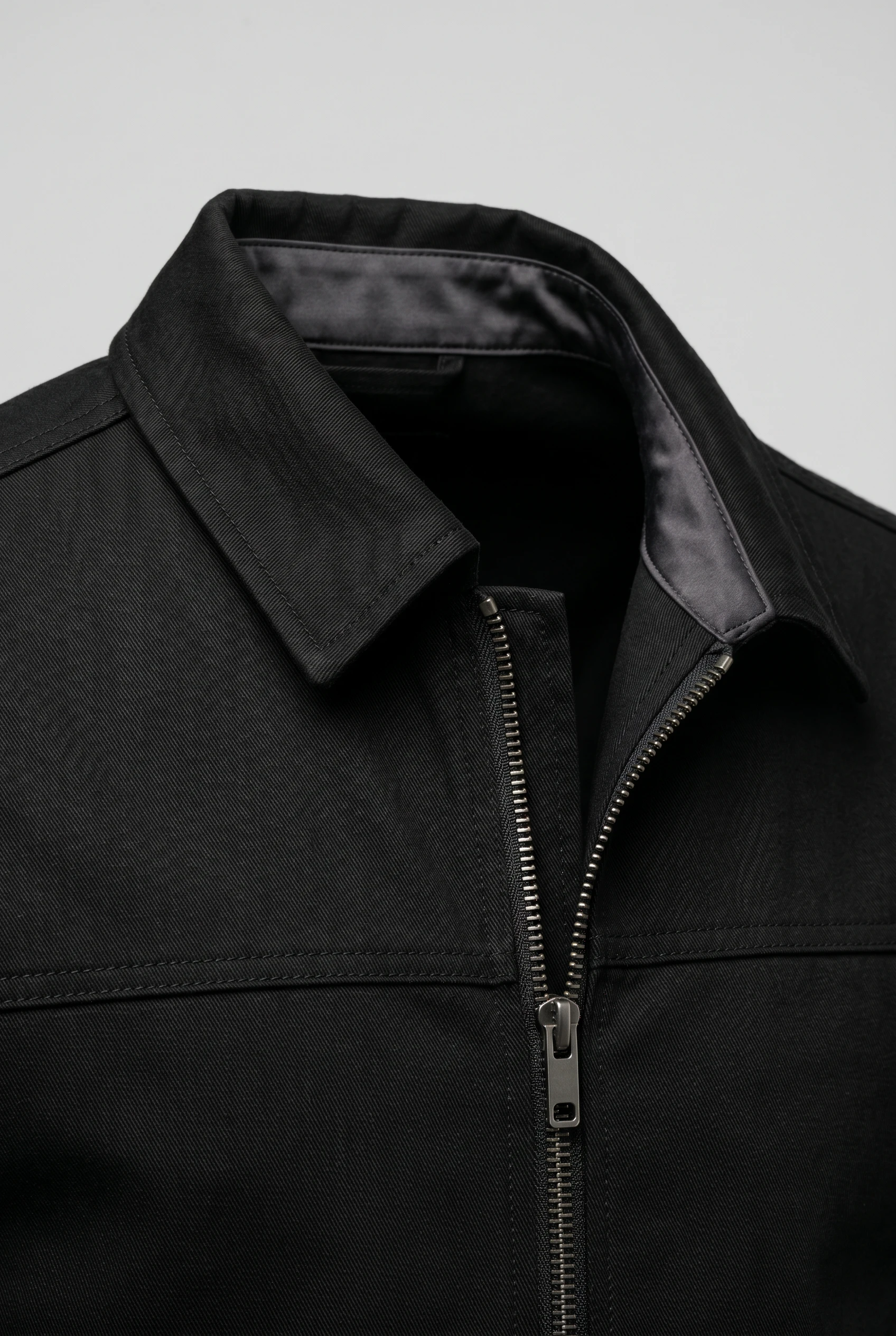
Show the stitching, texture, hardware, and finish that sell the garment. Select lens, framing, lighting, background, and product focus through buttons and presets built for fashion teams. No studio. No samples. No prompts.
- ~$0.55 per image
- ~30–40s per generation
- 150+ styles
- 2K or 4K
- Every aspect ratio
- Full commercial rights
7-day free trial • 50 tokens (10 images) • Cancel anytime

Direct the shoot. Zero prompts.
This setup is tuned for fashion detail work: an 85mm lens, clean studio light, close framing, and a visual style that keeps texture, trim, and construction readable. You click into the detail you need and generate a polished close-up without typing a line. 5 tokens · ~34s per image
- 6 clicks · 0 keystrokes
- app.rawshot.ai / new_shoot
How it works
Turn Garment Details Into Selling Images
From stitching and texture to hardware and trims, direct close-up fashion photography with controls made for repeatable output.
- Step 01
Select the Detail View
Choose close-up or detail framing, then set the lens, angle, and product focus around the exact area you want to show. The interface is built for fashion image direction, so every decision sits in a control, not an empty text box.
- Step 02
Adjust the Shoot Controls
Set lighting, background, aspect ratio, resolution, and visual style to match your PDP, campaign, or social format. You can move from clean catalog detail to dramatic editorial macro without rebuilding the workflow.
- Step 03
Generate and Reuse at Scale
Create the image in about 30–40 seconds, keep the settings, and apply the same setup across more garments. The same close-up logic works for one hero SKU in the browser or a catalog pipeline through the API.
Spec sheet
Proof That the Detail Holds Up
These twelve surfaces show how RAWSHOT keeps close-up fashion imagery usable for commerce, creative review, and scaled operations.
- 01
Synthetic by Design
Every model is built from 28 body attributes with 10+ options each, making accidental real-person likeness statistically negligible by design.
- 02
Every Setting Is a Click
Lens, framing, angle, light, background, and style live in buttons, sliders, and presets. You direct the shot in an application, not a chat box.
- 03
Garment Detail Comes First
Cut, colour, pattern, logo, fabric, drape, and proportion stay central to the output. RAWSHOT is engineered around the garment, which matters most in close crop imagery.
- 04
Diverse Synthetic Models
Build on-model close detail images across varied body presentations without relying on a narrow default face. Diversity is part of the product, transparently labelled.
- 05
Consistent Across SKU Runs
Reuse the same face, lighting setup, crop logic, and visual style across a full collection. That consistency keeps PDP detail images from drifting between products.
- 06
150+ Styles for Detail Work
Switch from catalog clarity to editorial tension, beauty-led close framing, noir, vintage, or campaign gloss with preset visual systems built for fashion.
- 07
2K and 4K in Any Ratio
Generate sharp close-ups for PDP zoom, lookbooks, marketplace cards, and paid social. Square, portrait, landscape, and vertical formats are all supported.
- 08
Labelled and Compliant
Outputs are AI-labelled, watermarked, and aligned with EU AI Act Article 50, California SB 942, and GDPR expectations. Honest provenance is a product value, not a footnote.
- 09
Signed Audit Trail per Image
Each asset carries C2PA-signed provenance metadata and a per-image record. That gives commerce teams a clearer chain of custody for review, publishing, and archiving.
- 10
GUI for One, API for Many
Use the browser for single-image detail direction or connect the REST API for nightly catalog pipelines. The core product stays the same at every scale.
- 11
Fast, Flat, and Refund-Aware
Stills run at about $0.55 per image and usually generate in 30–40 seconds. Tokens never expire, and failed generations refund their tokens.
- 12
Commercial Rights Stay Clear
Every output includes full commercial rights, permanent and worldwide. That clarity matters when close detail imagery moves from testing into live revenue channels.
Outputs
Close-Up Output, Ready to Publish
From fabric texture to zipper pullers and seam finish, these frames are built to show what the product is actually doing. Use them for PDP modules, campaign cut-ins, and marketplace detail slots.


Browse 150+ visual styles →
Comparison
RAWSHOT vs category tools vs DIY prompting
Three lenses on every dimension — what you optimize for in RAWSHOT versus typical category tools and blank-box AI workflows.
01
Interface
RAWSHOT
Click-driven controls for lens, crop, light, style, and garment focusCategory tools + DIY
Often mix basic presets with thinner fashion-specific control surfaces. DIY prompting: Relies on typed instructions, revisions, and repeated trial-and-error to steer outputs02
Garment fidelity
RAWSHOT
Built around real garment details like texture, trim, logos, and drapeCategory tools + DIY
Can prioritize aesthetic mood over precise product representation. DIY prompting: Often drifts on fabric behavior, invents logos, and changes construction details03
Model consistency
RAWSHOT
Same synthetic model can stay stable across repeated close-up SKU runsCategory tools + DIY
Consistency varies across sessions and product batches. DIY prompting: Faces and body presentation often shift between generations with no reliable lock04
Provenance
RAWSHOT
C2PA-signed metadata, visible watermarking, and cryptographic watermarking per imageCategory tools + DIY
Labelling and provenance support are often partial or absent. DIY prompting: Usually ships without signed provenance metadata or a dependable audit record05
Commercial rights
RAWSHOT
Full commercial rights to every output, permanent and worldwideCategory tools + DIY
Rights terms can be narrower or harder to verify operationally. DIY prompting: Usage rights are often unclear across models, tools, and source workflows06
Pricing transparency
RAWSHOT
Flat per-image pricing, tokens never expire, refunds on failed generationsCategory tools + DIY
May gate usage behind seats, tiers, or sales-led plans. DIY prompting: Costs spread across subscriptions, retries, and time spent steering weak results07
Catalog scale
RAWSHOT
Browser GUI and REST API use the same engine and output logicCategory tools + DIY
Scale features may sit behind separate enterprise layers. DIY prompting: No dependable fashion pipeline for batch consistency, auditability, or repeatable settings08
Iteration overhead
RAWSHOT
Adjust one control and regenerate a close detail variant quicklyCategory tools + DIY
Revision loops are shorter than DIY but still less garment-led. DIY prompting: Prompt-engineering overhead slows simple changes like angle, crop, or lighting
Prompting does not scale
Stop writing essays. Direct the shoot.
Most AI photo tools start with a blank text box. Rawshot turns the shoot into repeatable controls, so creative teams can produce consistent fashion imagery without prompt syntax or one-off hacks.
Category norm
ManualCreate a premium editorial fashion photograph of a model wearing the exact navy oversized wool coat from SKU-1842, full-body crop, realistic hands, consistent facial identity, clean e-commerce lighting, subtle Paris street background, 85mm lens, no logo distortion, no fabric hallucination, same pose as last campaign, repeatable for all colorways...
A prompt can describe one image. It cannot become a shared production system for hundreds of products, models, angles and markets.
Rawshot
ClicksSaved shoot recipe
Apply to 1 SKU or 10,000 via GUI, CSV or REST API.
Rawshot makes creative direction visible: buttons, presets and sliders instead of hidden prompt craft. The result is easier to teach, faster to approve and built for repeat production.
Use cases
Where Close Detail Imagery Wins the Sale
Operator archetypes and how click-directed, garment-first output fits the way they actually work.
- 01
Indie Designers Launching First Drops
Show stitching, fabric hand, and finish quality before you can justify a physical studio day.
Confidence · high
- 02
DTC Apparel Teams Updating PDPs
Add close product frames that explain texture and construction without reshooting the full collection.
Confidence · high
- 03
Accessories Brands Selling Craft
Focus on buckles, straps, hardware, and edge paint where purchase decisions are made.
Confidence · high
- 04
Footwear Labels Showing Materials
Direct close views of uppers, soles, seams, and finish so buyers can inspect the product visually.
Confidence · high
- 05
Jewelry Sellers Needing Precision
Create detail-led imagery for clasps, stones, settings, and metal finish in polished commerce formats.
Confidence · high
- 06
Handbag Brands Building Premium Pages
Use close crop product photography to show grain, lining, stitching, and hardware without losing brand consistency.
Confidence · high
- 07
Marketplace Sellers Improving Listings
Generate clear detail images that help products read better in crowded grid environments and zoom modules.
Confidence · high
- 08
Crowdfunded Fashion Projects
Present trim, textile, and make quality early so backers understand what they are funding.
Confidence · high
- 09
Pre-Order Brands Without Samples Everywhere
Photograph garment details before full production logistics are in place and keep launch pages moving.
Confidence · high
- 10
Resale and Vintage Operators
Highlight labels, fastenings, condition cues, and unique finish details that matter in one-off inventory.
Confidence · high
- 11
Kidswear Teams Showing Fabric Practicality
Bring attention to softness, closures, and construction details parents actually inspect before purchase.
Confidence · high
- 12
Catalog Teams Running Variant Pipelines
Standardize close-up product photography across large SKU counts through repeatable browser settings or API flows.
Confidence · high
— Principle
Honest is better than perfect.
Close-up fashion imagery invites scrutiny, so provenance matters even more when the frame is tight. Every RAWSHOT output is AI-labelled, multi-layer watermarked, and C2PA-signed, giving teams a clearer record of what the image is and where it came from. That matters for brand trust, internal review, and compliant publishing across EU-hosted workflows.
Rights & provenance
Full commercial rights. Forever.
- C2PA-signed on every image — EU AI Act Article 50 compliant
- 28-attribute synthetic models — real-person likeness statistically impossible
- Full commercial rights to every generation — no recurring licensing fees
- Tokens never expire · One-click cancel · Transparent pricing
EU AI Act
C2PA
Commercial use
Pricing
~$0.55 per image.
~30–40 seconds per generation. Tokens never expire. Cancel in one click.
- 01The cancel button is on the pricing page.
- 02No per-seat gates. No 'contact sales' walls for core features.
- 03Failed generations refund their tokens.
- 04Full commercial rights to every output, permanent, worldwide.
FAQ
Practical answers on control, rights, pricing, scale, and compliant publishing.
Do I need to write prompts to use RAWSHOT?
Never—you direct every output with sliders, presets, and clicks on the garment, not typed prompts. That UI control is consistent across GUI and REST API payloads, which is why ecommerce teams onboard buyers without rewriting creative briefs as chat threads. Instead of guessing wording, you select lens, framing, angle, lighting, background, visual style, aspect ratio, and product focus directly in the interface.
For catalog teams, reliability matters more than model cleverness; RAWSHOT keeps tokens, timings, refund rules, commercial rights framing, provenance signalling, watermarking cues, REST surface, and SKU-scale batch patterns explicit so operations can rehearse PDP launches without hallucinated garment inventions. The practical takeaway is simple: if your team can direct a product shot with choices, they can use RAWSHOT without learning syntax or maintaining a library of brittle text instructions.
What does an AI close up product photography generator actually change for fashion ecommerce teams?
It changes who gets access to detail-led imagery and how consistently that imagery gets made. Close-up product frames are where customers inspect stitching, fabric texture, trims, logos, hardware, and finish, yet traditional production often pushes those shots behind budget, sample logistics, or studio scheduling. RAWSHOT makes that layer of visual proof available in a click-driven workflow, so smaller brands and lean catalog teams can publish detail imagery without waiting for a full physical shoot.
Operationally, that means buyers, merchandisers, and ecommerce managers can create close crop assets in 2K or 4K, choose aspect ratios for PDPs or social, and keep the same model and visual system across multiple SKUs. Because outputs are C2PA-signed, AI-labelled, and covered by full commercial rights, the images are easier to review and route into real publishing workflows. For fashion teams, the gain is not novelty; it is dependable access to product-close imagery that used to be out of reach.
Why skip reshooting every SKU just to get new detail frames for a seasonal refresh?
Because seasonal refreshes usually need visual continuity and speed more than another expensive production cycle. When the garment already exists in your line plan, teams often need updated close detail views for a new campaign mood, a revised PDP structure, or a marketplace format, not a full day of studio coordination. RAWSHOT lets you keep the product focus on the seam, trim, texture, or accessory detail while changing the visual style, crop, background, or lighting through controls.
That is especially useful when the same collection has to serve ecommerce, lookbooks, paid media, and reseller channels at once. A team can hold onto a repeatable setup, generate variants in roughly 30–40 seconds each, and avoid the overhead of re-booking talent, shipping samples, or rebuilding shot lists from scratch. The result is a tighter seasonal workflow where detail imagery updates move at merchandising speed instead of studio speed.
How do we turn flat garments into catalogue-ready close-up imagery without prompting?
You start by choosing the shot logic in the interface rather than describing it in text. Set the lens, pick close-up or detail framing, choose the camera angle, define the lighting system, select a clean or editorial background, and lock the aspect ratio and resolution for the destination channel. Then set product focus so the output stays centered on the part of the garment that matters most, whether that is texture, trim, hardware, or construction.
From there, teams generate, review, and reuse the same settings across more SKUs or variants. The browser GUI works well for one-off direction and approvals, while the REST API supports larger catalog flows without changing the underlying image logic. Because RAWSHOT is engineered around the garment rather than an open-ended chat pattern, the workflow stays closer to how fashion operators already think: select the shot, adjust the controls, publish the assets.
Why does garment-led control beat DIY prompting in ChatGPT, Midjourney, or generic image models for fashion PDPs?
Because fashion PDPs fail when the garment drifts. Generic image systems are built around broad text interpretation, which means simple requests can mutate logos, stitching, fabric behavior, proportions, or hardware from one output to the next. That might be tolerable for moodboards, but it becomes a problem when customers are using close images to judge what they will actually receive.
RAWSHOT takes a different route: the product is the brief, and the interface lets you control the shoot with visible settings instead of linguistic guesswork. Teams can keep the same model, crop logic, lighting setup, and style across repeated outputs, while also getting clear commercial rights, C2PA-signed provenance metadata, and watermarking built into the workflow. The practical advantage is reproducibility. Your team spends less time steering around avoidable image drift and more time publishing detail frames that hold up under customer scrutiny.
Can we use RAWSHOT close-up images commercially, and are they clearly labelled?
Yes. Every output comes with full commercial rights that are permanent and worldwide, which is essential when detail imagery moves from concept review into PDPs, campaigns, marketplaces, email, and paid social. RAWSHOT also labels outputs as AI-made and applies both visible and cryptographic watermarking, so teams are not forced to choose between usable assets and honest attribution.
That transparency matters more, not less, in close-up imagery because detail frames invite inspection from customers, partners, and internal stakeholders. RAWSHOT pairs those rights with C2PA-signed provenance metadata and EU-hosted, GDPR-compliant operations, giving brands a clearer record of asset origin and handling. For commerce teams, the actionable takeaway is straightforward: you can publish the image, keep the attribution honest, and maintain a documented trail for review and compliance workflows.
What should our team check before publishing close-detail fashion imagery from RAWSHOT?
Start with garment truth. Confirm that the fabric texture, seam lines, trims, logos, hardware, colour relationships, and overall construction shown in the image match the product you intend to sell. In close-up frames, small mismatches matter more because customers are using those images to validate quality and finish, so review should focus on product specifics before aesthetics.
Then check the operational layer: confirm the selected aspect ratio and resolution for the destination channel, verify that the output is correctly AI-labelled, retain the C2PA provenance data, and make sure watermarking and asset handling fit your internal publishing policy. Because RAWSHOT also gives full commercial rights and a signed audit trail per image, compliance and merchandising can review the same file with fewer unknowns. A good workflow is to treat close-detail publishing like any other product accuracy check: product first, metadata second, launch third.
How much does still-image detail photography cost in RAWSHOT, and what happens to unused tokens?
Stills cost about $0.55 per image, and most generations complete in roughly 30–40 seconds. Tokens never expire, so teams do not have to rush through seasonal planning, buyer review cycles, or staggered assortment launches just to avoid losing prepaid value. That pricing is especially useful for close-up work because detail modules often need several variants before a merchandising team decides which crop or finish view belongs on the live PDP.
RAWSHOT also keeps the operating rules clear. Failed generations refund their tokens, the cancel button is on the pricing page, and core functionality is not hidden behind per-seat gates or a sales wall. For planning purposes, teams can estimate detail-image volume as a straightforward per-image workload rather than a maze of expiry clauses and hidden access thresholds. That makes budgeting easier whether you are producing ten close crops or ten thousand.
Can RAWSHOT plug into Shopify-scale catalog workflows or do we have to stay in the browser?
You can do both. RAWSHOT includes a browser GUI for hands-on image direction and a REST API for catalog-scale operations, so teams are not forced to choose between creative control and throughput. A merchandiser can define a close-detail setup in the interface, and an operations or engineering team can then apply the same logic across larger SKU batches through the API.
That matters in Shopify-scale environments where image needs fan out fast across product pages, variant groups, landing pages, and channel-specific crops. Because the same engine powers single-shoot and batch workflows, teams do not hit a quality cliff when they move from manual work to automation. The best practice is to establish a small set of approved detail-shot configurations, validate them on hero products, and then scale them through the API with the same standards intact.
How do creative, merchandising, and catalog ops teams scale close-up output together without losing consistency?
They scale by agreeing on controls, not by passing around loose text instructions. Creative sets the visual system, merchandising defines what product details must be shown, and catalog ops standardizes the repeatable fields such as lens, framing, angle, lighting, background, aspect ratio, and output resolution. RAWSHOT supports that division of labor because the important decisions are visible, reusable settings rather than hidden wording choices that change from person to person.
Once those settings are approved, a team can use the browser for exceptions and review rounds while running broader asset production through the REST API. The same synthetic model, the same close crop logic, and the same provenance layer stay available whether the workload is one launch page or a nightly catalog update. In practice, that gives brands a cleaner operating model: fewer interpretation gaps between teams, steadier output across SKUs, and faster movement from visual approval to publication.