
— Flat lay imagery · 150+ styles · 4K
Direct clean product-first layouts with the AI Flat Lay Fashion Photography Generator.
Generate flat lay fashion imagery that keeps attention on cut, colour, pattern, and proportion. Direct framing, lens, aspect ratio, background, and finish with clicks inside a real application, not a chat box. No studio. No sample shipping. No prompts.
- ~$0.55 per image
- ~30–40s per generation
- 150+ styles
- 2K or 4K
- Every aspect ratio
- Full commercial rights
7-day free trial • 50 tokens (10 images) • Cancel anytime

Direct the shoot. Zero prompts.
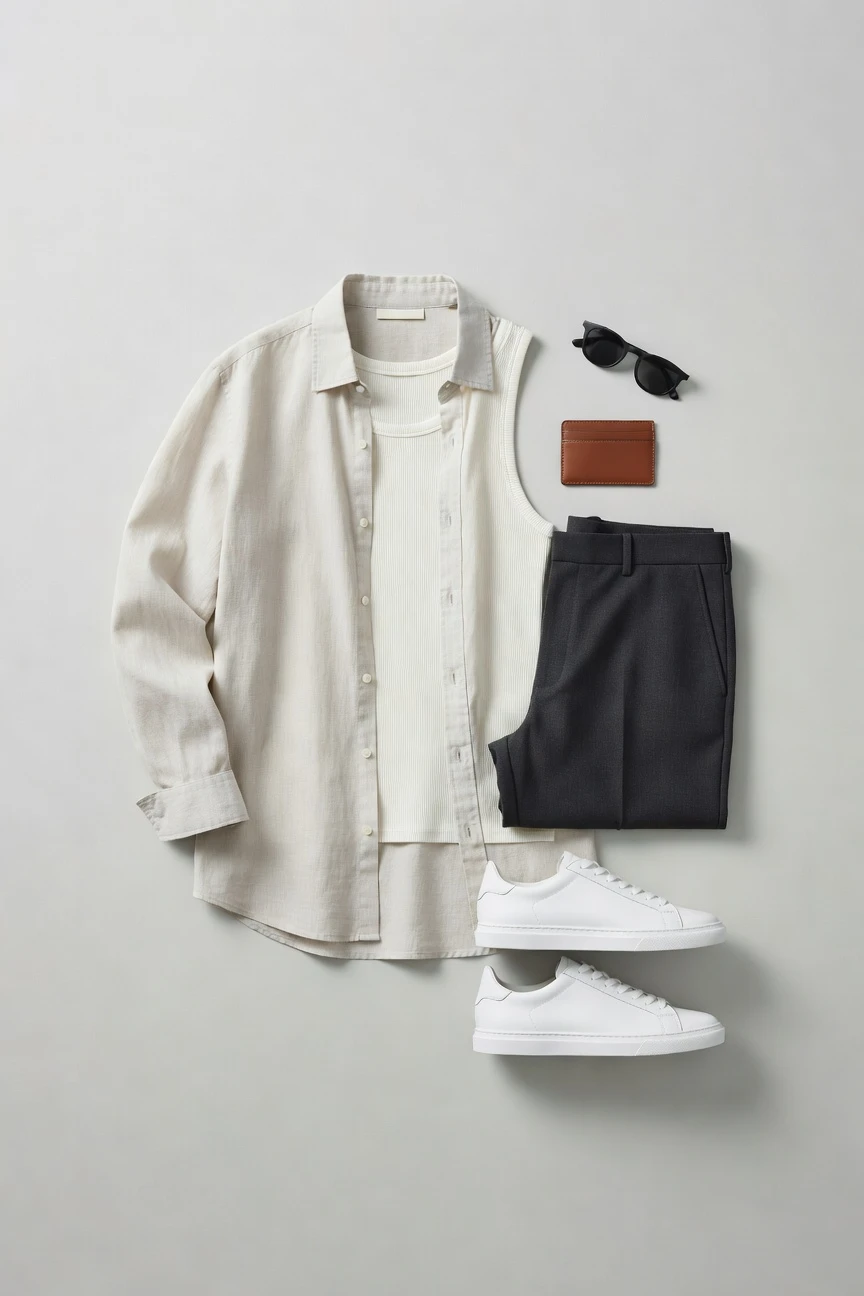
This setup starts with a flat lay frame, 85mm lens, 4:5 crop, and 4K output so you can build clean product-first imagery for PDPs, launch grids, and campaign inserts. You adjust only the visual decisions that matter, then generate. ~$0.55 per image · ~30-40s
- 11 clicks · 0 keystrokes
- app.rawshot.ai / new_shoot
How it works
Build Flat Lay Sets With Clicks
From one product image to repeatable launch and catalog assets, the workflow stays garment-led and operationally clear.
- Step 01
Upload the Garment
Start from the real product, not a blank text field. Your garment becomes the source for shape, colour, surface detail, and brand markings.
- Step 02
Set the Flat Lay
Click through framing, lens, angle, background, crop, and visual finish until the composition matches the job. Every creative choice sits in buttons, sliders, and presets.
- Step 03
Generate and Repeat
Create one image or a full set for every SKU, colourway, and channel. Keep the look consistent across PDPs, launch decks, ads, and catalog batches.
Spec sheet
Proof for Product-First Flat Lay Work
These twelve points show what fashion teams actually need from a flat lay workflow: control, fidelity, provenance, scale, and rights.
- 01
Synthetic by Design
Every RAWSHOT model system is built from 28 body attributes with 10+ options each, making accidental real-person likeness statistically negligible by design.
- 02
Every Setting Is a Click
You select lens, framing, angle, light, background, ratio, and style through the interface. No typed syntax stands between you and usable output.
- 03
Garment-Led Fidelity
RAWSHOT is engineered around the product, so cut, colour, pattern, logo placement, and drape stay central instead of getting bent by generic image logic.
- 04
Diverse Synthetic Models
When a flat lay shoot expands into on-model work, you can use transparently labelled synthetic models with broad attribute control and consistent reuse.
- 05
Consistent Across SKUs
Hold the same visual system across colourways, categories, and repeat drops. That makes merchandising cleaner and retakes less chaotic.
- 06
150+ Visual Styles
Move from catalog clean to campaign gloss, film grain, noir, street flash, or minimal studio looks without rebuilding the workflow each time.
- 07
Built for Every Surface
Generate in 2K or 4K and export the aspect ratio each channel needs, from square marketplace tiles to vertical launch assets and wide banners.
- 08
Labelled and Compliant
Outputs are AI-labelled, C2PA-signed, watermarked, EU-hosted, GDPR-compliant, and aligned with EU AI Act Article 50 and California SB 942 expectations.
- 09
Signed Audit Trail per Image
Each asset carries a provenance record that supports internal review, external disclosure, and downstream content governance without guesswork.
- 10
GUI to REST API
Use the browser app for one-off art direction, then move the same logic into catalog-scale pipelines through the REST API when volume grows.
- 11
Clear Economics and Timing
Images run at about $0.55 each and usually generate in 30–40 seconds. Tokens never expire, and failed generations refund their tokens.
- 12
Permanent Commercial Rights
Every output comes with full commercial rights, worldwide and permanent, so your team can publish across ecommerce, paid, social, and wholesale materials.
Outputs
Flat Lay Outputs, ready for commerce
Clean top-down compositions, detail-first crops, and stylised product spreads all run through the same click-driven workflow. You keep the garment central while adapting the finish for channel, season, or brand mood.


Browse 150+ visual styles →
Comparison
RAWSHOT vs category tools vs DIY prompting
Three lenses on every dimension — what you optimize for in RAWSHOT versus typical category tools and blank-box AI workflows.
01
Interface
RAWSHOT
Click-driven controls for framing, lens, light, background, style, and ratioCategory tools + DIY
Often mix limited presets with shallow text-led instructions and less directability. DIY prompting: You type instructions into generic image tools and hope wording lands correctly02
Garment fidelity
RAWSHOT
Engineered around the product so cut, colour, pattern, and logos stay groundedCategory tools + DIY
May capture general apparel shape but can soften or reinterpret key garment details. DIY prompting: Garments drift, logos get invented, and trims or proportions often change between attempts03
Flat lay composition
RAWSHOT
Top-down product layouts are set through framing, angle, crop, and product focusCategory tools + DIY
Can offer broad product scenes but less precise composition control for merchandise layouts. DIY prompting: You chase clean flat lays through repeated rewrites and still get uneven placement04
Model consistency across workflows
RAWSHOT
Same platform handles flat lay and consistent synthetic model imagery when neededCategory tools + DIY
Consistency can vary between tools, products, or locked higher-tier plans. DIY prompting: Faces, bodies, and styling shift across outputs, so catalog continuity breaks fast05
Provenance and labelling
RAWSHOT
C2PA-signed, visibly and cryptographically watermarked, and clearly AI-labelledCategory tools + DIY
Labelling and provenance support are uneven or absent across the category. DIY prompting: No built-in provenance metadata, weak disclosure patterns, and unclear downstream auditability06
Commercial rights
RAWSHOT
Full commercial rights to every output, permanent and worldwideCategory tools + DIY
Rights can depend on plan tier, contract scope, or platform-specific terms. DIY prompting: Usage terms are harder to interpret, especially across models, edits, and published assets07
Pricing transparency
RAWSHOT
About $0.55 per image, tokens never expire, one-click cancel, refunds on failuresCategory tools + DIY
Seats, volume gates, or sales-led packaging often complicate budgeting. DIY prompting: Low entry cost hides heavy iteration waste, operator time, and unpredictable usable yield08
Catalog scale
RAWSHOT
Browser GUI for one shoot and REST API for 10,000-SKU pipelinesCategory tools + DIY
Scale features may sit behind enterprise packaging or narrower integrations. DIY prompting: No reliable production workflow for nightly batch runs, audit trails, or merch ops handoff
Prompting does not scale
Stop writing essays. Direct the shoot.
Most AI photo tools start with a blank text box. Rawshot turns the shoot into repeatable controls, so creative teams can produce consistent fashion imagery without prompt syntax or one-off hacks.
Category norm
ManualCreate a premium editorial fashion photograph of a model wearing the exact navy oversized wool coat from SKU-1842, full-body crop, realistic hands, consistent facial identity, clean e-commerce lighting, subtle Paris street background, 85mm lens, no logo distortion, no fabric hallucination, same pose as last campaign, repeatable for all colorways...
A prompt can describe one image. It cannot become a shared production system for hundreds of products, models, angles and markets.
Rawshot
ClicksSaved shoot recipe
Apply to 1 SKU or 10,000 via GUI, CSV or REST API.
Rawshot makes creative direction visible: buttons, presets and sliders instead of hidden prompt craft. The result is easier to teach, faster to approve and built for repeat production.
Use cases
Where Flat Lay Work Unlocks Access
Operator archetypes and how click-directed, garment-first output fits the way they actually work.
- 01
Indie Designer Launches
Build clean product-first images for a first drop when studio budgets never made the schedule.
Confidence · high
- 02
DTC PDP Refreshes
Update stale product pages with sharper flat garment imagery that keeps the merchandising system consistent.
Confidence · high
- 03
Marketplace Sellers
Generate square and vertical commerce-ready layouts for listings that need fast, repeatable presentation.
Confidence · high
- 04
Crowdfunded Collections
Show the garment clearly before full production, using top-down layouts that keep attention on design details.
Confidence · high
- 05
Factory-Direct Manufacturers
Standardise flat lay outputs across many SKUs so wholesale, marketplace, and direct channels pull from one visual logic.
Confidence · high
- 06
Resale and Vintage Shops
Present one-off pieces with clean, product-led imagery when every item deserves clarity but not a full shoot day.
Confidence · high
- 07
Kidswear Brands
Use flat lay compositions to show sizing, sets, and colourways without scheduling child talent for every update.
Confidence · high
- 08
Adaptive Fashion Teams
Keep the garment central so closures, adjustments, and functional details stay visible and easy to evaluate.
Confidence · high
- 09
Accessories Merchandisers
Create handbags, jewelry, eyewear, and watch layouts that feel organised, premium, and ready for channel-specific crops.
Confidence · high
- 10
Footwear Catalog Teams
Build top-down and detail-focused shoe imagery for launch calendars, merchandising decks, and retailer submissions.
Confidence · high
- 11
Students and Small Labels
Test branding, line sheets, and collection pages with AI-assisted flat lay fashion photography before a first paid shoot exists.
Confidence · high
- 12
Enterprise Catalog Operations
Move from one browser-directed setup to batch generation through the API when product volume climbs into the thousands.
Confidence · high
— Principle
Honest is better than perfect.
Flat lay imagery still needs trust signals when it enters product pages, ads, and wholesale decks. RAWSHOT labels outputs, signs them with C2PA provenance metadata, and applies visible plus cryptographic watermarking so teams can publish with disclosure built in. That matters because commerce images are operational assets, not just pretty files.
Rights & provenance
Full commercial rights. Forever.
- C2PA-signed on every image — EU AI Act Article 50 compliant
- 28-attribute synthetic models — real-person likeness statistically impossible
- Full commercial rights to every generation — no recurring licensing fees
- Tokens never expire · One-click cancel · Transparent pricing
EU AI Act
C2PA
Commercial use
Pricing
~$0.55 per image.
~30–40 seconds per generation. Tokens never expire. Cancel in one click.
- 01The cancel button is on the pricing page.
- 02No per-seat gates. No 'contact sales' walls for core features.
- 03Failed generations refund their tokens.
- 04Full commercial rights to every output, permanent, worldwide.
FAQ
Practical answers on control, rights, pricing, scale, and compliant publishing.
Do I need to write prompts to use RAWSHOT?
Never—you direct every output with sliders, presets, and clicks on the garment, not typed prompts. That UI control is consistent across GUI and REST API payloads, which is why ecommerce teams onboard buyers without rewriting creative briefs as chat threads. For flat lay work, that matters because product teams usually need repeatable crops, backgrounds, aspect ratios, and detail emphasis more than they need an open-ended conversation box.
For catalog teams, reliability matters more than model cleverness; RAWSHOT keeps tokens, timings, refund rules, commercial rights framing, provenance signalling, watermarking cues, REST surface, and SKU-scale batch patterns explicit so operations can rehearse PDP launches without hallucinated garment inventions. The practical takeaway is simple: treat image direction like production software, where each decision is visible, repeatable, and easy to hand from creative to merchandising.
What does ai flat lay fashion photography generator actually change for ecommerce teams?
It changes who can publish polished product imagery and how quickly they can standardise it. Instead of waiting for studio time, sample shipping, retouch cycles, and budget approval, a commerce team can generate flat lay assets directly around the real garment and keep the presentation aligned across PDPs, collection pages, marketplaces, and campaign support materials. That is less about novelty and more about access to a visual system that many operators never had.
With RAWSHOT, the change is operationally concrete: you choose framing, lens, background, style, aspect ratio, and resolution in a click-driven interface, then generate in roughly 30–40 seconds per image at about $0.55. Outputs come with full commercial rights, failed generations refund tokens, and provenance is built in through C2PA signing plus watermarking. For teams running many SKUs, that means product presentation becomes a controllable workflow rather than a patchwork of ad hoc shoots and inconsistent edits.
Why skip reshooting every SKU when the season, palette, or channel changes?
Because seasonal updates usually change presentation requirements faster than traditional production can respond. Merchandising teams often need fresh crops, cleaner marketplace tiles, new brand backgrounds, or alternate ratios for paid and social, even when the garment itself has not changed. Paying for another full studio cycle just to update visual treatment is slow, expensive, and often unrealistic for smaller labels or fast-moving assortments.
RAWSHOT lets you keep the garment as the constant while adjusting the visual system around it through clicks. You can shift from catalog clean to a more campaign-led finish, move from square to 4:5 or 9:16, and regenerate at 2K or 4K without rebuilding the process from scratch. The useful habit for teams is to separate product truth from presentation variables, then version those variables deliberately as channels and seasons change.
How do we turn flat garments into catalogue-ready imagery without prompting?
You start with the product and set the visual decisions in the interface. For flat lay work, that usually means choosing the top-down framing, selecting the lens, setting angle and background, deciding whether the focus is the full product or a detail area, and picking the aspect ratio and finish that fit the destination channel. Because those choices are explicit, teams can build a repeatable setup instead of relying on memory or ad hoc wording.
RAWSHOT is designed to make that production path practical for day-to-day commerce operations. You generate stills in about 30–40 seconds, choose 2K or 4K, reuse the same setup across colourways and adjacent categories, and move into REST API workflows when volume grows. The best operational approach is to define one approved flat lay recipe per channel, then reuse it as a standard rather than reinventing direction for each SKU.
Why does garment-led control beat DIY prompting in ChatGPT, Midjourney, or generic image models for fashion PDPs?
Because fashion PDPs fail when the garment drifts. Generic image tools are built to satisfy broad visual instructions, so they often reinterpret proportions, invent logo details, soften trims, or change the relationship between colour and fabric surface from one output to the next. That can be acceptable for loose concepting, but it is a poor fit for product presentation where customers, buyers, and internal teams expect the image to stay anchored to the item being sold.
RAWSHOT is built around the garment and the production workflow, not around a chat exchange. You control framing, angle, background, style, resolution, and ratio with visible settings, and each published asset can carry C2PA provenance plus watermarking and AI labelling. The practical rule is straightforward: use generic image systems for loose ideation if you want, but use a garment-led application when the file is going onto a real product page or into a catalog pipeline.
Are RAWSHOT flat lay outputs labelled, compliant, and safe to use commercially?
Yes. RAWSHOT outputs are AI-labelled, C2PA-signed, and watermarked with both visible and cryptographic methods, and the platform is EU-hosted and GDPR-compliant. That matters for fashion teams because product imagery moves through many hands—creative, merchandising, legal, retail partners, marketplaces—and each hand benefits from clear attribution about what the asset is and where it came from. Honest disclosure is not a side note; it is part of durable brand practice.
Commercially, RAWSHOT gives full commercial rights to every output, permanent and worldwide, which removes a common source of ambiguity in content operations. The right way to use the platform is to treat provenance and labelling as part of your publishing standard, especially for PDPs, ads, and wholesale materials that travel outside the core team. Clear rights plus clear disclosure make adoption much easier across the business.
What quality checks should a buyer or merchandiser run before publishing AI-assisted flat lays?
Start with the garment itself. Check cut, colour, pattern placement, logo accuracy, edge definition, and whether the composition highlights the areas a shopper or buyer actually needs to evaluate. Then verify the crop, ratio, and background against channel requirements so a strong image does not fail simply because it was prepared for the wrong surface. Quality control in fashion is rarely one dramatic issue; it is usually a set of small mismatches that erode trust.
With RAWSHOT, teams should also confirm that provenance and disclosure standards are intact before files move downstream. Because outputs are labelled, C2PA-signed, and watermarked, those checks can become part of a standard publishing checklist alongside visual review. The best practice is to make image QA a repeatable merchandising step, not a subjective last-minute glance right before launch.
How much does the ai flat lay fashion photography generator cost per image, and what happens if a generation fails?
For still images, the working figure is about $0.55 per image, and generation usually lands in roughly 30–40 seconds. That pricing is useful because it lets teams estimate cost at the level they actually plan work: by PDP set, by category refresh, by launch assortment, or by nightly batch. More importantly, tokens do not expire, so teams are not forced into artificial deadlines just to preserve credit value.
If a generation fails, the tokens are refunded, which keeps testing and production planning straightforward. RAWSHOT also keeps cancellation simple with a one-click cancel flow on the pricing page and avoids per-seat gates or sales-led locks on core features. In practice, that means buyers and operators can budget by output volume rather than by software politics or hidden packaging rules.
Can RAWSHOT plug into Shopify-scale catalogs or internal product pipelines through an API?
Yes. RAWSHOT supports single-shoot work in the browser GUI and catalog-scale production through a REST API, so teams can begin manually and expand into automation without switching systems. That matters for apparel operations because visual needs usually start with one urgent launch and then spread into repeatable batch jobs across colourways, categories, and seasonal updates. A tool that only works for one of those stages creates friction the moment volume arrives.
The useful implementation pattern is to approve a flat lay setup in the GUI first, then carry that structure into API-driven workflows for larger runs. Because the platform keeps pricing, timing, provenance, and rights predictable, operations teams can plan around real output requirements rather than improvising around disconnected tools. That makes RAWSHOT suitable for both storefront updates and larger catalog maintenance cycles.
What does scaling from one browser shoot to thousands of flat lay assets look like across creative and ops teams?
It looks like one shared production logic used by different roles at different volumes. A creative lead or merchandiser can define the approved visual setup in the interface—framing, angle, background, crop, and finish—while operations teams reuse that structure across larger SKU groups. Because the controls are explicit, handoff is cleaner than passing around subjective notes or trying to preserve a fragile text formula that different people interpret differently.
RAWSHOT is built for that expansion path: same engine, same product, same image pricing, same output quality whether you are generating a handful of launch assets or running a large batch. Add C2PA-signed provenance, watermarking, and permanent worldwide commercial rights, and the result is a workflow that creative, merchandising, and technical teams can all trust. The practical move is to standardise one approved recipe, then scale it through the browser or API as demand grows.
Keep exploring