
— Infant apparel imagery · 150+ styles · 4K
Launch tiny-size fashion campaigns with the AI Infant Photography Generator.
Generate infant apparel imagery built for ecommerce, lookbooks, and launch pages. Direct framing, lighting, background, and product focus with buttons, sliders, and presets in a real application for fashion teams. No studio. No samples. No typed commands.
- ~$0.55 per image
- ~30–40s per generation
- 150+ styles
- 2K or 4K
- Every aspect ratio
- Full commercial rights
7-day free trial • 50 tokens (10 images) • Cancel anytime

Direct the shoot. Zero prompts.
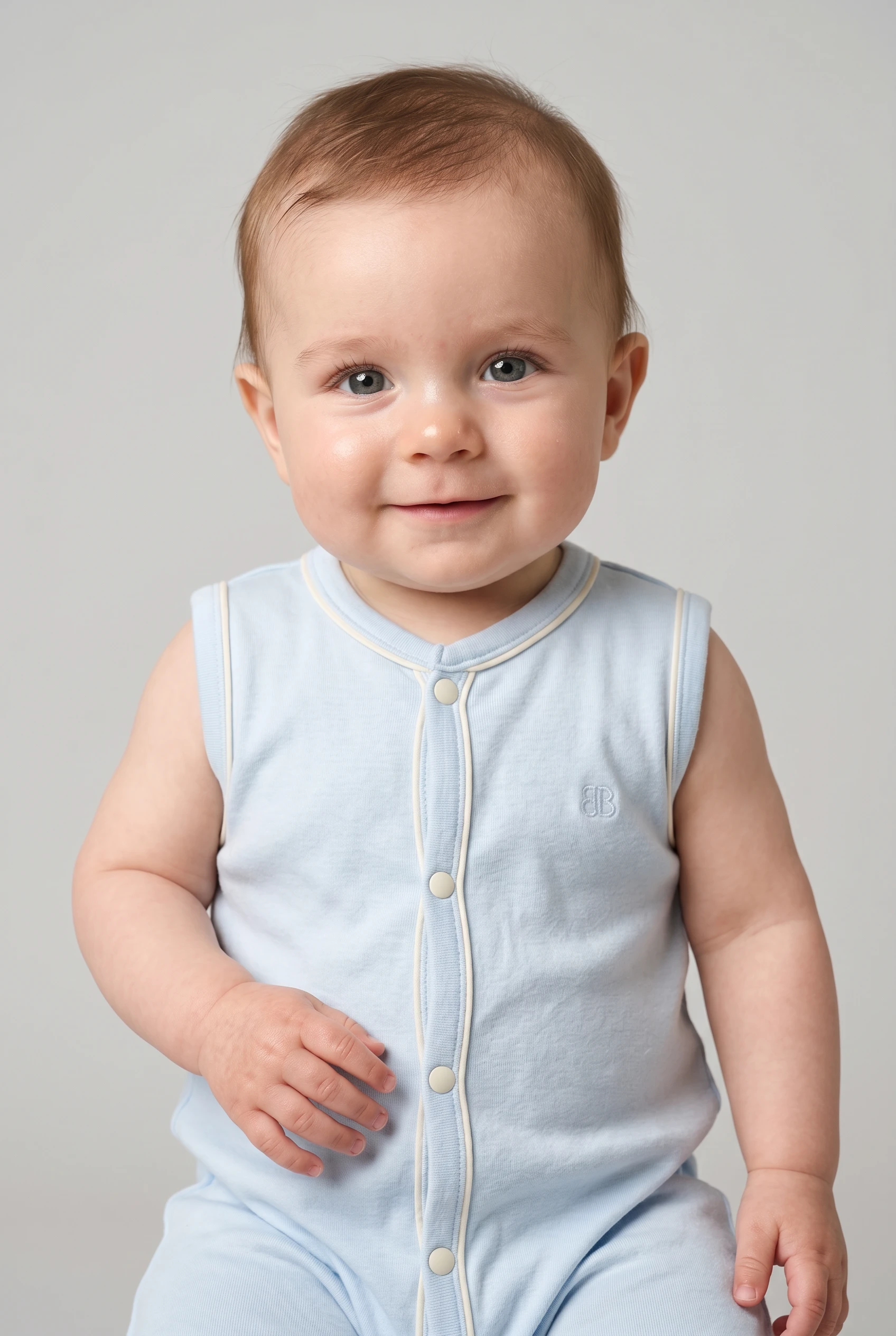
Pre-set for infant apparel pages with a half-body frame, soft studio light, clean backdrop, and full-outfit focus. You click visual decisions for tiny garments and branded details instead of typing instructions. 5 tokens · ~34s per image
- 6 clicks · 0 keystrokes
- app.rawshot.ai / new_shoot
How it works
From Infant Garment to Launch Image
Three steps turn tiny-size apparel into campaign-ready stills with garment-led controls, consistent styling, and a workflow built for commerce teams.
- Step 01
Upload the Garment
Start with the product visuals you already have. RAWSHOT builds the image around the infant garment, so cut, colour, trims, print, and proportion stay central.
- Step 02
Set the Shoot With Clicks
Choose lens, framing, lighting, backdrop, aspect ratio, and visual style in the interface. Every creative decision is a control, so buyers and marketers can direct imagery without learning syntax.
- Step 03
Generate and Scale Out
Create one hero image for a launch page or roll the same setup across a full size run. The same engine works in the browser for single looks and through the REST API for catalog pipelines.
Spec sheet
Proof for Infant Apparel Teams
These twelve surfaces show what matters in production: garment fidelity, clear controls, provenance, rights, and scale without gatekeeping.
- 01
Built From Synthetic Attributes
Every RAWSHOT model is composed from 28 body attributes with 10+ options each. Accidental real-person likeness is statistically negligible by design.
- 02
Every Setting Is a Click
You direct lens, crop, light, backdrop, and style through controls in the UI. No empty text field sits between your team and a usable image.
- 03
Garment-Led Representation
Infant apparel needs accurate scale, trim, print, and fabric behaviour. RAWSHOT is engineered around the product so logos, seams, and silhouette stay faithful.
- 04
Diverse Synthetic Models
Use transparently labelled synthetic models for different brand directions and size stories. That gives smaller labels access to on-model imagery they never had before.
- 05
Consistency Across Every SKU
Keep the same face, camera logic, and styling system across a whole infant collection. That means fewer mismatched PDPs and less cleanup between releases.
- 06
150+ Visual Style Presets
Move from catalog clean to warm lifestyle to editorial gloss without rebuilding the shoot each time. Presets give infant collections range while keeping brand direction tight.
- 07
2K, 4K, and Any Ratio
Generate square, portrait, landscape, marketplace, and social crops from the same workflow. Choose 2K or 4K depending on where the asset needs to land.
- 08
Labelled and Compliance-Ready
Outputs are AI-labelled, watermarked, and aligned with EU AI Act Article 50, California SB 942, and GDPR expectations. Transparency is built into the product, not hidden in footnotes.
- 09
Signed Audit Trail Per Image
Each output carries C2PA-linked provenance information and image-level traceability. Commerce teams get a clear record of what the file is and where it came from.
- 10
GUI for One Shoot, API for Scale
Work in the browser when a merchandiser needs a few launch assets. Use the REST API when a catalog team needs repeatable output across thousands of products.
- 11
Fast, Clear Token Economics
Still images run at about $0.55 each and generate in roughly 30–40 seconds. Tokens never expire, and failed generations refund automatically.
- 12
Worldwide Commercial Rights Included
Every output comes with full commercial rights, permanent and worldwide. You can publish across PDPs, ads, lookbooks, and marketplaces without a separate licensing maze.
Outputs
Tiny Garments, Clear Direction
See how infant apparel can move from clean catalog framing to warmer campaign styling without losing product truth. Each image is directed through controls, then delivered with clear labelling and rights.


Browse 150+ visual styles →
Comparison
RAWSHOT vs category tools vs DIY prompting
Three lenses on every dimension — what you optimize for in RAWSHOT versus typical category tools and blank-box AI workflows.
01
Interface
RAWSHOT
Click-driven controls for lens, framing, light, background, and styleCategory tools + DIY
Often mix limited presets with vague text fields and thinner control depth. DIY prompting: You type instructions, revise repeatedly, and still translate taste into brittle wording02
Garment fidelity
RAWSHOT
Engineered around infant garments, trims, prints, logos, and proportionCategory tools + DIY
Category outputs can smooth details or generalise product-specific construction. DIY prompting: Garments drift, logos get invented, and product details change between attempts03
Model consistency across SKUs
RAWSHOT
Same model logic and setup can stay consistent across a collectionCategory tools + DIY
Consistency exists, but often behind narrower workflows or gated plans. DIY prompting: Faces, proportions, and styling shift from image to image with no stable baseline04
Provenance + labelling
RAWSHOT
C2PA-signed, visibly watermarked, cryptographically watermarked, and AI-labelledCategory tools + DIY
Labelling and provenance support varies and is not always image-level. DIY prompting: No standard provenance metadata and no reliable labelling chain for published assets05
Commercial rights
RAWSHOT
Permanent worldwide commercial rights included with every outputCategory tools + DIY
Rights can depend on plan structure, platform terms, or upgrade tiers. DIY prompting: Rights clarity is often unclear across tools, models, and source conditions06
Pricing transparency
RAWSHOT
About $0.55 per image, no seat gates, tokens never expireCategory tools + DIY
Plans may bundle credits, seats, or sales-led tiers around core workflows. DIY prompting: Usage costs vary by tool and retries, with no fashion-specific refund logic07
Iteration speed
RAWSHOT
New still variants generate in about 30–40 seconds eachCategory tools + DIY
Fast enough for drafts, but less predictable for repeatable product workflows. DIY prompting: Time disappears into rewording, retries, and cleanup after generation errors08
Catalog scale
RAWSHOT
Browser GUI and REST API use the same engine and quality levelCategory tools + DIY
Scale features may sit behind enterprise packaging or limited integrations. DIY prompting: No dependable SKU pipeline, audit trail, or repeatable batch structure for commerce
Prompting does not scale
Stop writing essays. Direct the shoot.
Most AI photo tools start with a blank text box. Rawshot turns the shoot into repeatable controls, so creative teams can produce consistent fashion imagery without prompt syntax or one-off hacks.
Category norm
ManualCreate a premium editorial fashion photograph of a model wearing the exact navy oversized wool coat from SKU-1842, full-body crop, realistic hands, consistent facial identity, clean e-commerce lighting, subtle Paris street background, 85mm lens, no logo distortion, no fabric hallucination, same pose as last campaign, repeatable for all colorways...
A prompt can describe one image. It cannot become a shared production system for hundreds of products, models, angles and markets.
Rawshot
ClicksSaved shoot recipe
Apply to 1 SKU or 10,000 via GUI, CSV or REST API.
Rawshot makes creative direction visible: buttons, presets and sliders instead of hidden prompt craft. The result is easier to teach, faster to approve and built for repeat production.
Use cases
Where Infant Apparel Teams Need Images Fast
Operator archetypes and how click-directed, garment-first output fits the way they actually work.
- 01
Indie babywear launch
A small label creates first-look campaign imagery for newborn essentials before paying for a traditional shoot.
Confidence · high
- 02
DTC infant basics refresh
An ecommerce team updates PDP visuals for seasonal colours while keeping the same model direction across the line.
Confidence · high
- 03
Crowdfunded nursery brand
A founder shows infant apparel on-model for preorders, landing pages, and paid social before bulk production starts.
Confidence · high
- 04
Marketplace listing cleanup
A seller standardises baby bodysuits, rompers, and sets into cleaner, more trustworthy listing imagery.
Confidence · high
- 05
Factory-direct catalog build
A manufacturer turns sample visuals into polished infant apparel pages for wholesale outreach and direct sales.
Confidence · high
- 06
Organic cotton capsule drop
A sustainable label presents tiny garments in soft, clean styling that fits a premium brand voice.
Confidence · high
- 07
Gift set merchandising
A team shows coordinated infant outfits and accessories together in one composition for bundle merchandising.
Confidence · high
- 08
Wholesale line sheet support
Sales teams create consistent imagery for buyers who need to compare fabrics, prints, and silhouettes quickly.
Confidence · high
- 09
Resale babywear curation
A resale operator upgrades mixed product photos into a more coherent storefront for second-hand infant fashion.
Confidence · high
- 10
Editorial story for new parents
A content team produces warm infant fashion visuals for blog features, email stories, and launch storytelling.
Confidence · high
- 11
Agency concept testing
A creative team tests infant campaign directions, framing, and lighting before committing to a larger production plan.
Confidence · high
- 12
Student childrenswear portfolio
A fashion student builds infant-focused portfolio images with controlled styling, labelled outputs, and commercial-ready presentation.
Confidence · high
— Principle
Honest is better than perfect.
Infant apparel imagery needs trust, not ambiguity. Every RAWSHOT output is AI-labelled, carries visible and cryptographic watermarking, and supports C2PA provenance so teams can publish with clear disclosure. We host in the EU, align with GDPR expectations, and treat transparency as product design rather than legal cleanup.
Rights & provenance
Full commercial rights. Forever.
- C2PA-signed on every image — EU AI Act Article 50 compliant
- 28-attribute synthetic models — real-person likeness statistically impossible
- Full commercial rights to every generation — no recurring licensing fees
- Tokens never expire · One-click cancel · Transparent pricing
EU AI Act
C2PA
Commercial use
Pricing
~$0.55 per image.
~30–40 seconds per generation. Tokens never expire. Cancel in one click.
- 01The cancel button is on the pricing page.
- 02No per-seat gates. No 'contact sales' walls for core features.
- 03Failed generations refund their tokens.
- 04Full commercial rights to every output, permanent, worldwide.
FAQ
Practical answers on control, rights, pricing, scale, and compliant publishing.
Do I need to write prompts to use RAWSHOT?
Never—you direct every output with sliders, presets, and clicks on the garment, not typed prompts. That matters because fashion teams do not need another tool that turns buyers, founders, or merchandisers into syntax specialists before they can ship a PDP or launch page. In RAWSHOT, you choose framing, lens, lighting, background, visual style, aspect ratio, and product focus in a real application built for apparel work. The interface stays consistent whether you are making one image in the browser or structuring repeatable output through the REST API.
For catalog teams, reliability matters more than clever chat behaviour. RAWSHOT keeps token use, timings, failed-generation refunds, commercial rights, watermarking, and provenance signalling explicit, so operations can plan image production instead of guessing what a model will do next. That means a buyer can set the look, a marketer can approve it, and an ops team can reproduce it without rewriting the same creative request ten different ways.
What does an AI infant photography generator actually deliver for ecommerce teams?
It gives ecommerce teams a practical way to create infant apparel imagery without booking a studio day for every update, colour drop, or launch window. The value is not abstraction; it is usable output for PDPs, landing pages, marketplaces, email, and paid social. With RAWSHOT, you generate on-model stills around the garment itself, then direct the visual outcome through controls for lens choice, crop, lighting, backdrop, style preset, aspect ratio, and resolution. That makes the workflow understandable to the people who already run merchandising calendars and campaign approvals.
For infant products, the brief is usually about trust and clarity: show the cut, the print, the trim, and the softness story without introducing visual noise. RAWSHOT supports 2K and 4K stills, every aspect ratio, 150+ style presets, and full commercial rights on every output. Because each image is AI-labelled and provenance-aware, teams can treat disclosure and asset governance as part of normal production, not a scramble after the file is already live.
Why skip reshooting every infant SKU when colours or prints change?
Because repeated reshoots slow down assortment changes that should be operationally simple. Infant collections often repeat the same body shape across multiple prints, trims, and seasonal colours, yet traditional photography makes each variation feel like a separate production event with scheduling, sample handling, and post timelines attached. RAWSHOT lets you keep a consistent visual system while changing the product details that actually matter to shoppers. That shortens the distance between merchandising decisions and publishable assets.
The advantage is control, not chaos. You can keep the same framing, lens logic, lighting style, and background while updating the garment itself, which makes a collection read as one coherent brand world rather than a patchwork of disconnected image days. For teams managing frequent infant assortment refreshes, that means fewer bottlenecks, cleaner PDP consistency, and a more realistic path to keeping every SKU visually represented instead of only the highest-priority products.
How do we turn flat garment assets into catalogue-ready infant imagery without prompting?
You start with the product visuals you already have and then set the shoot through interface controls rather than typed instructions. In practice, that means choosing whether the image should be full outfit, upper-body, or detail-led, selecting a lens and camera angle, defining the lighting system, and picking a background and visual preset that match the channel. The workflow is direct enough for merchandisers and marketers to use together, which matters when infant apparel needs to move quickly from buying decision to product page.
RAWSHOT is built around garment representation, so the software does not treat the apparel as a vague styling suggestion. Cut, colour, pattern, logo, fabric behaviour, and proportion stay central to the output. From there, teams can generate stills at 2K or 4K, choose the aspect ratio for PDPs or social placements, and repeat the same setup across adjacent SKUs. That gives you a catalogue workflow that behaves like production tooling, not an experiment that has to be re-explained every time.
Why does RAWSHOT beat ChatGPT, Midjourney, or generic image models for fashion PDP work?
The difference is that RAWSHOT is built as a garment-led application, while generic tools are built around open-ended text interpretation. For fashion PDP work, that gap becomes obvious fast. A commerce team needs repeatable framing, stable model behaviour, accurate logos and prints, and a predictable way to recreate approved looks across a whole catalog. Generic image systems often send teams into retry loops where garments drift, faces change, and product details get bent around whatever wording happened to be used that time.
RAWSHOT replaces that roulette with controls buyers and creatives can actually operate: lens, crop, lighting, background, style, aspect ratio, and product focus. It also keeps provenance, watermarking, rights, and image-level traceability visible, which generic image workflows usually leave undefined. If your job is publishing infant apparel imagery at operational quality, a tool built around the garment and the workflow is more useful than a general model that needs constant reinterpretation.
Can we use these infant fashion images commercially, and are they clearly labelled?
Yes. Every RAWSHOT output includes full commercial rights that are permanent and worldwide, so teams can publish across ecommerce, marketplaces, paid media, lookbooks, and brand content without negotiating a second license layer. Just as important, the outputs are clearly labelled rather than disguised. RAWSHOT applies visible and cryptographic watermarking and supports C2PA-linked provenance, which gives teams a concrete way to manage disclosure and asset traceability instead of hoping nobody asks where an image came from.
That clarity matters for infant categories because trust is part of the buying context. Parents and gift buyers respond to product information that feels straightforward, and brands protect themselves when labelling practices are not hidden in legal fine print. RAWSHOT is EU-hosted, GDPR-conscious, and aligned to current disclosure expectations, so marketing, legal, and ecommerce teams can work from the same operating rules when assets move from generation to publication.
What should our team check before publishing AI-assisted infant apparel imagery?
Start with the garment itself. Confirm that print placement, trims, logo treatment, closures, silhouette, and overall proportion match the actual product, because those are the details shoppers use to judge trust. Then review the shoot logic: framing should support the selling point, the lighting should fit the brand, and the chosen style should not distract from the infant garment. Good publication QA is not about chasing abstract perfection; it is about making sure the product remains the brief all the way to the final asset.
After visual review, verify governance signals. RAWSHOT outputs are AI-labelled, watermarked, and traceable through provenance tooling, so teams should keep those signals intact through export and publishing workflows. It is also worth confirming the intended resolution and aspect ratio for the destination channel, whether that is PDP, marketplace, email, or paid social. When teams treat visual accuracy and disclosure as one checklist, assets move faster and with fewer downstream approvals.
How much does still-image generation cost for infant catalog work?
For stills, RAWSHOT runs at about $0.55 per image, with generation times around 30–40 seconds. That pricing structure is simple enough for small brands and serious enough for larger catalog planning because tokens do not expire and failed generations refund automatically. In practical terms, a team can test multiple infant apparel directions, compare crops or styles, and keep working without feeling forced into wasteful all-or-nothing production choices.
The rest of the commercial model is equally direct. There are no per-seat gates for core features, and the cancel control is available on the pricing page rather than hidden behind support. That matters because image operations usually involve more than one role: founders, buyers, merchandisers, creatives, and ops leads all need access to the same workflow. The result is a clearer budgeting model for infant fashion content, from a handful of launch assets to much larger catalog runs.
Can RAWSHOT plug into a Shopify-scale infant apparel workflow through API?
Yes. RAWSHOT supports both a browser workflow for single-shoot work and a REST API for catalog-scale operations, so teams do not have to switch products when they move from testing to production. That is useful for infant apparel businesses running on Shopify or similar commerce stacks because the same visual logic used to approve one hero image can be carried into larger batch workflows. The output quality, pricing basis, and garment-led controls stay aligned rather than splitting into a lightweight tool for creatives and a different system for ops.
In practice, teams can standardise settings, map image requirements to channels, and build repeatable asset generation around SKU changes or collection drops. Because provenance, labelling, and rights framing stay explicit at the image level, downstream content operations are easier to document and govern. The important takeaway is that RAWSHOT behaves like infrastructure for apparel imaging, not just a browser toy that stops being useful once the catalog grows.
One shoot or ten thousand: how does RAWSHOT handle both without changing the workflow?
RAWSHOT uses the same engine, model system, and pricing logic whether you are making one infant campaign image in the GUI or producing assets across a very large catalog. That consistency matters because teams should not need one workflow for creative exploration and another for scaled delivery. A founder can direct a first launch image with clicks, then an operations team can carry that same logic into repeatable production when the assortment expands. The product does not punish growth with a different quality tier or a hidden sales-only edition.
Operationally, that means fewer handoff losses. Creative direction remains visible in controls, approved setups stay reproducible, and image governance remains attached through provenance and watermarking. Combined with non-expiring tokens, refund logic on failed generations, and full commercial rights, the workflow supports both early-stage experimentation and mature catalog maintenance. The result is access to fashion photography infrastructure for teams that previously had to go without it.
Keep exploring