
— American male attributes · Catalog consistency · Save once
AI American Male Generator — with click-driven control over every attribute.
Build an American male model profile you can reuse across campaigns, PDPs, and full catalog runs without drift. You select body traits, age range, hair, expression, and styling direction through controls built for fashion teams, then save the model to use across every SKU. Each model is a synthetic composite, transparently labelled and ready for C2PA-signed output.
- ~$0.99 per model
- ~50–60s per generation
- 150+ styles
- 28 attributes × 10+ options each
- Save once, reuse across catalog
- Synthetic and labelled
7-day free trial • 50 tokens (10 images) • Cancel anytime

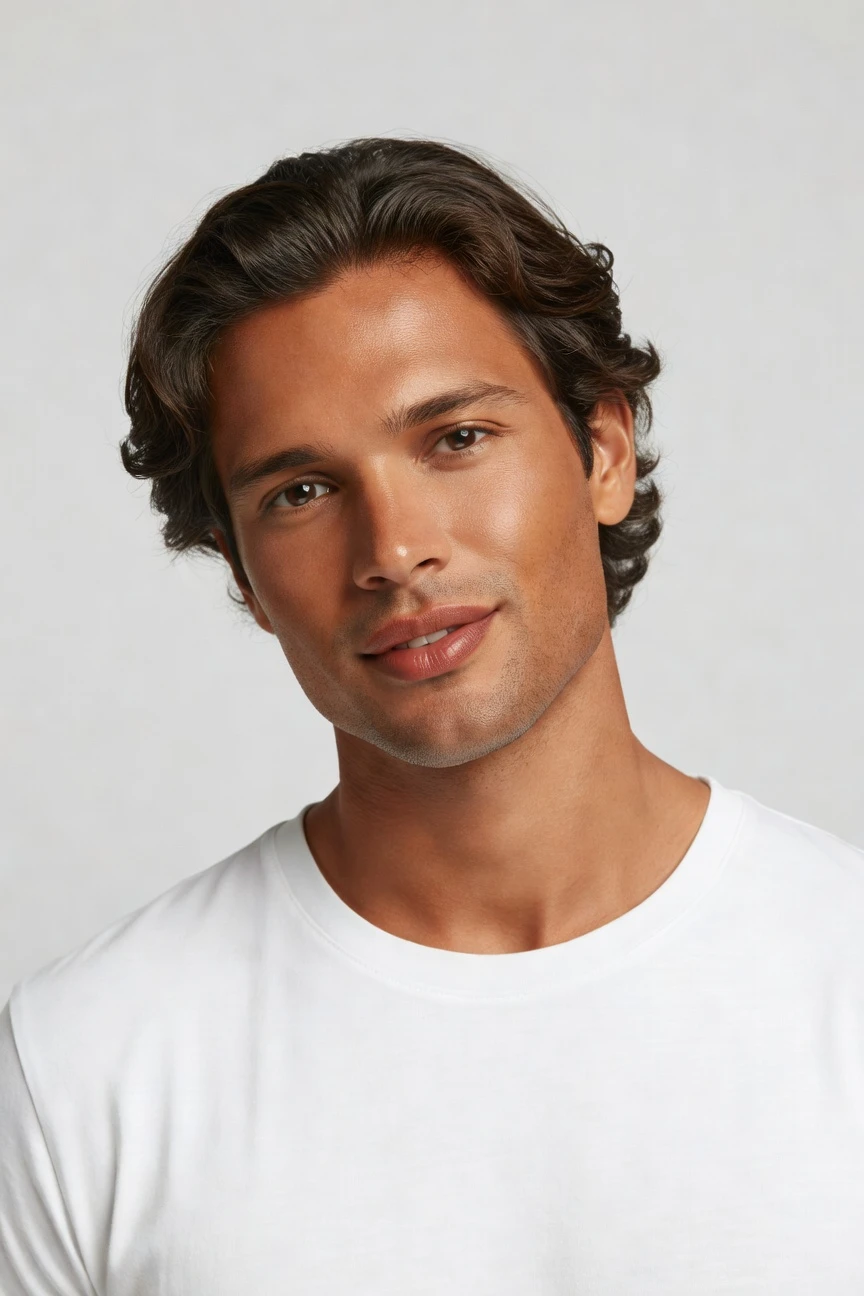
Saved model setup
Male · 26–35 · Dark brown · 175cm
Build a model. Zero prompts.
This setup starts from a copper skin tone and male presentation, then sets an adult age range, average body type, wavy hair, and dark brown colour. The result is a reusable American male model base for catalog, lifestyle, and campaign work directed entirely through clicks. 28 attributes · 10+ options each
- 6 clicks · 0 keystrokes
- app.rawshot.ai / build_model
How it works
Build Once, Reuse Across Every SKU
Start from the model attributes that matter, save the result to your library, then carry that consistency through browser and API workflows.
- Step 01
Select the Model Attributes
Choose the skin tone, gender presentation, age range, body type, height, hair, and expression that fit your brand. Every setting is a control in the interface, so direction stays visual and repeatable.
- Step 02
Save the Face and Body Once
Generate the model, review the profile, and save it to your library for reuse. That gives your team one consistent American male model base for every future shoot.
- Step 03
Apply It Across the Catalog
Use the saved model in the browser for one-off shoots or through the API for batch workflows. The same identity carries across lookbooks, campaigns, and SKU-scale production.
Spec sheet
Proof That the Model Stays Usable
These twelve points show how RAWSHOT keeps model building practical for fashion teams, from attribute control to rights, provenance, and scale.
- 01
Attribute Depth, Not Guesswork
Build from 28 body attributes with 10+ options each, so the model is shaped through structured choices rather than vague trial and error.
- 02
Every Setting Is a Click
You direct the model with buttons, sliders, and presets. No prompt box, no syntax, and no translation layer between intent and output.
- 03
Built Around the Garment
Once your model is saved, the product stays the brief. Cut, colour, pattern, logos, fabric, and proportion are represented around the real garment.
- 04
Synthetic by Design
RAWSHOT models are synthetic composites built for diversity and transparency. They are not tied to a real person and are clearly labelled as such.
- 05
Same Face Across SKUs
Save one male model profile and reuse it across the whole catalog. That keeps identity stable from hero look to last product page.
- 06
Styled for Catalog or Campaign
Apply the same saved model across 150+ visual presets, from clean studio setups to editorial, lifestyle, street, noir, and vintage directions.
- 07
Ready for Any Frame
Generate outputs in 2K or 4K and in every aspect ratio your team needs. Move from close-up to full-body without rebuilding the model.
- 08
Labelled and Compliant
Outputs are AI-labelled, watermarked, and aligned with EU AI Act Article 50, California SB 942, and GDPR-conscious EU hosting practices.
- 09
Audit Trail Per Image
Each output carries provenance metadata and a signed record. That gives teams a traceable history for review, approval, and publication workflows.
- 10
GUI for Shoots, API for Scale
Use the browser interface for one look or connect the REST API for nightly catalog runs. The same engine powers both paths.
- 11
Predictable Time and Token Use
Model generations run in about 50–60 seconds, tokens never expire, and failed generations refund their tokens so planning stays straightforward.
- 12
Commercial Rights Included
Every output comes with full commercial rights, permanent and worldwide. You can publish across ecommerce, paid media, marketplaces, and wholesale decks.
Outputs
One Model, many outputs.
Save the model once, then move it through different garments, framings, and visual directions without losing identity. That is what makes a reusable model useful for commerce teams, not just impressive in a demo.


Browse all 600+ models →
Comparison
RAWSHOT vs category tools vs DIY prompting
Three lenses on every dimension — what you optimize for in RAWSHOT versus typical category tools and blank-box AI workflows.
01
Interface
RAWSHOT
Click-driven controls for attributes, styling, framing, and output reuseCategory tools + DIY
Mixed controls with partial text dependence and thinner production workflow logic. DIY prompting: Typed instructions in a chat flow with inconsistent interpretation between runs02
Model consistency
RAWSHOT
Save one face and body, then reuse them across the catalogCategory tools + DIY
Some consistency tools, often weaker across large SKU sets. DIY prompting: Faces drift between generations, even when instructions stay similar03
Garment fidelity
RAWSHOT
Garment-led output built to preserve cut, colour, pattern, and logosCategory tools + DIY
Fashion-focused visuals but less disciplined garment representation in edge cases. DIY prompting: Garments drift, logos get invented, and details change from image to image04
Provenance and labelling
RAWSHOT
C2PA-signed outputs with visible and cryptographic watermarking cuesCategory tools + DIY
Labelling varies and provenance metadata is often less explicit. DIY prompting: No dependable provenance record and no built-in publication-ready labelling05
Commercial rights
RAWSHOT
Permanent worldwide commercial rights included with every outputCategory tools + DIY
Rights may be narrower, plan-dependent, or buried in platform terms. DIY prompting: Usage clarity is often uncertain across tools, models, and training sources06
Pricing transparency
RAWSHOT
Flat per-model pricing, tokens never expire, refunds on failed runsCategory tools + DIY
Credits, seat limits, or plan gates can complicate forecasting. DIY prompting: Usage costs vary by tool, retries, and workflow sprawl across platforms07
Catalog scale
RAWSHOT
Same product in browser and REST API, ready for high-volume pipelinesCategory tools + DIY
Scale paths may require higher plans or separate enterprise packaging. DIY prompting: No reliable batch structure for repeatable SKU production at scale08
Operational overhead
RAWSHOT
Teams click, review, save, and reuse without specialist syntax knowledgeCategory tools + DIY
Less manual than DIY, but often still need workaround habits. DIY prompting: Prompt-engineering overhead slows buyers, marketers, and catalog operators
Prompting does not scale
Stop writing essays. Direct the shoot.
Most AI photo tools start with a blank text box. Rawshot turns the shoot into repeatable controls, so creative teams can produce consistent fashion imagery without prompt syntax or one-off hacks.
Category norm
ManualCreate a premium editorial fashion photograph of a model wearing the exact navy oversized wool coat from SKU-1842, full-body crop, realistic hands, consistent facial identity, clean e-commerce lighting, subtle Paris street background, 85mm lens, no logo distortion, no fabric hallucination, same pose as last campaign, repeatable for all colorways...
A prompt can describe one image. It cannot become a shared production system for hundreds of products, models, angles and markets.
Rawshot
ClicksSaved shoot recipe
Apply to 1 SKU or 10,000 via GUI, CSV or REST API.
Rawshot makes creative direction visible: buttons, presets and sliders instead of hidden prompt craft. The result is easier to teach, faster to approve and built for repeat production.
Use cases
Where a Reusable Male Model Pays Off
Operator archetypes and how click-directed, garment-first output fits the way they actually work.
- 01
Indie Menswear Labels
Launch a first collection with a saved American male model identity before you can afford recurring studio days.
Confidence · high
- 02
DTC Basics Brands
Keep the same male face and body across tees, hoodies, denim, and outerwear so your PDPs read as one system.
Confidence · high
- 03
Marketplace Sellers
Standardise on-model imagery for fast-moving assortments without rebuilding the model every time a new SKU lands.
Confidence · high
- 04
Factory-Direct Manufacturers
Show private-label collections on a consistent male model across buyer decks, wholesale previews, and ecommerce listings.
Confidence · high
- 05
Crowdfunding Creators
Present concept garments on a copper-skin male model early, so backers see a cohesive range before production scale-up.
Confidence · high
- 06
Streetwear Drops
Move one saved model through editorial, studio, and lifestyle presets while keeping the brand face stable between capsules.
Confidence · high
- 07
Adaptive Fashion Teams
Build representative male model profiles and reuse them across product education, campaign work, and fit-focused storytelling.
Confidence · high
- 08
Resale and Vintage Stores
Create a cleaner, more consistent male presentation across one-off garments that would never justify a fresh physical shoot.
Confidence · high
- 09
Kids-to-Adult Family Brands
Separate your menswear line with a dedicated adult male model identity that stays consistent across seasonal updates.
Confidence · high
- 10
Subscription Apparel Businesses
Refresh monthly edits with the same saved model so continuity holds even when garments rotate constantly.
Confidence · high
- 11
Editorial Commerce Teams
Use one male model across shoppable stories, landing pages, and campaign modules without visual drift between assets.
Confidence · high
- 12
Catalog Operations Leads
Save approved male model profiles once, then deploy them through the API for repeatable multi-SKU production.
Confidence · high
— Principle
Honest is better than perfect.
When you publish a synthetic American male model, clarity matters as much as aesthetics. RAWSHOT labels outputs, applies visible and cryptographic watermarking, and attaches C2PA provenance metadata so teams know what they are shipping. The model itself is a synthetic composite built from structured attributes, which keeps accidental real-person likeness statistically negligible by design.
Rights & provenance
Full commercial rights. Forever.
- C2PA-signed on every image — EU AI Act Article 50 compliant
- 28-attribute synthetic models — real-person likeness statistically impossible
- Full commercial rights to every generation — no recurring licensing fees
- Tokens never expire · One-click cancel · Transparent pricing
EU AI Act
C2PA
Commercial use
Pricing
~$0.99 per model generation.
~50–60 seconds per generation. Save the model once, reuse it across your entire catalog.
- 01Tokens never expire. Cancel in one click.
- 02Same face, same body, every SKU — no drift between shoots.
- 03No per-seat gates. No 'contact sales' walls for core features.
- 04Failed generations refund their tokens.
FAQ
Practical answers on control, rights, pricing, scale, and compliant publishing.
Do I need to write prompts to use RAWSHOT?
Never—you direct every output with sliders, presets, and clicks on the garment, not typed prompts. That UI control is consistent across GUI and REST API payloads, which is why ecommerce teams onboard buyers without rewriting creative briefs as chat threads. Instead of translating a fashion decision into syntax, you select model attributes, framing, lighting, background, and style in a real application built for apparel work.
For catalog teams, reliability matters more than model cleverness; RAWSHOT keeps tokens, timings, refund rules, commercial rights framing, provenance signalling, watermarking cues, REST surface, and SKU-scale batch patterns explicit so operations can rehearse PDP launches without invented garment details or workflow drift. The practical takeaway is simple: if your team can make merchandising decisions, they can direct the shoot in RAWSHOT without specialist text skills.
What does an AI American male generator actually change for catalog teams?
It changes consistency, speed of setup, and who gets access to on-model imagery in the first place. Instead of booking talent and rebuilding a visual identity every time a new product range arrives, your team creates a reusable male model profile once and applies it across the assortment. That matters for catalog work because shoppers notice drift immediately when face, body, posture, or styling logic changes from one product page to the next.
In RAWSHOT, that consistency comes from saved model profiles, structured body attributes, and a garment-led workflow that keeps the product central. Teams can move the same model through studio, lifestyle, and editorial outputs, then carry the same setup into REST API pipelines for scale. The result is not abstract efficiency language; it is a cleaner catalog, faster approvals, and imagery for brands that never had dependable access to fashion photography before.
Why skip reshooting every SKU when the season styling changes?
Because the expensive part of seasonal updates is often not the idea but the logistics around talent, scheduling, samples, and re-creating continuity. If your brand already knows the face, body profile, and overall direction it wants, rebuilding those from scratch every season wastes time and introduces inconsistency. A saved synthetic model lets you preserve visual identity while changing garments, layouts, backgrounds, and style presets as the collection evolves.
RAWSHOT is built for that exact pattern. You save the approved model once, then reuse it across fresh campaigns, PDP refreshes, and lookbook variants with 150+ style directions, multiple framings, and 2K or 4K output options. Because outputs are labelled, watermarked, and C2PA-signed, the publishing chain stays transparent as well as fast. For operations teams, the smart move is to lock the model profile early, then iterate the collection around it instead of restarting each shoot cycle.
How do we turn flat garments into catalogue-ready imagery without prompting?
You start with the real product and a saved model profile, then direct the output through controls for camera, framing, pose, expression, lighting, background, and visual style. That sequence matters because the garment remains the brief while the interface gives you directorial control in buttons and presets rather than text interpretation. For catalog teams, this is what makes the process trainable across buyers, marketers, and studio operators.
RAWSHOT supports upper-body, lower-body, full-outfit, footwear, jewelry, handbags, watches, sunglasses, and accessories, with up to four products in one composition. Once the model is chosen, you can generate clean studio images, lifestyle variants, or editorial treatments and keep the same identity across the range. In practice, the best workflow is to approve the model first, define your house framings and lighting presets second, and then batch garment outputs through the browser or API.
Why does garment-led control beat ChatGPT, Midjourney, or generic image tools for fashion PDPs?
Because fashion PDPs fail when the garment changes, not when the image looks less dramatic. Generic tools are built around typed instructions and broad image interpretation, which makes them vulnerable to logo invention, pattern drift, inconsistent faces, and outputs that look persuasive until you compare them against the real product. That is a poor fit for commerce, where detail accuracy and repeatability matter more than novelty.
RAWSHOT is structured differently. You work in an application made for apparel teams, using saved models, visual controls, product-aware framing, and repeatable output settings rather than open-ended chat behaviour. Add C2PA provenance, watermarking, explicit commercial rights, and API access, and the workflow becomes operational instead of experimental. If your goal is reliable product pages, garment-led control beats prompt roulette every time because it reduces ambiguity where ecommerce teams can least afford it.
Are RAWSHOT male model outputs safe to publish in ads, PDPs, and marketplaces?
Yes. RAWSHOT includes full commercial rights to every output, permanent and worldwide, so teams can publish across ecommerce sites, paid media, marketplaces, wholesale materials, and social placements without negotiating separate usage tiers. That clarity matters because content operations break down quickly when licensing rules are vague or scattered across plan documents. Publishing confidence starts with knowing what you can use and how it is labelled.
RAWSHOT also treats transparency as part of the product, not a legal footnote. Outputs are AI-labelled, watermarked with visible and cryptographic methods, and backed by C2PA provenance metadata so your team has a signed record of what the asset is. The models are synthetic composites built from structured attributes rather than scans of a real individual, which helps keep accidental real-person likeness statistically negligible by design. The operational takeaway is to publish with clear internal review standards, not with hidden uncertainty.
What should our QA team check before publishing a synthetic American male model image?
Start with the basics that matter to commerce: garment accuracy, logo integrity, colour match, proportion, drape, and whether the saved model identity stayed consistent with your approved profile. Then check framing, background cleanliness, styling coherence, and whether the selected visual preset still suits the channel, whether that is a PDP, marketplace tile, ad, or editorial landing page. Quality review should look at the product first and the aesthetic second.
RAWSHOT adds two more checks that are often missing in generic workflows: provenance and labelling. Because outputs are AI-labelled, watermarked, and tied to C2PA metadata, your team can verify that the publication asset carries the right transparency signals before release. The strongest QA habit is to review one approved model profile, one garment truth source, and one channel-specific output standard together, so every published image stays consistent in both presentation and disclosure.
How much does model building cost, and what happens to unused tokens?
Model generation in RAWSHOT costs about $0.99 per model and typically completes in around 50–60 seconds. Tokens never expire, the cancel button is on the pricing page, and failed generations refund their tokens, which makes budgeting much simpler for teams that work in bursts around launches, funding cycles, or seasonal drops. That predictability is useful whether you are testing one reusable male model or building a larger library for different lines.
It also helps to separate model costs from still and video costs operationally. A saved model becomes reusable infrastructure for later imagery work, so the real value is not the single generation but the consistency you carry into future outputs across the catalog. For finance and production planning, the sensible approach is to approve a small core model set, save it to the library, and then reuse it broadly instead of re-solving identity in every project.
Can we plug saved models into Shopify-scale or PLM-linked workflows through the API?
Yes. RAWSHOT offers a REST API for catalog-scale pipelines, so teams can move beyond one-off browser sessions and connect saved models to broader product operations. That matters when your source of truth sits in ecommerce, merchandising, or product lifecycle systems and you need image generation to follow the structure of SKUs, assortments, deadlines, and approval states. A reusable model only becomes valuable at scale when operations can call it consistently.
Because the same engine powers the browser GUI and API workflows, teams do not have to maintain one creative logic for small shoots and another for high-volume runs. Saved identities, output settings, and audit-minded publication practices stay aligned across both. RAWSHOT is also PLM-integration ready and supports a signed audit trail per image, which helps teams keep traceability intact as they automate. The practical step is to define approved model libraries and map them to product families before volume ramps.
How do small teams and large catalog operators use the same model workflow without separate editions?
They use the same product. RAWSHOT does not gate core functionality behind per-seat walls or force a split between a lightweight creative tool and a separate enterprise system for serious production. An indie brand can build one reusable male model in the browser, while a large catalog team can run that same logic across thousands of SKUs through the API. The underlying promise stays constant: one shoot or ten thousand, same engine, same output standards, same pricing logic.
That matters because fashion teams often grow unevenly. A brand may start with a founder and a freelancer, then add merchandisers, growth marketers, and operations staff who all need the same model identity and governance rules. With RAWSHOT, the handoff is straightforward: approve the model once, save it, document your style presets, and let each role work from the same foundation. That is infrastructure for access, not a tool that becomes unusable the moment your volume increases.