
— Eyewear imagery · 150+ styles · 4K
Direct your next launch with the Eyewear AI Product Photography Generator.
Generate clean packshots, campaign frames, and detail-led eyewear imagery built around the product. Select lens, framing, aspect ratio, resolution, and product focus with clicks in a real interface. No studio. No samples. No prompts.
- ~$0.55 per image
- ~30–40s per generation
- 150+ styles
- 2K or 4K
- Every aspect ratio
- Full commercial rights
7-day free trial • 50 tokens (10 images) • Cancel anytime

Direct the shoot. Zero prompts.
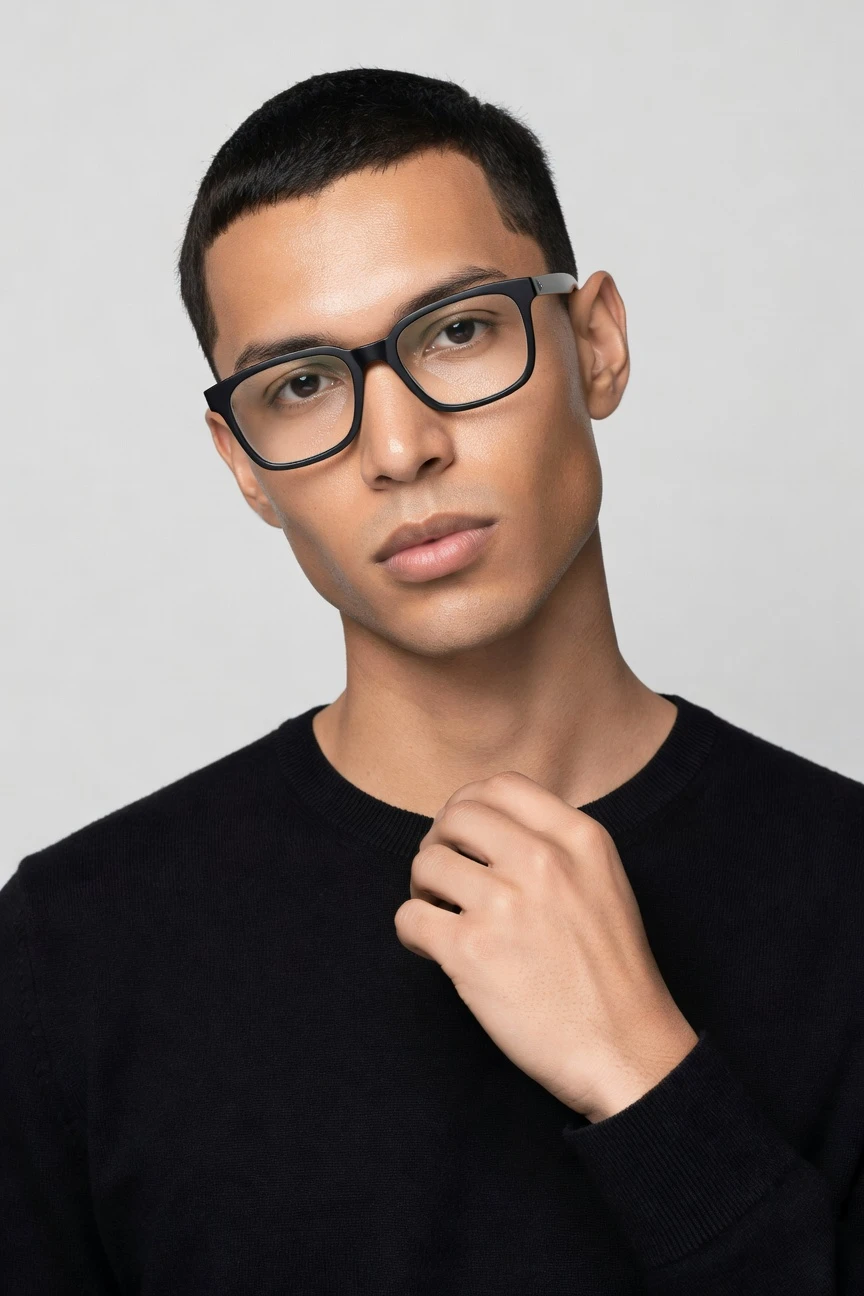
This setup is tuned for eyewear-first imagery: an 85mm lens, half-body crop, 4:5 frame, 4K output, and accessory focus so the frames stay central while the model supports the product. ~$0.55 per image · ~30-40s
- 5 clicks · 0 keystrokes
- app.rawshot.ai / new_shoot
How it works
From Frame Upload to Launch Assets
A click-driven workflow for eyewear teams that need clean product representation, fast iteration, and batch-ready output without studio logistics.
- Step 01
Upload the Frames
Start with your real product images. RAWSHOT builds the shoot around the eyewear, so frame shape, colour, finish, and logo placement stay central.
- Step 02
Set the Shot With Clicks
Choose camera, crop, background, lighting, visual style, and product focus from buttons and sliders. You direct clean optical packshots or campaign-ready compositions without typing instructions.
- Step 03
Generate and Scale
Create single hero images in the browser or push large eyewear catalogs through the API. The same engine, pricing logic, and labelled output apply whether you make one asset or thousands.
Spec sheet
Proof for Eyewear Teams That Need Control
These twelve points show how RAWSHOT keeps the product central while staying operationally clear on rights, provenance, and scale.
- 01
Synthetic Models by Design
Every model is a synthetic composite built from 28 body attributes with 10+ options each. Accidental real-person likeness is statistically negligible by design.
- 02
Every Setting Is a Click
Lens, framing, light, background, pose, style, and product focus live in the interface. You direct the image in an application, not a chat box.
- 03
The Product Stays the Brief
RAWSHOT is engineered around the real item, so frame silhouette, lens tint, pattern, finish, and branding are represented faithfully instead of being bent around guesswork.
- 04
Diverse Synthetic Casting
Build eyewear imagery across different faces and proportions with transparently labelled synthetic models. That gives small brands access to broader representation without a casting day.
- 05
Consistency Across SKUs
Keep the same face, crop logic, and visual direction across a whole optical line. That matters when shoppers compare frame shapes, colours, and materials side by side.
- 06
Styles for PDP to Campaign
Choose from 150+ visual style presets, including catalog clean, editorial, studio, street, vintage, noir, and beauty-led close crops for eyewear launches.
- 07
Built for Detail and Format Range
Generate in 2K or 4K and export in every major aspect ratio. That covers square grids, portrait PDP stacks, marketplace crops, and wider campaign placements.
- 08
Labelled and Compliance-Ready
Outputs are AI-labelled, watermarked, and aligned with EU AI Act Article 50 requirements, California SB 942, and GDPR-first handling in EU-hosted infrastructure.
- 09
Signed Audit Trail per Image
Each output carries C2PA provenance metadata and a per-image record. That gives commerce teams a clear chain of attribution for internal review and downstream publishing.
- 10
Browser to REST API
Use the browser GUI for one-off eyewear shoots or connect the REST API for nightly catalog pipelines. Indie teams and enterprise operations use the same core product.
- 11
Fast, Flat, and Transparent
Images are about $0.55 each and usually generate in 30–40 seconds. Tokens never expire, and failed generations refund their tokens automatically.
- 12
Rights Stay Clear
Every output includes full commercial rights, permanent and worldwide. You do not need to renegotiate usage when assets move from PDP to ads, email, or marketplaces.
Outputs
Outputs for PDP, campaign, and social
Show frames as clean ecommerce assets, beauty-led close crops, or brand imagery with the product still doing the work. The styling changes, but the eyewear remains central.


Browse 150+ visual styles →
Comparison
RAWSHOT vs category tools vs DIY prompting
Three lenses on every dimension — what you optimize for in RAWSHOT versus typical category tools and blank-box AI workflows.
01
Interface
RAWSHOT
Click-driven controls for lens, crop, light, style, and product focusCategory tools + DIY
Usually mix presets with text fields and lighter operational control. DIY prompting: Typed instructions, retries, and manual phrasing changes before usable output appears02
Garment fidelity
RAWSHOT
Built around the real product, with accessory-first representation for framesCategory tools + DIY
Often prioritize overall scene aesthetics over exact product details. DIY prompting: Frame shape drifts, logos mutate, and material finishes get invented03
Model consistency across SKUs
RAWSHOT
Reuse consistent synthetic models across eyewear lines and seasonal dropsCategory tools + DIY
Can vary face identity or body proportions between outputs. DIY prompting: Faces change from image to image unless you keep reworking instructions04
Provenance + labelling
RAWSHOT
C2PA-signed, visibly watermarked, cryptographically watermarked, and AI-labelledCategory tools + DIY
Labelling and provenance support are often partial or absent. DIY prompting: No built-in provenance metadata and no reliable attribution chain05
Commercial rights
RAWSHOT
Full commercial rights to every output, permanent and worldwideCategory tools + DIY
Rights language can be narrower or split by plan level. DIY prompting: Rights clarity depends on model terms and remains hard to audit internally06
Pricing transparency
RAWSHOT
Flat per-image pricing, tokens never expire, refunds on failed generationsCategory tools + DIY
Seats, tiers, or gated plans can complicate forecasting. DIY prompting: Usage is hard to estimate because iteration overhead eats time and credits07
Catalog scale
RAWSHOT
Same engine in browser GUI and REST API for one shoot or ten thousandCategory tools + DIY
Scale features may sit behind enterprise sales processes. DIY prompting: Batching is fragile, manual, and difficult to keep consistent across catalogs08
Iteration reliability
RAWSHOT
Repeatable settings make eyewear variants easier to compare and approveCategory tools + DIY
Preset-heavy flows can still produce noticeable drift between runs. DIY prompting: Prompt-engineering overhead slows approvals and creates inconsistent review rounds
Prompting does not scale
Stop writing essays. Direct the shoot.
Most AI photo tools start with a blank text box. Rawshot turns the shoot into repeatable controls, so creative teams can produce consistent fashion imagery without prompt syntax or one-off hacks.
Category norm
ManualCreate a premium editorial fashion photograph of a model wearing the exact navy oversized wool coat from SKU-1842, full-body crop, realistic hands, consistent facial identity, clean e-commerce lighting, subtle Paris street background, 85mm lens, no logo distortion, no fabric hallucination, same pose as last campaign, repeatable for all colorways...
A prompt can describe one image. It cannot become a shared production system for hundreds of products, models, angles and markets.
Rawshot
ClicksSaved shoot recipe
Apply to 1 SKU or 10,000 via GUI, CSV or REST API.
Rawshot makes creative direction visible: buttons, presets and sliders instead of hidden prompt craft. The result is easier to teach, faster to approve and built for repeat production.
Use cases
Who Uses Eyewear Imagery Like This
Operator archetypes and how click-directed, garment-first output fits the way they actually work.
- 01
Indie Eyewear Brands
Launch new frame drops with clean ecommerce imagery and campaign crops before you can justify a full production day.
Confidence · high
- 02
DTC Optical Startups
Build a consistent product page system across acetate, metal, and tinted styles with the same face and shot logic.
Confidence · high
- 03
Sunglasses Labels
Direct seasonal visuals for resort, street, or luxury positioning while keeping the eyewear shape and finish central.
Confidence · high
- 04
Marketplace Sellers
Create platform-ready eyewear product photography in multiple aspect ratios for listings, ads, and catalog refreshes.
Confidence · high
- 05
Crowdfunded Accessories Projects
Show frames convincingly before large inventory commitments, so your launch page looks finished early.
Confidence · high
- 06
Factory-Direct Manufacturers
Turn supplier imagery into polished on-model assets for wholesale outreach, B2B catalogs, and direct channels.
Confidence · high
- 07
Resale and Vintage Operators
Present one-off or limited eyewear pieces with detail-led crops that help buyers inspect shape, tint, and finish.
Confidence · high
- 08
Optical Boutiques Going Online
Expand beyond flat supplier visuals into on-model frame imagery that feels branded without building a studio workflow.
Confidence · high
- 09
Creative Directors Testing Concepts
Compare editorial, catalog, and beauty-led eyewear directions quickly before committing campaign budget elsewhere.
Confidence · high
- 10
Students and Emerging Designers
Produce portfolio-grade eyewear visuals with real application controls instead of learning syntax before you can make anything.
Confidence · high
- 11
Social Commerce Teams
Generate square, portrait, and vertical eyewear assets for paid social, reels covers, and landing pages from one setup.
Confidence · high
- 12
Catalog Operations Teams
Run repeatable accessory-first shoots at SKU scale through the API while keeping approvals tied to clear settings and audit records.
Confidence · high
— Principle
Honest is better than perfect.
Eyewear imagery is often used in paid media, PDPs, and marketplaces where attribution matters. Every RAWSHOT output is AI-labelled, watermarked, and C2PA-signed, with a per-image audit trail that gives teams something concrete to review and archive. We do that because honesty travels better through commerce systems than ambiguity.
Rights & provenance
Full commercial rights. Forever.
- C2PA-signed on every image — EU AI Act Article 50 compliant
- 28-attribute synthetic models — real-person likeness statistically impossible
- Full commercial rights to every generation — no recurring licensing fees
- Tokens never expire · One-click cancel · Transparent pricing
EU AI Act
C2PA
Commercial use
Pricing
~$0.55 per image.
~30–40 seconds per generation. Tokens never expire. Cancel in one click.
- 01The cancel button is on the pricing page.
- 02No per-seat gates. No 'contact sales' walls for core features.
- 03Failed generations refund their tokens.
- 04Full commercial rights to every output, permanent, worldwide.
FAQ
Practical answers on control, rights, pricing, scale, and compliant publishing.
Do I need to write prompts to use RAWSHOT?
Never—you direct every output with sliders, presets, and clicks on the garment, not typed prompts. That UI control is consistent across GUI and REST API payloads, which is why ecommerce teams onboard buyers without rewriting creative briefs as chat threads. For eyewear especially, that matters because the approval conversation is usually about crop, frame emphasis, lighting, and background discipline, not about inventing the right sentence to coax a model into behaving.
For catalog teams, reliability matters more than model cleverness; RAWSHOT keeps tokens, timings, refund rules, commercial rights framing, provenance signalling, watermarking cues, REST surface, and SKU-scale batch patterns explicit so operations can rehearse PDP launches without invented product details. The practical takeaway is simple: your team can work in familiar production language, set the shot with controls, and publish labelled imagery without building a new workflow around syntax.
What does an eyewear ai product photography generator actually change for ecommerce catalogs?
It changes who gets access to product imagery and how repeatable the work becomes. Instead of planning a studio day for every frame update, teams can generate on-model eyewear visuals around the real product with a click-driven setup that stays consistent across SKUs. That helps catalog operators compare frame families, lens colours, and hero-image crops in a controlled way, which is exactly what PDP systems need.
In RAWSHOT, the benefit is not abstract automation language; it is operational clarity. You select camera, framing, product focus, style, aspect ratio, and resolution directly, generate in roughly 30–40 seconds, and keep costs around $0.55 per image with non-expiring tokens and refunds on failed runs. For commerce teams, that means faster launch cycles, clearer approvals, and a better path from product upload to labelled, commercially usable assets.
Why skip reshooting every eyewear SKU for seasonal updates?
Because seasonal changes usually demand visual direction updates more often than they demand full production logistics. An optical brand may want warmer lifestyle backgrounds in summer, darker studio mood in autumn, or cleaner marketplace crops for a retail push, but the frame itself still needs to remain accurate across every version. Rebuilding that through physical shoots for each change is slow, expensive, and often unrealistic for smaller operators.
RAWSHOT lets you keep the product central while changing the surrounding art direction through controls and presets. You can hold the same model logic, framing, and accessory focus, then swap style, background, or aspect ratio without reopening the entire production process. The operational advantage is that merchandising, growth, and creative teams can test seasonal directions with labelled outputs and clear rights, then publish the versions that fit each channel.
How do we turn flat product shots into catalogue-ready eyewear imagery without prompting?
You start with the real product images and set the shoot around them. In practice, teams choose the crop, lens, background, lighting, product focus, and output format in the interface, then generate visuals that present the frames in catalog, campaign, or detail-led contexts. That structure is useful for eyewear because buyers often need both clean comparison images and more expressive launch assets from the same product source.
RAWSHOT supports browser-based single shoots and REST API workflows for larger catalogs, so the process works whether you are building a twelve-SKU capsule or a much larger optical range. Images come out labelled, watermarked, and C2PA-signed, with commercial rights attached. The best way to use it operationally is to define a repeatable setup per collection, lock in the visual rules you want, and generate all required channel variants from that baseline.
Why does garment-led control beat DIY prompting in ChatGPT, Midjourney, or generic image tools for fashion PDPs?
Because fashion teams need repeatable product representation, not a conversation that sometimes lands on something close. Generic image systems are built around typed instructions, so the work quickly becomes trial-and-error: one version changes the frame shape, another invents a logo, another swaps the face, and another gives you no clear provenance record at all. That is inefficient for ecommerce review because every approval round has to re-check the product itself.
RAWSHOT is engineered around the item and directed through controls, which gives teams a more stable way to manage frame emphasis, crop discipline, and SKU consistency. It also adds C2PA provenance metadata, visible and cryptographic watermarking, and commercially clear outputs rather than leaving rights and attribution ambiguous. For PDP work, the practical advantage is simple: fewer surprises, cleaner approvals, and imagery that behaves like production infrastructure instead of model roulette.
Are RAWSHOT eyewear images labelled for commercial use, and what rights do we get?
Yes. RAWSHOT outputs are AI-labelled, watermarked, and include C2PA-signed provenance metadata, and every output comes with full commercial rights that are permanent and worldwide. That combination matters for eyewear brands because the same visual often travels from product pages to paid ads, email flows, organic social, and marketplace listings, and teams need consistency in both attribution and usage terms.
The trust layer is part of the product rather than an afterthought. RAWSHOT is built by an EU company, hosted in the EU, aligned with GDPR expectations, and designed for Article 50 style transparency with compliance-conscious labelling practices. For operators, that means you can brief legal, creative, and growth teams from the same factual baseline: the outputs are labelled, the provenance is signed, and the rights are already clear enough to move assets through commerce channels.
What should a merchandiser check before publishing AI-assisted eyewear images on PDPs or marketplaces?
Check the product first, then the attribution layer. For eyewear, that means reviewing frame silhouette, bridge shape, arm detail, tint, logo placement, and whether the crop keeps attention where the shopper needs it. After that, confirm the asset format, aspect ratio, and background fit the destination channel, because a strong campaign crop is not always the right marketplace image.
With RAWSHOT, merchandisers should also verify that the output carries the expected transparency signals: AI labelling, watermarking, and C2PA provenance metadata tied to the image record. Because the platform is garment-led and click-directed, those checks become easier to standardize across collections and approval teams. A good operational habit is to set a repeatable review checklist per channel, so publishing stays fast without losing discipline on product accuracy or attribution clarity.
How much does still-image generation cost for eyewear launches, and what happens if a run fails?
Still images are about $0.55 each, and most generations complete in roughly 30–40 seconds. Tokens never expire, which is useful for brands that work in bursts around collection drops, marketplace updates, or ad refreshes rather than in constant daily production. That pricing model is straightforward enough for small teams to forecast without getting trapped in seat math or volume penalties.
If a generation fails, the tokens are refunded automatically, and there is no need to negotiate with support to correct the balance. You also get one-click cancellation directly from the pricing page, which keeps the commercial side as transparent as the production side. For teams planning eyewear launches, the simplest approach is to budget by final image count, test a repeatable setup early, and then scale the same logic across all required variants.
Can we connect this to Shopify-scale catalogs or internal asset pipelines through an API?
Yes. RAWSHOT offers a REST API alongside the browser GUI, so the same core system can serve a solo creative making launch assets and a catalog team running larger batch jobs. That matters for eyewear businesses because new frame colours, lens variants, and retailer-specific image requirements often create repetitive production work that benefits from a structured pipeline rather than one-off manual sessions.
The value of the API is not just throughput; it is consistency. Teams can keep the same visual logic, model choices, output specs, and provenance expectations across many SKUs instead of rebuilding instructions every time. In practice, the best use is to establish approved settings in the GUI first, then translate those patterns into API-driven runs for larger assortments, channel-specific crops, or recurring catalog refreshes.
Can one team use the browser while another scales the eyewear ai product photography generator through API batches?
Yes, and that is one of the clearest advantages of the product design. RAWSHOT uses the same engine, model system, pricing logic, and output standards whether someone is creating a single hero image in the interface or an operations team is processing a large eyewear catalog through the API. There is no separate enterprise edition required just to make scale work, which keeps handoff friction low between creative and catalog functions.
Operationally, that means teams can split roles cleanly. A brand or art lead can establish the visual direction in the browser, approve frame emphasis and channel crops, and then pass a stable setup to ecommerce operations for larger runs. Because the outputs remain labelled, signed, and commercially clear across both paths, the workflow stays coherent from concept testing to SKU-scale publishing.
Keep exploring