
— Shirt imagery · 150+ styles · 4K
Direct clean catalog and campaign visuals with the Shirts AI Product Photography Generator.
Generate shirt imagery that stays focused on fit, placket, collar, pattern, and drape. Direct framing, lens, crop, styling, and output shape with buttons, sliders, and presets inside a real application. No studio. No samples. No prompts.
- ~$0.55 per image
- ~30–40s per generation
- 150+ styles
- 2K or 4K
- Every aspect ratio
- Full commercial rights
7-day free trial • 50 tokens (10 images) • Cancel anytime

Direct the shoot. Zero prompts.
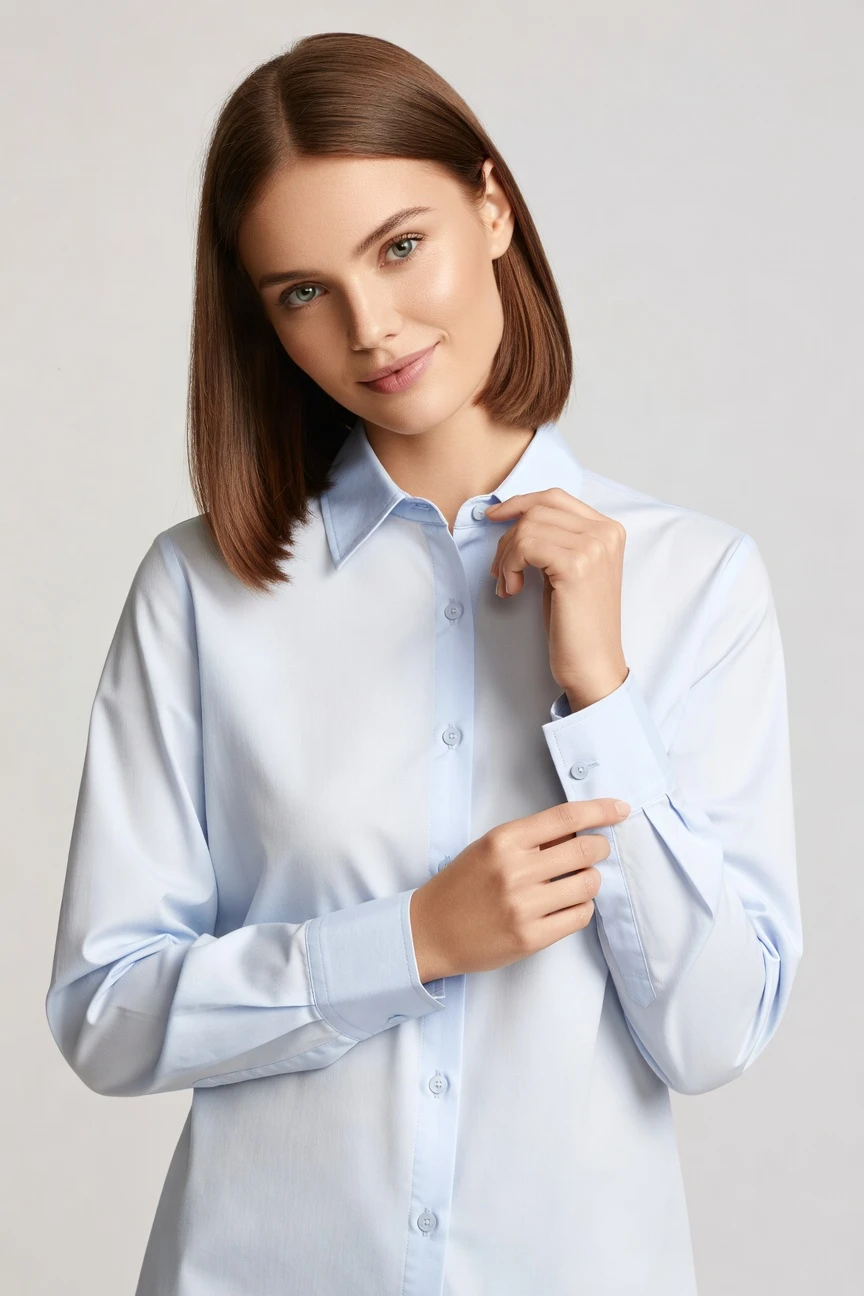
For shirts, we preselect an 85mm lens, half-body framing, a 4:5 crop, 4K output, and upper-body product focus so attention stays on collar shape, sleeve line, buttons, and fabric fall. ~$0.55 per image · ~30-40s
- 5 clicks · 0 keystrokes
- app.rawshot.ai / new_shoot
How it works
From Shirt Flat to On-Model Output
Three steps turn shirt assets into controlled product imagery for PDPs, ads, and catalog updates without studio logistics.
- Step 01
Upload the Shirt
Start with the garment image you already have. We build the shoot around the product, so shirt details like collar structure, stripe direction, logo placement, and sleeve proportion stay central.
- Step 02
Set the Visual Direction
Choose lens, framing, lighting, background, style, and crop with clicks. You direct the result like an application workflow, not a text box.
- Step 03
Generate and Reuse at Scale
Produce publishable outputs in the browser for one look or send the same setup through the REST API for large shirt catalogs. The workflow stays consistent from single SKU to nightly batch.
Spec sheet
Proof for Shirt Imaging Teams
These twelve points show where control, garment fidelity, provenance, and scale matter when shirts need to look right across every channel.
- 01
Built on Synthetic Model Design
Every model comes from a synthetic composite system with 28 body attributes and 10+ options each. Accidental real-person likeness is statistically negligible by design.
- 02
Every Setting Is a Click
Lens, crop, pose, light, background, and style live in controls you can see. You direct the shirt shoot in a UI instead of wrestling with typed instructions.
- 03
Shirt Details Stay the Brief
Collars, cuffs, plackets, prints, logos, and fabric drape are treated as the product truth. The garment leads the image rather than being bent around generic image behavior.
- 04
Diverse Synthetic Models
Choose from broad body presentation options for different brand needs and audiences. That gives smaller labels access to model variety without arranging repeated live shoots.
- 05
Consistency Across Shirt SKUs
Keep the same face, framing logic, and visual direction across oxford shirts, tees, polos, and overshirts. Catalogs look coherent instead of assembled from mismatched shoots.
- 06
150+ Visual Styles
Move from catalog clean to campaign gloss, editorial noir, street flash, vintage, or minimalist setups in a few clicks. One shirt range can serve PDP, social, and seasonal creative from the same base.
- 07
2K, 4K, and Any Ratio
Generate square, portrait, landscape, and marketplace-ready crops in 2K or 4K. That covers PDPs, ads, lookbooks, email, and paid social without rebuilding the shoot.
- 08
Labelled and Compliance-Ready
Outputs are C2PA-signed, AI-labelled, and protected with visible plus cryptographic watermarking. We are EU-hosted and built for transparent use under current disclosure requirements.
- 09
Signed Audit Trail per Image
Each output carries provenance metadata that records what it is. That gives teams a clearer internal review path for approvals, vendor handoff, and publishing governance.
- 10
GUI for One Shoot, API for Scale
Use the browser interface for direct art direction or plug the same engine into catalog operations through REST. There is no separate product for bigger teams.
- 11
Clear Speed and Pricing
Still images run at about $0.55 each and usually generate in 30–40 seconds. Tokens never expire, and failed generations refund their tokens.
- 12
Permanent Worldwide Rights
You receive full commercial rights to every output. That makes shirt imagery easier to deploy across storefronts, campaigns, marketplaces, and wholesale materials.
Outputs
Shirts, directed your way
Clean PDP crops, sharper close framing, editorial lighting, or campaign mood from the same garment base. The shirt stays central while the styling direction changes around it.


Browse 150+ visual styles →
Comparison
RAWSHOT vs category tools vs DIY prompting
Three lenses on every dimension — what you optimize for in RAWSHOT versus typical category tools and blank-box AI workflows.
01
Interface
RAWSHOT
Click-driven application with visible controls for lens, crop, light, and styleCategory tools + DIY
Usually mix presets with lighter control depth and less operational clarity. DIY prompting: Relies on typed instructions, retries, and memory of what wording worked last time02
Garment fidelity
RAWSHOT
Engineered around shirt cut, colour, pattern, logo placement, and drapeCategory tools + DIY
Can look strong visually but may soften or reinterpret product specifics. DIY prompting: High risk of garment drift, invented details, missing buttons, or altered logos03
Model consistency
RAWSHOT
Same synthetic model logic can stay stable across many shirt SKUsCategory tools + DIY
Consistency varies by workflow and often needs more manual supervision. DIY prompting: Faces and body presentation shift between outputs even with repeated instructions04
Provenance
RAWSHOT
C2PA-signed outputs with visible and cryptographic watermarking plus AI labelsCategory tools + DIY
Disclosure support varies and provenance metadata is not always central. DIY prompting: No dependable provenance layer or signed metadata for downstream governance05
Commercial rights
RAWSHOT
Full commercial rights to every output, permanent and worldwideCategory tools + DIY
Rights language may differ by plan, seat, or workflow surface. DIY prompting: Rights clarity depends on model terms and can stay unclear for commerce use06
Pricing transparency
RAWSHOT
About $0.55 per image, tokens never expire, refunds on failuresCategory tools + DIY
More likely to gate features by seats, plans, or sales-led packaging. DIY prompting: Low entry cost but high retry waste and no predictable per-image outcome07
Catalog scale
RAWSHOT
Browser GUI and REST API use the same engine and output logicCategory tools + DIY
Scale features may sit behind enterprise packaging or separate workflows. DIY prompting: No reliable batch pipeline for large shirt catalogs with repeatable settings08
Operational overhead
RAWSHOT
Teams reuse saved visual decisions and keep production language inside the UICategory tools + DIY
Some operator training still centers on tool-specific workarounds. DIY prompting: Prompt-engineering overhead becomes the real workflow, not the shirt itself
Prompting does not scale
Stop writing essays. Direct the shoot.
Most AI photo tools start with a blank text box. Rawshot turns the shoot into repeatable controls, so creative teams can produce consistent fashion imagery without prompt syntax or one-off hacks.
Category norm
ManualCreate a premium editorial fashion photograph of a model wearing the exact navy oversized wool coat from SKU-1842, full-body crop, realistic hands, consistent facial identity, clean e-commerce lighting, subtle Paris street background, 85mm lens, no logo distortion, no fabric hallucination, same pose as last campaign, repeatable for all colorways...
A prompt can describe one image. It cannot become a shared production system for hundreds of products, models, angles and markets.
Rawshot
ClicksSaved shoot recipe
Apply to 1 SKU or 10,000 via GUI, CSV or REST API.
Rawshot makes creative direction visible: buttons, presets and sliders instead of hidden prompt craft. The result is easier to teach, faster to approve and built for repeat production.
Use cases
Where Shirt Sellers Need Better Access
Operator archetypes and how click-directed, garment-first output fits the way they actually work.
- 01
Indie Shirt Labels
Launch a first collection with clean on-model images before traditional photography is even on the table.
Confidence · high
- 02
DTC Basics Brands
Keep tees, oxfords, polos, and long-sleeves visually aligned across storefront, email, and paid social.
Confidence · high
- 03
Marketplace Shirt Sellers
Create consistent catalog-ready shirt imagery for crowded listings where clear fit and collar shape matter.
Confidence · high
- 04
Crowdfunded Apparel Projects
Show campaign visuals for shirts early, before you commit to shipping samples around the world.
Confidence · high
- 05
Factory-Direct Manufacturers
Turn factory garment assets into usable product photography for buyers, marketplaces, and wholesale decks.
Confidence · high
- 06
Print and Pattern Brands
Present stripe, check, graphic, and logo shirts with framing that keeps attention on the surface design.
Confidence · high
- 07
Uniform and Workwear Teams
Standardize shirt imagery across colorways and cuts so procurement buyers see a coherent line.
Confidence · high
- 08
Resale and Vintage Operators
Use controlled apparel imagery to present shirt inventory with a cleaner brand layer around varied stock.
Confidence · high
- 09
Kidswear Brands
Build shirt catalog images in multiple styles without arranging repeated physical productions for every drop.
Confidence · high
- 10
Adaptive Fashion Lines
Show shirt features with respectful, controlled framing that supports clearer product communication.
Confidence · high
- 11
Editorial Merch Teams
Generate shirt campaign assets and detail crops from one setup when launch calendars move faster than shoot schedules.
Confidence · high
- 12
Enterprise Catalog Teams
Run high-volume shirt updates through the API while keeping the same visual system used by browser-based creative teams.
Confidence · high
— Principle
Honest is better than perfect.
Shirt imagery sells trust as much as style, so provenance should travel with the file. Every output is AI-labelled, C2PA-signed, and watermarked with visible plus cryptographic layers, giving commerce teams a cleaner review and publishing trail without hiding what the asset is.
Rights & provenance
Full commercial rights. Forever.
- C2PA-signed on every image — EU AI Act Article 50 compliant
- 28-attribute synthetic models — real-person likeness statistically impossible
- Full commercial rights to every generation — no recurring licensing fees
- Tokens never expire · One-click cancel · Transparent pricing
EU AI Act
C2PA
Commercial use
Pricing
~$0.55 per image.
~30–40 seconds per generation. Tokens never expire. Cancel in one click.
- 01The cancel button is on the pricing page.
- 02No per-seat gates. No 'contact sales' walls for core features.
- 03Failed generations refund their tokens.
- 04Full commercial rights to every output, permanent, worldwide.
FAQ
Practical answers on control, rights, pricing, scale, and compliant publishing.
Do I need to write prompts to use RAWSHOT?
Never—you direct every output with sliders, presets, and clicks on the garment, not typed prompts. That matters because apparel teams do not need another skill layer between the product and the publishable image; they need a reliable way to choose framing, lens, lighting, aspect ratio, and style without turning a shirt launch into syntax work. In RAWSHOT, the controls are visible, repeatable, and built for fashion production rather than chat behavior.
For catalog and campaign teams, that means buyers, merchandisers, creatives, and operators can use the same workflow in the browser GUI or through REST API payloads without rewriting briefs as chat experiments. Tokens, timings, refund rules, commercial rights, provenance signalling, watermarking, and batch logic stay explicit, so operations can plan launches around known steps instead of hoping a text box interprets the garment correctly.
What does AI-assisted shirt photography change for SKU-scale catalogs?
It changes who gets access to on-model imagery and how consistently that imagery can be produced across many SKUs. Shirt catalogs often suffer from fragmented production: one set of samples for PDPs, another for campaign use, another for marketplace crops, all with different faces, different lighting, and different timing. RAWSHOT lets teams keep one controlled visual system across those outputs by setting lens, framing, style, background, and crop inside the application.
That matters at SKU scale because shirts multiply quickly through fits, fabrics, sleeve lengths, prints, and colourways. With RAWSHOT, the same engine works for one browser-led shoot or a larger REST workflow, while still giving full commercial rights, labelled outputs, C2PA provenance, and refundable failed generations. The practical result is not abstract efficiency language; it is a catalog that looks coherent and can be updated without reopening the whole production chain.
Why skip reshooting every shirt SKU for seasonal updates?
Because seasonal change usually affects styling direction, channel mix, and launch timing more often than it changes the underlying garment. If the shirt itself is already the brief, you should be able to move from clean catalog presentation to warmer lifestyle framing or sharper campaign mood without booking another physical day, coordinating another team, and waiting on another edit cycle. RAWSHOT gives that control through selectable visual styles, lighting systems, framing options, and aspect ratios.
That approach is especially useful when you need to refresh homepage art, paid social crops, or wholesale presentation while the same core shirt remains in stock. You can keep the product central, preserve recognizable details like collar line and placket, and generate updated assets in 2K or 4K with labelled provenance attached. For operators, the takeaway is simple: reshoot only when the product changes materially, not every time the season or channel plan does.
How do we turn flat garments into catalogue-ready shirt imagery without prompting?
You start from the garment asset and set the shoot direction in the interface. For shirts, teams usually choose an upper-body or half-body framing, a lens that keeps proportions clean, a background that matches the channel, and a visual style aligned to PDP or campaign needs. Those decisions are clicks, not writing tasks, so the workflow stays understandable for ecommerce teams who care about repeatability more than experimentation.
RAWSHOT is built around the product, which is why shirt-specific details such as cuffs, buttons, stripes, logos, and drape remain central to the output. Once the setup is right, you can reuse the same logic across multiple SKUs in the GUI or operationalize it through the REST API for larger batches. Combined with full commercial rights, C2PA signing, watermarking, and refundable failed generations, the process becomes publishable and governable rather than merely interesting.
Why does garment-led control beat DIY prompting in ChatGPT, Midjourney, or generic image models for fashion PDPs?
Because a fashion PDP is judged on product accuracy, not on whether a model can produce a visually appealing surprise. Generic image tools ask teams to steer with typed language, which makes shirt photography vulnerable to drift: stripe spacing changes, logos mutate, plackets simplify, sleeves reshape, and faces vary from one output to the next. That is tolerable for concept exploration, but it is a weak foundation for commerce where the garment has to remain the source of truth.
RAWSHOT replaces that roulette with visible controls and a workflow made for apparel teams. You select lens, framing, light, aspect ratio, and style directly, then generate labelled outputs with C2PA provenance, watermarking, and clear commercial rights. For a buyer or ecommerce lead, the practical advantage is reproducibility: you can brief, review, rerun, and scale the same shirt logic without relying on wording tricks to keep the product stable.
Is the shirts ai product photography generator safe to publish on storefronts and ads?
Yes, if your team values transparent publishing and treats provenance as part of brand governance. RAWSHOT outputs are AI-labelled, C2PA-signed, and protected with both visible and cryptographic watermarking, so the file itself carries a clearer record of what it is. That matters on storefronts, marketplaces, and ad workflows because the operational question is not only whether the image looks good, but whether your team can account for how it should be disclosed and managed.
RAWSHOT also provides full commercial rights to every output, permanent and worldwide, which simplifies deployment across owned and paid channels. Our synthetic models are designed from 28 body attributes with 10+ options each, making accidental real-person likeness statistically negligible by design. For commerce teams, the right practice is to review garment accuracy, keep provenance intact in the asset pipeline, and publish labelled assets as a deliberate brand standard rather than a hidden exception.
What should a merch team check before publishing AI shirt images?
Start with the garment itself. Confirm that collar shape, sleeve length, cuff treatment, button count, print placement, colour, fabric behavior, and logo details match the item being sold. Then review framing and crop for the intended channel, because a shirt image that works on a PDP may still need a different ratio or tighter composition for paid social, email, or marketplace placement. Quality control in apparel is about product truth first and styling second.
After garment review, verify the asset handling layer: keep the AI label intact, preserve C2PA provenance metadata, and maintain the visible and cryptographic watermarking path in your internal workflow. RAWSHOT supports those checks while also giving full commercial rights and a signed audit trail per image. The operational takeaway is to build a repeatable approval checklist around garment fidelity, channel fit, and provenance preservation before assets move into the live catalog.
How much does a shirts ai product photography generator cost per image?
With RAWSHOT, still images are about $0.55 per image and usually generate in around 30–40 seconds. Tokens never expire, failed generations refund their tokens, and the cancel button is on the pricing page, which gives teams a much cleaner planning model than opaque subscriptions or seat-based access. For shirt programs, that makes budgeting easier whether you are testing a handful of hero products or updating a large seasonal assortment.
It is also important to separate still-image economics from other asset types. Video uses more tokens per second than stills, so video costs more, and model generation has its own pricing as well. For a merchandising or ecommerce lead, the useful planning approach is to map shirt imagery by deliverable type—PDP, campaign, marketplace, social—and then estimate output counts using the per-image rate rather than guessing around hidden tiers or expiring credits.
Can we plug this into Shopify-scale shirt workflows through an API?
Yes. RAWSHOT provides a REST API for catalog-scale operations while keeping the same core engine used in the browser interface. That means a team can validate a shirt setup visually in the GUI, then operationalize the same logic in a larger workflow for batch production, assortment refreshes, or overnight runs. The product does not split smaller users and larger teams into different editions with different output quality.
For Shopify-scale or marketplace-heavy operations, the value is consistency more than novelty. You can standardize shirt framing, crops, visual styles, and model direction across many SKUs, then pass those outputs into your publishing pipeline with rights clarity and provenance attached. Because tokens do not expire and failed generations refund, the API becomes easier to manage operationally, especially for teams that need predictable reruns rather than experimental one-off image creation.
How do creative and catalog teams share one shirt workflow from single shoot to 10,000-SKU batch?
They share it by using the same production logic instead of handing work across disconnected tools. A creative lead can set the shirt direction in the browser—selecting crop, lens, light, style, and aspect ratio—while a catalog operator applies that approved setup across a much larger set of products through the REST API. Because the engine, rights framing, and provenance model stay the same, the handoff is operational rather than interpretive.
That matters when brands need both control and throughput. The same shirt can feed a campaign tile, PDP image, social asset, and marketplace crop without forcing each team to invent a new method. RAWSHOT supports that continuity with click-based controls, 150+ styles, 2K and 4K outputs, signed provenance metadata, and transparent token behavior. In practice, teams should treat the approved visual setup as reusable infrastructure, not as a one-time creative artifact.
Keep exploring