
— Bridal casting · Save once · 28 attributes
AI Bridal Model Generator — with click-driven control over every attribute.
Create a bridal fit model that stays consistent from first lookbook draft to full collection rollout. You select body attributes, age range, expression, and styling direction, then save the model to reuse across every gown, veil, and accessory set. The result is a transparently labelled synthetic composite with provenance built in.
- ~$0.99 per generation
- ~50–60s
- 150+ styles
- 2K or 4K
- Every aspect ratio
- Save once, reuse
7-day free trial • 50 tokens (10 images) • Cancel anytime

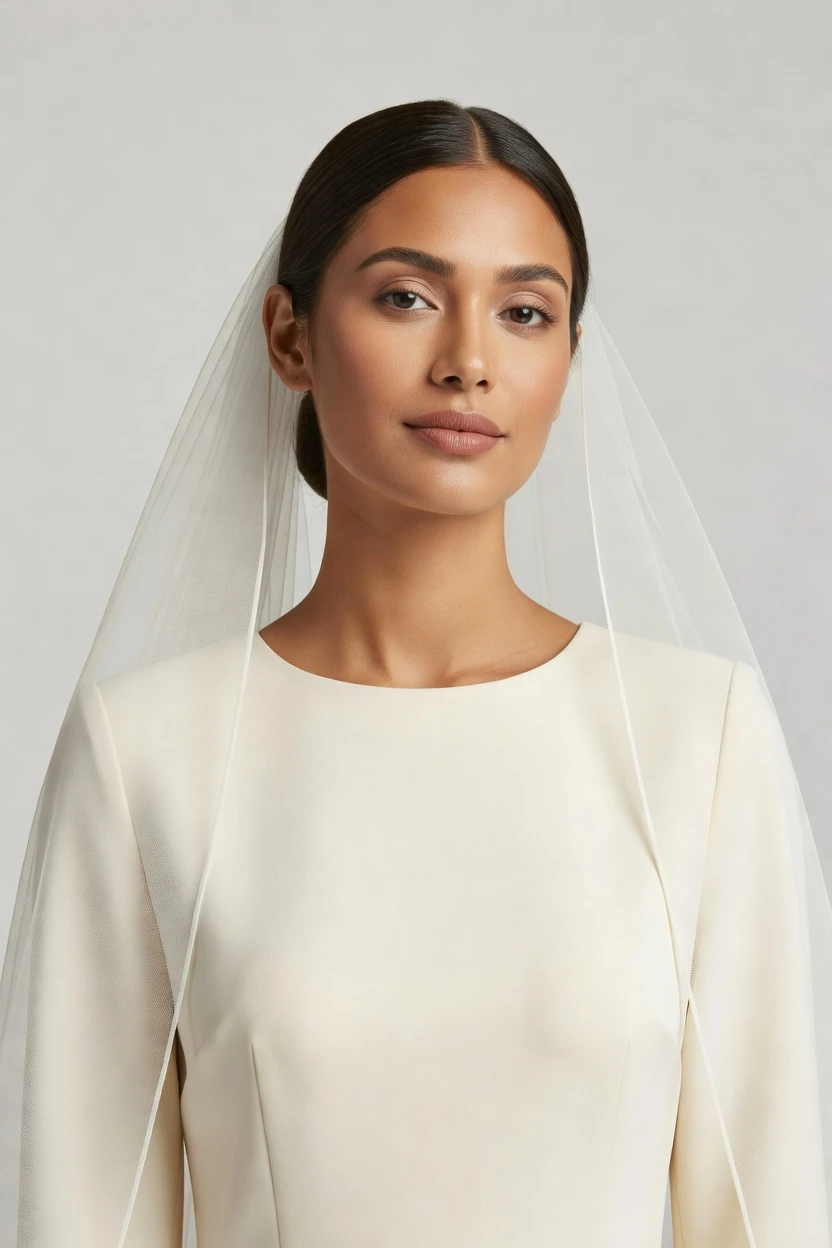
Saved model setup
Female · 26–35 · Dark brown · 175cm
Build a model. Zero prompts.
This bridal setup starts from a warm skin-tone entry point, refined into a poised female-presenting model with neutral expression and polished hair for gowns, veils, and formal accessories. You click through attributes, save the result, and reuse the same model across the whole bridal line. 28 attributes · 10+ options each
- 6 clicks · 0 keystrokes
- app.rawshot.ai / build_model
How it works
Build Once, Reuse Across the Bridal Line
Start with the model, lock consistency early, and carry the same bridal cast through every gown, accessory, and season update.
- Step 01
Set the Bridal Base
Choose the model attributes that matter for bridal presentation, from skin tone and body type to hair, age range, and expression. Every decision lives in the interface as a control you can review before saving.
- Step 02
Save the Model to Library
Generate the model once, then keep that exact face and body available for future shoots. This gives bridal teams a stable cast for gowns, veils, reception looks, and accessories across the whole line.
- Step 03
Reuse Across Every Look
Apply the saved model in the browser for one-off creative work or in larger catalog workflows. The same identity carries through every SKU, so your bridal imagery stays consistent instead of drifting between sessions.
Spec sheet
Proof for Bridal Teams That Need Consistency
These twelve surfaces show how RAWSHOT handles casting control, garment representation, provenance, scale, and rights without tradeoffs.
- 01
No Real-Person Likeness Dependence
Each saved model is built from 28 body attributes with 10+ options each, making accidental real-person likeness statistically negligible by design.
- 02
Every Setting Is Click-Driven
You direct casting with buttons, sliders, and presets inside the application. No empty text field stands between you and a usable bridal model.
- 03
Made for Garment Fidelity
Gown shape, neckline, lace placement, embellishment, drape, and proportion stay central. The garment is the brief, not an afterthought wrapped around a generic image system.
- 04
Diverse Synthetic Models, Clearly Labelled
Build a bridal cast from transparently labelled synthetic composites designed for fashion use. Diversity is available by design, not borrowed from real people.
- 05
Same Face Across Every SKU
Save one bridal model and reuse it across gowns, veils, shoes, and jewelry. The face and body remain consistent across the whole catalog.
- 06
150+ Visual Styles for Bridal Direction
Move from clean ecommerce to editorial bridal storytelling with presets for catalog, lifestyle, campaign, studio, vintage, noir, and more.
- 07
2K and 4K in Every Ratio
Generate bridal imagery for PDPs, lookbooks, marketplaces, and social placements in the frame you need. Resolution and aspect ratio stay flexible from the start.
- 08
Provenance and Labelling Built In
Outputs are C2PA-signed, AI-labelled, and aligned with EU AI Act Article 50 and California SB 942 expectations. Honesty is part of the product, not a disclaimer.
- 09
Signed Audit Trail per Image
Every output can carry a signed audit trail that supports review, handoff, and internal governance. That matters when bridal launches involve many stakeholders and many versions.
- 10
GUI for Shoots, REST API for Scale
Use the browser interface for one bridal collection or connect the REST API for nightly catalog production. The same engine serves both workflows.
- 11
Fast, Flat, and Transparent
Photo generation runs at about ~$0.55 per image in ~30–40 seconds, with tokens that never expire. The economics stay visible instead of hiding behind seat limits or volume gates.
- 12
Commercial Rights Stay Clear
Full commercial rights to every output, permanent, worldwide. Bridal teams can publish, sell, syndicate, and archive without rights ambiguity around core usage.
Outputs
Bridal Models, Ready to Reuse
Build a bridal cast once, then carry it through ceremony looks, reception edits, accessories, and seasonal collection updates. The point is not novelty per output; it is dependable identity across the line.


Browse all 600+ models →
Comparison
RAWSHOT vs category tools vs DIY prompting
Three lenses on every dimension — what you optimize for in RAWSHOT versus typical category tools and blank-box AI workflows.
01
Interface
RAWSHOT
Click-driven controls for casting, styling, framing, and reuseCategory tools + DIY
Often mix limited controls with vague text-led direction and thinner workflow structure. DIY prompting: You type instructions, iterate manually, and lose time translating visual intent into syntax02
Garment fidelity
RAWSHOT
Built around cut, colour, drape, trim, and logo integrityCategory tools + DIY
Can produce attractive fashion outputs with weaker garment-specific reliability. DIY prompting: Garment drift appears across outputs, and details mutate between generations03
Model consistency across SKUs
RAWSHOT
Save one bridal model and reuse the same face and bodyCategory tools + DIY
Consistency exists in narrower forms and often weakens across larger catalogs. DIY prompting: Inconsistent faces across outputs make catalog continuity hard to maintain04
Provenance + labelling
RAWSHOT
C2PA-signed, AI-labelled, visible and cryptographic watermarking supportCategory tools + DIY
Provenance and compliance signals are often partial or absent. DIY prompting: Missing provenance metadata leaves no clean audit record for commerce teams05
Commercial rights
RAWSHOT
Full commercial rights to every output, permanent and worldwideCategory tools + DIY
Rights terms can be narrower, tiered, or less operationally clear. DIY prompting: Unclear rights create hesitation for paid media, marketplaces, and resale channels06
Pricing transparency
RAWSHOT
Flat per-model pricing, no per-seat gates, tokens never expireCategory tools + DIY
Per-seat pricing and volume tiers can punish growth. DIY prompting: Tool access may be simple, but production economics stay unpredictable and manual07
Catalog API
RAWSHOT
Same product supports browser shoots and REST API pipelinesCategory tools + DIY
API access is commonly gated behind higher plans or sales conversations. DIY prompting: No purpose-built catalog API for repeatable fashion production workflows08
Iteration reliability
RAWSHOT
Repeatable controls and saved models make variants easier to manageCategory tools + DIY
Iteration is faster than studios but less deterministic at scale. DIY prompting: Invented logos, styling drift, and repeated trial-and-error slow every approved variant
Prompting does not scale
Stop writing essays. Direct the shoot.
Most AI photo tools start with a blank text box. Rawshot turns the shoot into repeatable controls, so creative teams can produce consistent fashion imagery without prompt syntax or one-off hacks.
Category norm
ManualCreate a premium editorial fashion photograph of a model wearing the exact navy oversized wool coat from SKU-1842, full-body crop, realistic hands, consistent facial identity, clean e-commerce lighting, subtle Paris street background, 85mm lens, no logo distortion, no fabric hallucination, same pose as last campaign, repeatable for all colorways...
A prompt can describe one image. It cannot become a shared production system for hundreds of products, models, angles and markets.
Rawshot
ClicksSaved shoot recipe
Apply to 1 SKU or 10,000 via GUI, CSV or REST API.
Rawshot makes creative direction visible: buttons, presets and sliders instead of hidden prompt craft. The result is easier to teach, faster to approve and built for repeat production.
Use cases
Where Bridal Operators Need a Repeatable Cast
Operator archetypes and how click-directed, garment-first output fits the way they actually work.
- 01
Indie Bridal Designers
Launch a first collection with a saved bridal model that carries the same identity across every gown without booking a studio day.
Confidence · high
- 02
Made-to-Order Wedding Labels
Show multiple silhouettes on one consistent model while designs are still moving through fittings and production planning.
Confidence · high
- 03
DTC Veil Brands
Pair veils, headpieces, and accessories with the same bridal face across product pages so the brand reads as one system.
Confidence · high
- 04
Bridal Ecommerce Teams
Standardize model reuse across ceremony looks, reception edits, and close-up accessory shots without face drift between SKUs.
Confidence · high
- 05
Marketplace Sellers
Create on-model bridal listings that look coherent across marketplaces where visual trust decides whether shoppers click through.
Confidence · high
- 06
Crowdfunded Occasionwear Projects
Present bridal prototypes with a polished cast before full production, so backers see the line as a real brand, not a sketch.
Confidence · high
- 07
Plus and Inclusive Bridal Lines
Build labelled synthetic models that match your intended fit strategy and represent the collection with more control from the start.
Confidence · high
- 08
Resale and Vintage Bridal Shops
Give archived gowns a consistent on-model presentation even when each dress comes from a different source and era.
Confidence · high
- 09
Factory-Direct Manufacturers
Show private-label bridal programs on one reusable model across buyer decks, line sheets, and wholesale approvals.
Confidence · high
- 10
Editorial Bridal Lookbooks
Keep the same bridal character across seasonal storytelling, then shift only style, lighting, and framing for each chapter.
Confidence · high
- 11
Student and Graduate Collections
Present thesis bridal work with dependable casting and commercial polish when budget rules out traditional production.
Confidence · high
- 12
Enterprise Catalog Teams
Use saved model consistency in the GUI or REST API to keep large bridal assortments aligned across regional and channel-specific outputs.
Confidence · high
— Principle
Honest is better than perfect.
Bridal imagery trades on trust, so provenance cannot be an afterthought. RAWSHOT outputs are C2PA-signed, AI-labelled, and designed with visible plus cryptographic watermarking support, giving teams a clear record of what the image is. The models are synthetic composites by design, with accidental real-person likeness statistically negligible by design.
Rights & provenance
Full commercial rights. Forever.
- C2PA-signed on every image — EU AI Act Article 50 compliant
- 28-attribute synthetic models — real-person likeness statistically impossible
- Full commercial rights to every generation — no recurring licensing fees
- Tokens never expire · One-click cancel · Transparent pricing
EU AI Act
C2PA
Commercial use
Pricing
~$0.99 per model generation.
~50–60 seconds per generation. Save the model once, reuse it across your entire catalog.
- 01Tokens never expire. Cancel in one click.
- 02Same face, same body, every SKU — no drift between shoots.
- 03No per-seat gates. No 'contact sales' walls for core features.
- 04Failed generations refund their tokens.
FAQ
Practical answers on control, rights, pricing, scale, and compliant publishing.
Do I need to write prompts to use RAWSHOT?
Never. You direct every output with sliders, presets, and clicks on the garment, not typed instructions. That matters for bridal teams because consistency breaks when creative direction lives in improvised text instead of a repeatable interface. In RAWSHOT, the same control logic carries from model building to photo and video work, so teams can standardize how they cast, review, and approve imagery without retraining everyone to become syntax specialists.
For commerce operations, reliability beats improvisation. RAWSHOT keeps timings, token usage, refund rules, rights, provenance signalling, watermarking cues, and reuse patterns explicit, which makes launch planning easier for buyers, marketers, and catalog leads. You save the bridal model once, reuse it across the line, and know the workflow will behave like an application rather than a chat experiment.
What does an AI bridal model generator actually change for bridal ecommerce teams?
It changes who gets access to consistent on-model imagery. Bridal teams often need the same face and body across gowns, veils, shoes, and accessories, but traditional casting and reshoots make that hard to sustain collection after collection. RAWSHOT lets you build a synthetic bridal model once, save it to your library, and reuse it across the whole assortment so the line presents as one coherent brand instead of a string of disconnected shoots.
That consistency matters operationally as much as creatively. Buyers can compare silhouettes on the same cast, marketers can run launches with a stable visual identity, and catalog teams can extend existing looks into new channels without starting from zero. Because the system is click-driven, labelled, and built with C2PA provenance and clear commercial rights, the workflow supports real commerce publishing rather than one-off experimentation.
Why skip reshooting every bridal SKU when the season changes?
Because bridal collections evolve faster than studio schedules. Hem details, lace trims, accessory pairings, and regional merchandising updates often change after initial planning, and reshooting every variation creates delay as much as expense. With RAWSHOT, you keep a saved model in your library and apply it again as the assortment changes, which protects visual continuity while letting the line update around the same cast.
This is especially useful when the business needs new PDP images, marketplace variants, or campaign crops on short notice. The model remains stable, the garment stays central, and the team works inside the same interface rather than rebuilding direction from scratch each time. That gives bridal operators a way to maintain continuity through season updates without treating every revision like a brand-new production.
How do we turn flat garments into catalogue-ready bridal imagery without prompting?
You start by building or selecting a saved model, then choose the controls that define the output: framing, angle, lighting, visual style, and product emphasis. For bridal work, that means you can present a gown, veil, gloves, jewelry, or footwear on a consistent cast while still adjusting the scene for clean ecommerce, lifestyle, or editorial needs. The interface is built for direct selection, so teams review visible settings instead of decoding text-based instructions.
That structure matters once more than one person touches the workflow. Merchandising can lock consistency, creative can choose style presets, and operations can push the approved setup through the browser or the REST API. The result is a repeatable bridal imaging pipeline where the product stays faithful, the cast stays stable, and the process is understandable to everyone involved in launch readiness.
Why does RAWSHOT beat ChatGPT, Midjourney, or generic image models for bridal PDPs?
Because bridal commerce needs repeatability, not roulette. Generic image systems often drift on garment details, change faces across outputs, invent branding elements, and leave teams with weak provenance and unclear publication confidence. That may be tolerable for rough mood exploration, but it breaks down fast when a buyer needs the same gown shape, trim placement, and model identity preserved across product pages and channel variants.
RAWSHOT is built as a fashion application with click-driven controls, garment-led logic, saved model reuse, and signed provenance surfaces. You are not translating bridal direction into trial-and-error text and hoping the next result stays close enough. You are working in a system that is meant for apparel operations, with clearer rights, auditability, and consistency from one approved SKU to the next.
Can we publish bridal outputs commercially, and are they clearly labelled as synthetic?
Yes. RAWSHOT provides full commercial rights to every output, permanent and worldwide, which gives bridal brands a clear usage position for ecommerce, marketplaces, paid media, and archived catalog assets. The platform also treats transparency as a product feature rather than a hidden legal footnote, so outputs are AI-labelled and designed to carry provenance and watermarking signals that support honest publishing.
That approach matters in bridal because shoppers are making high-trust purchases and often scrutinize images closely. RAWSHOT outputs are C2PA-signed, and the models are synthetic composites built from controlled attributes rather than borrowed real identities. For brand teams, the practical takeaway is simple: publish with clear internal governance, keep the provenance record attached, and use the rights framework confidently across channels.
What should a bridal team check before publishing RAWSHOT images live?
First, review garment fidelity with the same seriousness you would apply to a studio proof. Check silhouette, neckline, lace placement, embellishment scale, drape, accessory pairing, and whether the saved model still matches the intended casting strategy for the collection. Then confirm the output carries the compliance and governance signals your team expects, including AI labelling, provenance handling, and the internal approval trail required for your channel mix.
RAWSHOT supports that discipline by keeping the process structured rather than improvised. Because the model is saved, the face and body remain stable across outputs, which makes side-by-side QA easier for merchandisers and ecommerce leads. Before publish, teams should treat the image as production-ready commercial media: verify the product, verify the context, verify the provenance record, then ship with confidence.
How much does the bridal model workflow cost, and what happens to unused tokens?
The model workflow runs at about ~$0.99 per model generation, with typical generation times around 50–60 seconds. Tokens never expire, failed generations refund their tokens, and cancellation is available in one click, which keeps the economics predictable for bridal teams working across launch calendars instead of fixed studio days. That structure is useful when you need to build several candidate casts, approve one, and keep the rest of the budget available for later collection work.
Because RAWSHOT also supports still imagery and video on the same platform, teams can separate the cost of model creation from the cost of image or reel production. In practice, that means you save the bridal model once, then reuse it across the catalog rather than paying to recreate identity every time. Predictable token rules make it easier to plan rollouts, approvals, and seasonal updates without surprise expiry pressure.
Can we connect this bridal casting workflow to Shopify-scale or internal catalog systems?
Yes. RAWSHOT is built for both browser-based creative work and REST API production pipelines, so bridal teams can start with hands-on model building in the interface and then connect approved workflows to larger catalog operations. That matters when a collection begins as a small creative project but later needs to feed ecommerce stacks, regional variants, or channel-specific publishing rules.
The practical benefit is continuity between teams. Creative can define the saved model and visual direction, operations can automate repeat work through the API, and merchandising can keep the assortment aligned without switching to a different product tier. Because the same engine serves both single-shoot and catalog-scale use, bridal brands can move from boutique launch mode to enterprise throughput without rebuilding the process.
How do teams scale one saved bridal model across many roles, shoots, and SKUs?
They treat the saved model as shared infrastructure, not as a one-off asset. Once the bridal cast is approved, the same identity can be reused by ecommerce managers, marketers, art directors, and catalog operators across gowns, accessories, seasonal edits, and market-specific crops. That gives every team a stable starting point while still leaving room to adjust styling, framing, and visual presets for each publishing context.
RAWSHOT supports that handoff by combining a click-driven GUI with API-ready production paths, plus auditability and provenance signals that keep governance visible as volume grows. The result is not just faster output; it is a more dependable operating model for bridal commerce. When the same face, same body, and same rights framework carry through the line, teams can scale work without sacrificing consistency.
Keep exploring