
— Catalog · Studio Clean · 4K
Launch cleaner PDP imagery with the AI Catalog Page Generator.
Generate catalog-ready fashion images that keep the garment intact and the brand presentation consistent across every page. Direct framing, lens, lighting, background, aspect ratio, and product focus with clicks inside a real interface built for fashion teams. No studio. No samples. No prompts.
- ~$0.55 per image
- ~30–40s per generation
- 150+ styles
- 2K or 4K
- Every aspect ratio
- Full commercial rights
7-day free trial • 50 tokens (10 images) • Cancel anytime

Direct the shoot. Zero prompts.
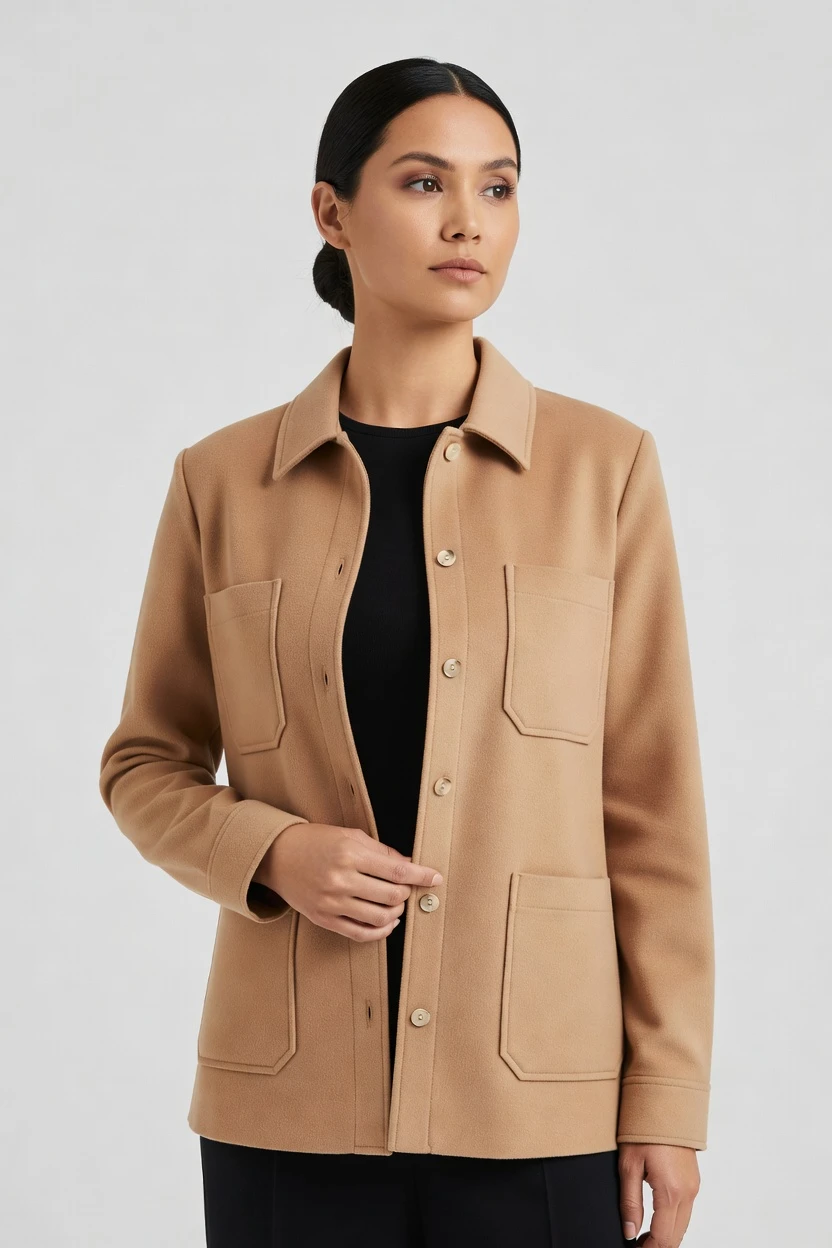
Pre-set for catalog page output: 85mm lens, half-body framing, studio softbox lighting, light grey seamless, and 4:5 composition. The result is clean on-model imagery that keeps attention on fit, cut, colour, and product detail for PDP use. 5 tokens · ~34s per image
- 6 clicks · 0 keystrokes
- app.rawshot.ai / new_shoot
How it works
Build Catalog Pages Without the Blank Box
Three steps take you from garment upload to repeatable, page-ready imagery for single looks or full catalog runs.
- Step 01
Upload the Garment
Start from the real product, not a blank text box. Your garment becomes the center of the shoot, so cut, colour, pattern, logo, and proportion stay grounded in what you actually sell.
- Step 02
Set the Catalog Frame
Click through lens, framing, pose, angle, lighting, background, style, and aspect ratio. You direct the result like an ecommerce image workflow, with controls that teams can repeat across every SKU.
- Step 03
Generate and Reuse
Create on-model images in 2K or 4K, then keep the setup consistent across the rest of the catalog. Use the browser GUI for one-off pages or the REST API for nightly batch production.
Spec sheet
Proof for Catalog Image Operations
These twelve surfaces show why RAWSHOT fits real apparel workflows, from garment accuracy and provenance to API scale and rights clarity.
- 01
No-Likeness by Design
Every model is a synthetic composite built from 28 body attributes with 10+ options each. Accidental real-person likeness is statistically negligible by design.
- 02
Every Setting Is a Click
Lens, framing, pose, lighting, background, visual style, and product focus live in buttons, sliders, and presets. You direct the image in an application, not a chat box.
- 03
The Garment Stays the Brief
RAWSHOT is engineered around apparel fidelity, so cut, colour, pattern, logo, fabric, drape, and proportion are represented faithfully. That matters when a catalog page has to sell the exact product, not an interpretation of it.
- 04
Diverse Synthetic Models
Choose from transparently labelled synthetic models built for fashion presentation. This gives smaller brands access to on-model imagery without relying on a traditional casting workflow.
- 05
Same Face Across Every SKU
Save a model and keep the same face and body across your full assortment. Your catalog reads as one system instead of a patchwork of near-matches.
- 06
150+ Visual Styles
Switch between catalog, lifestyle, editorial, campaign, studio, street, noir, vintage, and more. You can keep PDP pages clean while still building supporting imagery for launches and merchandising.
- 07
2K, 4K, Any Ratio
Generate stills in 2K or 4K and choose the aspect ratio the destination needs. That covers PDP crops, collection grids, marketplace requirements, and social cutdowns from the same workflow.
- 08
Labelled and Compliant
Every output is C2PA-signed, AI-labelled, and supported by visible plus cryptographic watermarking. RAWSHOT is built for EU AI Act Article 50, California SB 942, GDPR, and EU hosting requirements.
- 09
Signed Audit Trail per Image
Each image carries a signed record for provenance and operational traceability. Catalog teams get cleaner review, approval, and compliance handoff when every asset has a verifiable trail.
- 10
GUI for One Shoot, API for Scale
Use the browser GUI when you are styling a single product page, then move the same logic into the REST API for large assortments. The indie designer and the enterprise catalog team use the same engine.
- 11
Fast, Flat Image Economics
Images run at about $0.55 each and usually complete in 30–40 seconds. Tokens never expire, failed generations refund tokens, and growth is not punished with per-seat gates.
- 12
Commercial Rights Stay Clear
Every output includes full commercial rights, permanent and worldwide. That gives ecommerce, marketplace, and merchandising teams a cleaner path from generation to publication.
Outputs
Catalog Outputs, Ready to Publish
Clean product-page imagery starts with garment-led control and ends with consistent presentation across the whole assortment. These outputs are built for PDPs, collection grids, marketplaces, and supporting merchandising assets.


Browse 150+ visual styles →
Comparison
RAWSHOT vs category tools vs DIY prompting
Three lenses on every dimension — what you optimize for in RAWSHOT versus typical category tools and blank-box AI workflows.
01
Interface
RAWSHOT
Click-driven controls for lens, framing, light, background, style, and product focusCategory tools + DIY
Often mix limited presets with lighter control depth and less repeatable workflows. DIY prompting: You type instructions, revise wording, and spend time steering outputs through trial and error02
Garment fidelity
RAWSHOT
Built around the real garment so cut, colour, logo, and drape stay groundedCategory tools + DIY
Can hold the overall look but often soften detail or alter product specifics. DIY prompting: Garment drift is common, with mutated seams, changed trims, and invented logos03
Model consistency across SKUs
RAWSHOT
Save one model and reuse the same face and body across the catalogCategory tools + DIY
Consistency options vary and may weaken across larger SKU runs. DIY prompting: Faces change between outputs, so assortments lose continuity from page to page04
Provenance + labelling
RAWSHOT
C2PA-signed, AI-labelled, watermarked, with a signed audit trail per imageCategory tools + DIY
Provenance support is often partial, absent, or not central to the workflow. DIY prompting: Missing provenance metadata leaves no clean labelling or traceable audit record05
Commercial rights
RAWSHOT
Full commercial rights to every output, permanent and worldwideCategory tools + DIY
Rights can be narrower, less explicit, or tied to plan structure. DIY prompting: Rights position is often unclear for commerce teams publishing at scale06
Pricing transparency
RAWSHOT
Flat per-image pricing, tokens never expire, failed generations refund tokensCategory tools + DIY
Per-seat plans, volume tiers, and sales-gated upgrades are more common. DIY prompting: Low entry cost hides heavy iteration waste when unusable variants pile up07
Iteration speed per variant
RAWSHOT
Repeatable variants from saved settings keep catalog updates operationally cleanCategory tools + DIY
Variants are possible but can require more manual rework between outputs. DIY prompting: Each new variant means more typing, more retries, and less predictable reproduction08
Catalog API
RAWSHOT
Browser GUI for one-offs and REST API for nightly catalog-scale productionCategory tools + DIY
APIs may exist but core capability is often segmented by plan or account tier. DIY prompting: No dedicated catalog API, so batch production becomes brittle manual orchestration
Prompting does not scale
Stop writing essays. Direct the shoot.
Most AI photo tools start with a blank text box. Rawshot turns the shoot into repeatable controls, so creative teams can produce consistent fashion imagery without prompt syntax or one-off hacks.
Category norm
ManualCreate a premium editorial fashion photograph of a model wearing the exact navy oversized wool coat from SKU-1842, full-body crop, realistic hands, consistent facial identity, clean e-commerce lighting, subtle Paris street background, 85mm lens, no logo distortion, no fabric hallucination, same pose as last campaign, repeatable for all colorways...
A prompt can describe one image. It cannot become a shared production system for hundreds of products, models, angles and markets.
Rawshot
ClicksSaved shoot recipe
Apply to 1 SKU or 10,000 via GUI, CSV or REST API.
Rawshot makes creative direction visible: buttons, presets and sliders instead of hidden prompt craft. The result is easier to teach, faster to approve and built for repeat production.
Use cases
Where Catalog Teams Need Repeatable Image Control
Operator archetypes and how click-directed, garment-first output fits the way they actually work.
- 01
Indie Fashion Labels
Launch a polished product page for a small drop without booking a studio day or rebuilding the look from scratch for each variant.
Confidence · high
- 02
DTC Apparel Teams
Keep fit presentation, framing, and model consistency aligned across PDPs while new colours and seasonal updates move into the store.
Confidence · high
- 03
Marketplace Sellers
Generate clean on-model imagery in the aspect ratios major marketplaces need, while keeping the garment itself central and legible.
Confidence · high
- 04
Resale and Vintage Operators
Present one-off garments with stronger page imagery when there is no budget or time for a traditional fashion shoot.
Confidence · high
- 05
Kidswear Brands
Build catalog pages that stay visually consistent across sizes, sets, and seasonal assortments without fragmenting the brand look.
Confidence · high
- 06
Adaptive Fashion Lines
Show fit and garment function more clearly on page with controlled framing, clean backgrounds, and repeatable styling decisions.
Confidence · high
- 07
Lingerie DTC Brands
Produce consistent ecommerce imagery across collections where proportion, support details, and color accuracy matter to conversion.
Confidence · high
- 08
Factory-Direct Manufacturers
Turn production-ready garments into usable catalog assets fast enough for wholesale sheets, B2B portals, and direct retail pages.
Confidence · high
- 09
Crowdfunding Creators
Build trustworthy product pages before a large studio budget exists, so the garment can be seen clearly during launch.
Confidence · high
- 10
On-Demand Labels
Keep a stable visual system across frequent SKU additions by reusing saved models, framing choices, and catalog presets.
Confidence · high
- 11
Merchandising Teams
Refresh collection pages, category banners, and product tiles with the same model and visual system instead of reshooting whole lines.
Confidence · high
- 12
Catalog Operations at Scale
Run repeatable image generation through the REST API when hundreds or thousands of SKUs need consistent page-ready output.
Confidence · high
— Principle
Honest is better than perfect.
Catalog pages are commercial surfaces, so provenance cannot be an afterthought. RAWSHOT signs outputs with C2PA metadata, applies visible and cryptographic watermarking, and labels AI output clearly so teams can publish with traceability, not ambiguity. That matters whether you are updating one PDP or pushing a full assortment across retail channels.
Rights & provenance
Full commercial rights. Forever.
- C2PA-signed on every image — EU AI Act Article 50 compliant
- 28-attribute synthetic models — real-person likeness statistically impossible
- Full commercial rights to every generation — no recurring licensing fees
- Tokens never expire · One-click cancel · Transparent pricing
EU AI Act
C2PA
Commercial use
Pricing
~$0.55 per image.
~30–40 seconds per generation. Tokens never expire. Cancel in one click.
- 01The cancel button is on the pricing page.
- 02No per-seat gates. No 'contact sales' walls for core features.
- 03Failed generations refund their tokens.
- 04Full commercial rights to every output, permanent, worldwide.
FAQ
Practical answers on control, rights, pricing, scale, and compliant publishing.
Do I need to write prompts to use RAWSHOT?
Never—you direct every output with sliders, presets, and clicks on the garment, not typed prompts. That UI control is consistent across GUI and REST API payloads, which is why ecommerce teams onboard buyers without rewriting creative briefs as chat threads. Instead of guessing the right wording, you select lens, framing, lighting, background, pose, visual style, aspect ratio, and product focus in a workflow that looks like software for fashion operations.
For catalog teams, reliability matters more than model cleverness; RAWSHOT keeps tokens, timings, refund rules, commercial rights framing, provenance signalling, watermarking cues, REST surface, and SKU-scale batch patterns explicit so operations can rehearse PDP launches without hallucinated garment inventions. The practical takeaway is simple: if your team can choose a crop and approve a background, it can run RAWSHOT without learning a new language first.
What does an AI catalog page generator actually change for fashion ecommerce teams?
It changes who gets access to on-model product imagery and how repeatably that imagery can be produced. Traditional fashion photography often sits behind studio budgets, sample logistics, and scheduling constraints that smaller brands simply cannot absorb, while generic AI tools push the burden back onto the operator through typed instructions and unstable outputs. RAWSHOT turns that into a click-driven workflow where the garment leads the image and the controls are explicit.
For ecommerce teams, that means you can create clean PDP visuals, category page assets, and variant-consistent product imagery without treating every SKU as a separate production event. You generate stills in 2K or 4K, keep one model across the assortment, and carry clear commercial rights plus C2PA provenance into publishing. The result is not abstract efficiency language; it is a more dependable path from product to page for teams that never had a full studio pipeline in the first place.
Why skip reshooting every SKU when the season, colorway, or merchandising page changes?
Because reshooting every update ties routine catalog maintenance to the slowest and most expensive part of the old workflow. When a collection changes color, a new landing page needs a different crop, or merchandising wants a cleaner on-model hero, the real need is often variation in presentation rather than a full physical production cycle. RAWSHOT lets teams regenerate those variants from saved controls instead of reopening a studio process.
That matters most when assortments move quickly and visual consistency still has to hold. You can preserve the same model, framing logic, and lighting language across pages while updating aspect ratios, visual styles, or product focus for the destination. Because images are priced per output, tokens never expire, and failed generations refund tokens, operators can plan catalog refreshes as ongoing production work rather than exceptional events.
How do we turn flat garments into catalogue-ready imagery without prompting?
You start with the garment and then set the image through interface controls that map to real photographic decisions. In RAWSHOT, teams choose lens, framing, pose, angle, lighting, background, visual style, aspect ratio, resolution, and product focus directly, so the workflow feels like directing a shoot rather than negotiating with a text field. That structure keeps decision-making visible for buyers, merchandisers, and ecommerce managers who need reproducible outputs.
Once the look is approved, the same settings can be reused across additional SKUs or adapted for new compositions. A brand can move from a half-body PDP image on light grey to a full-body collection-page frame without losing continuity in model identity or garment presentation. For operations, the lesson is straightforward: build a repeatable house style in clicks, save it, and apply it across the catalog instead of rewriting intent every time.
Why does RAWSHOT beat ChatGPT, Midjourney, or generic image models for fashion PDP work?
The difference is not that generic image tools cannot make attractive pictures; it is that fashion commerce needs repeatable, product-led images with clean operational rules. DIY systems push teams into typed instructions and repeated retries, which is where garment drift, invented logos, unstable proportions, and inconsistent faces tend to appear. Those problems are annoying in moodboards and costly on product pages, where the garment itself has to remain the brief.
RAWSHOT replaces that roulette with explicit controls, saved model consistency, and provenance features meant for publication. You get C2PA-signed outputs, labelled AI imagery, watermarking, a signed audit trail per image, and full commercial rights stated clearly. For a fashion team, that means fewer ambiguous outputs and a workflow you can hand from creative to merchandising to compliance without losing confidence in what the image represents.
Can we use RAWSHOT images commercially on product pages, ads, and marketplaces?
Yes. Every RAWSHOT output comes with full commercial rights, permanent and worldwide, which gives commerce teams a clear publication path across PDPs, paid media, marketplaces, email, and collection pages. That clarity matters because visual teams often move faster than legal review cycles, and unclear rights become a hidden blocker long after the image has been approved aesthetically. RAWSHOT makes the rights position explicit from the start.
RAWSHOT also pairs rights clarity with transparency signals that matter to modern brand operations. Outputs are AI-labelled, C2PA-signed, and supported by visible plus cryptographic watermarking, with a signed audit trail per image. The practical takeaway for teams is to treat publication as an end-to-end process: approve the garment representation, confirm the destination crop, and publish knowing the rights and provenance story travel with the asset.
What should merch and QA teams check before publishing catalog images from RAWSHOT?
Start with the product itself: confirm the cut, colour, logo, pattern, fabric impression, and proportion match the garment you intend to sell. Then review the operational layer that affects page performance, such as framing consistency, background cleanliness, aspect ratio, and whether the same saved model is being used across related SKUs. Those checks are more useful than abstract image scoring because they map directly to what customers will encounter on the page.
RAWSHOT supports that review with provenance and traceability rather than hiding the image’s origin. Teams can verify C2PA signing, AI labelling, watermarking cues, and the signed audit trail attached to each image before publishing. In practice, the cleanest workflow is to standardize a short approval pass for garment fidelity, destination crop, and provenance status so catalog assets move into production with fewer surprises.
How much does still-image generation cost for catalog pages, and what happens to unused tokens?
For stills, RAWSHOT runs at about $0.55 per image, and most generations complete in roughly 30–40 seconds. Tokens never expire, which is important for brands with uneven launch calendars, seasonal pauses, or experimental assortment planning where production comes in bursts rather than a steady monthly rhythm. If a generation fails, the tokens for that failed attempt are refunded, so teams are not punished for platform-side misses.
The broader pricing model also stays operationally clean. There are no per-seat gates for core features, no requirement to cross a sales wall to unlock normal usage, and cancellation is one click from the pricing page. The best way to budget RAWSHOT is as a predictable per-image production line: estimate the number of page-ready variants you need, keep tokens on hand, and scale up only when merchandising demand actually arrives.
Can RAWSHOT plug into Shopify-scale catalogs or internal product pipelines through an API?
Yes. RAWSHOT is built for both browser-based single-shoot work and REST API workflows, so a team can begin in the GUI and then move the same logic into larger catalog operations. That matters for Shopify stores, marketplace feeds, PLM-connected environments, and internal content pipelines where approved visual rules need to be repeated across many products without recreating the setup manually each time.
The useful distinction is not small brand versus large brand, but one shoot versus ten thousand. RAWSHOT keeps the same engine, same output quality, and the same basic pricing logic whether you are styling a few pages by hand or running nightly batch generation for a broad assortment. For teams building process, the practical move is to validate the look in the interface first, then encode the approved settings into your API workflow for scale.
How do creative, ecommerce, and operations teams share one workflow as output volume grows?
They share a system where decisions are explicit, repeatable, and not trapped inside one person’s writing style. In RAWSHOT, creative can define the approved visual language through saved choices for model, lens, framing, light, background, and style; ecommerce can map those outputs to page requirements; and operations can extend the same rules through the REST API when volume rises. That alignment is difficult to maintain in DIY tools because each new batch can depend on fresh wording and subjective interpretation.
RAWSHOT keeps the workflow stable from first-page experiments to broad catalog throughput. Teams can work in the GUI for approvals, rely on 2K or 4K output for destination needs, keep provenance and rights attached to every asset, and scale without introducing seat penalties as more people need access. The operational takeaway is to treat image generation like infrastructure: lock the approved controls, then let each team use the same system at its own stage of the process.
Keep exploring