
— Hair attribute · Catalog consistency · Save once
AI Auburn Hair Male Generator — with click-driven control over every attribute.
Auburn-haired male talent is often a narrow casting need, especially when you need the same face and proportions across every SKU. You set 28 body attributes with 10+ options each, save the model once, and reuse it across your catalog without drift. Every output is transparently labelled, C2PA-signed, and built from synthetic composites rather than a real-person likeness.
- ~$0.99 per model
- ~50–60s per generation
- 150+ styles
- 28 attributes × 10+ options
- Save once, reuse across catalog
- EU-hosted and labelled
7-day free trial • 50 tokens (10 images) • Cancel anytime

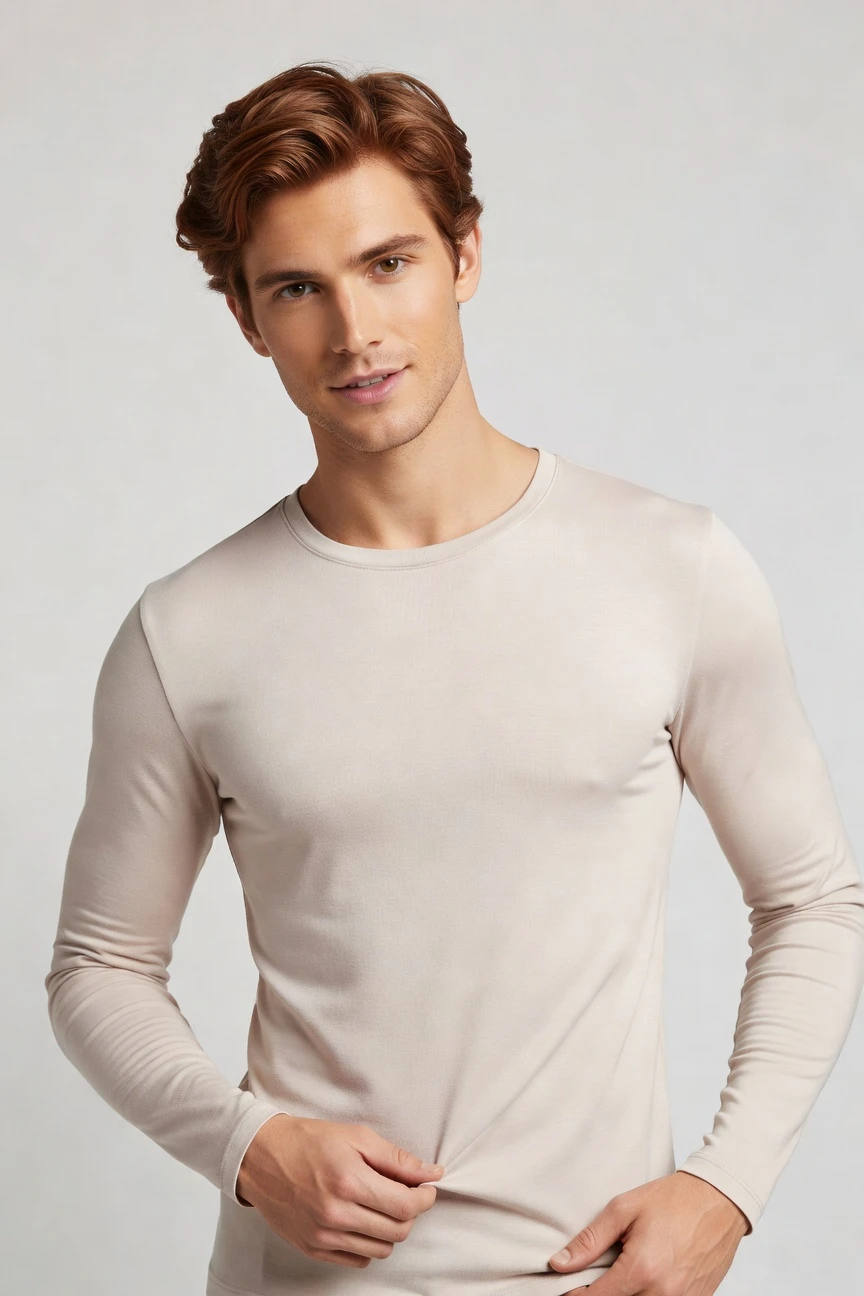
Saved model setup
Male · 26–35 · Auburn · 175cm
Build a model. Zero prompts.
This setup starts from a male presentation with an auburn hair target, then locks age, body shape, height, and hairstyle for repeatable casting. You click the attributes once, save the result, and reuse the same model across every product line. 28 attributes · 10+ options each
- 6 clicks · 0 keystrokes
- app.rawshot.ai / build_model
How it works
Build and Reuse a Consistent Male Model
Start with the hair attribute, lock the rest of the identity, then deploy the same saved model across your full assortment.
- Step 01
Set the Core Attributes
Choose male presentation, auburn hair, body shape, height, and age range from visual controls. The model starts as a structured build, not a blank text field.
- Step 02
Save the Model Identity
Once the face and body read right for your brand, save that synthetic model to your library. You can return to the same identity for every future garment.
- Step 03
Reuse Across Every SKU
Apply the saved model in the browser for one-off shoots or through the API for catalog-scale runs. The same casting logic holds from a single look to thousands of products.
Spec sheet
Proof for Attribute-Led Model Building
These twelve points show how RAWSHOT handles identity control, garment accuracy, compliance, and scale without turning fashion teams into text operators.
- 01
28 Attributes, Structured for Reuse
You control 28 body attributes with 10+ options each, then save the result as a reusable synthetic identity. That design keeps accidental real-person likeness statistically negligible by design.
- 02
Every Setting Is a Click
Hair colour, gender presentation, expression, and body shape live in buttons, sliders, and presets. You direct the model build through the interface, not a chat box.
- 03
The Garment Stays the Brief
RAWSHOT is engineered around cut, colour, pattern, logo, fabric, drape, and proportion. The product leads the image instead of being bent around generic image logic.
- 04
Diverse Synthetic Casting
Build male models across a broad range of skin tones, body types, ages, and heritage options. The casting library is transparent, labelled, and designed for fashion teams that need choice without ambiguity.
- 05
One Face Across the Catalog
Save the auburn-haired male model once and keep the same identity from SKU to SKU. No drift between launches, retakes, or seasonal updates.
- 06
150+ Visual Styles
Move the same saved model through catalog, lifestyle, editorial, campaign, studio, street, Y2K, vintage, noir, and more. Brand changes do not require recasting.
- 07
2K, 4K, and Every Ratio
Generate outputs in 2K or 4K and fit them to the channels you actually publish on. Full-length, cropped, square, vertical, and widescreen compositions stay available from the same base model.
- 08
Labelled and Compliance-Ready
Outputs are AI-labelled, C2PA-signed, and backed by visible plus cryptographic watermarking. RAWSHOT is built for EU-hosted compliance and clear disclosure practice.
- 09
Signed Audit Trail per Image
Each image carries provenance metadata tied to its creation record. That gives teams a documented chain for review, governance, and downstream publishing.
- 10
GUI for One Shoot, API for Scale
Use the browser interface for directorial one-offs or the REST API for nightly catalog pipelines. The same engine and saved models work in both modes.
- 11
Fast Model Creation, Clear Tokens
Model generation runs in about 50–60 seconds at roughly $0.99, and tokens never expire. Failed generations refund their tokens, so experiments stay controlled.
- 12
Permanent Worldwide Commercial Rights
Every output includes full commercial rights for permanent worldwide use. Teams can publish across ecommerce, campaigns, marketplaces, and wholesale materials without rights ambiguity.
Outputs
Auburn-Haired Male Models, Saved for Repeat Use
Build once, then carry the same identity through catalog, campaign tests, and seasonal updates. The point is not novelty; it is dependable casting control at product speed.


Browse all 600+ models →
Comparison
RAWSHOT vs category tools vs DIY prompting
Three lenses on every dimension — what you optimize for in RAWSHOT versus typical category tools and blank-box AI workflows.
01
Interface
RAWSHOT
Click-driven model builder with visual controls for every core attributeCategory tools + DIY
Usually mix templates with lighter controls and less direct casting precision. DIY prompting: Typed instructions in chat or image tools, with interpretation gaps on every run02
Model consistency
RAWSHOT
Save one male identity and reuse it across the entire catalogCategory tools + DIY
Some consistency tools, but often weaker persistence across large SKU sets. DIY prompting: Faces drift between outputs, so the same model rarely stays stable03
Hair attribute control
RAWSHOT
Auburn hair is a set attribute, not a vague stylistic suggestionCategory tools + DIY
Hair options may exist, but often with fewer structured combinations. DIY prompting: Hair colour and style shift unpredictably between generations and angles04
Garment fidelity
RAWSHOT
Built around cut, logos, colour, pattern, and drape of real productsCategory tools + DIY
Fashion-focused, but garment handling can still simplify or smooth details. DIY prompting: Garments drift, logos get invented, and proportions change across attempts05
Provenance and labelling
RAWSHOT
C2PA-signed outputs with visible and cryptographic watermarking by defaultCategory tools + DIY
Labelling varies and provenance is not always embedded per output. DIY prompting: No standard provenance metadata and little disclosure structure for publishing06
Commercial rights
RAWSHOT
Permanent worldwide commercial rights included for every outputCategory tools + DIY
Rights may depend on plan terms or contract layers. DIY prompting: Rights clarity is often unclear for commerce teams and agency workflows07
Pricing transparency
RAWSHOT
Flat per-model pricing, tokens never expire, refunds on failed generationsCategory tools + DIY
Plans often add seat limits, tier jumps, or gated features. DIY prompting: Usage cost is detached from fashion workflow and retries multiply wasted effort08
Catalog scale
RAWSHOT
Same saved models work in browser GUI and REST API pipelinesCategory tools + DIY
Scale features may sit behind higher tiers or sales-led packaging. DIY prompting: No reliable batch structure for SKU pipelines, approvals, or audit trails
Prompting does not scale
Stop writing essays. Direct the shoot.
Most AI photo tools start with a blank text box. Rawshot turns the shoot into repeatable controls, so creative teams can produce consistent fashion imagery without prompt syntax or one-off hacks.
Category norm
ManualCreate a premium editorial fashion photograph of a model wearing the exact navy oversized wool coat from SKU-1842, full-body crop, realistic hands, consistent facial identity, clean e-commerce lighting, subtle Paris street background, 85mm lens, no logo distortion, no fabric hallucination, same pose as last campaign, repeatable for all colorways...
A prompt can describe one image. It cannot become a shared production system for hundreds of products, models, angles and markets.
Rawshot
ClicksSaved shoot recipe
Apply to 1 SKU or 10,000 via GUI, CSV or REST API.
Rawshot makes creative direction visible: buttons, presets and sliders instead of hidden prompt craft. The result is easier to teach, faster to approve and built for repeat production.
Use cases
Where a Saved Male Model Pays Off
Operator archetypes and how click-directed, garment-first output fits the way they actually work.
- 01
Menswear DTC Launches
A founder building a first menswear line can lock one auburn-haired model and use it across every PDP before a studio budget exists.
Confidence · high
- 02
Marketplace Catalog Teams
Sellers with dozens of listings can keep the same male face and body across product updates instead of rebuilding casting every time.
Confidence · high
- 03
Seasonal Outerwear Drops
An outerwear label can reuse one saved model across jackets, knits, and trousers so the collection reads as one brand world.
Confidence · high
- 04
Adaptive Fashion Brands
Teams that need consistent representation can set the identity once, then focus review time on fit, access details, and garment clarity.
Confidence · high
- 05
Crowdfunded Apparel Projects
Pre-launch brands can present a coherent male casting direction for campaign pages without waiting for physical shoot logistics.
Confidence · high
- 06
Factory-Direct Manufacturers
Suppliers can generate customer-ready sample imagery with a consistent auburn-haired male model for line sheets and buyer outreach.
Confidence · high
- 07
Editorial Concept Testing
Creative teams can test mood shifts, lighting changes, and framing options around the same saved model before committing to final assets.
Confidence · high
- 08
Resale and Vintage Sellers
Shops can standardise presentation across mixed inventory by applying one dependable male identity to many one-off garments.
Confidence · high
- 09
Student Fashion Portfolios
Design students can present thesis collections on a repeatable model build that looks intentional across every look.
Confidence · high
- 10
Kidswear Parent Brand Extensions
A parent label adding teen or young adult mens lines can trial brand direction with consistent casting before expanding production.
Confidence · high
- 11
Wholesale Lookbook Prep
Sales teams can prepare retailer-facing assortments with one stable model identity instead of patchwork reference imagery.
Confidence · high
- 12
Large SKU Migration Projects
Enterprise catalog teams moving thousands of garments into a new visual system can preserve one male casting profile across the whole pipeline.
Confidence · high
— Principle
Honest is better than perfect.
When you build a specific male identity with auburn hair, trust matters as much as control. RAWSHOT labels outputs, embeds C2PA provenance, and adds visible plus cryptographic watermarking so buyers, publishers, and compliance teams know what they are looking at. The model itself is a synthetic composite across structured attributes, designed to avoid real-person likeness rather than obscure it.
Rights & provenance
Full commercial rights. Forever.
- C2PA-signed on every image — EU AI Act Article 50 compliant
- 28-attribute synthetic models — real-person likeness statistically impossible
- Full commercial rights to every generation — no recurring licensing fees
- Tokens never expire · One-click cancel · Transparent pricing
EU AI Act
C2PA
Commercial use
Pricing
~$0.99 per model generation.
~50–60 seconds per generation. Save the model once, reuse it across your entire catalog.
- 01Tokens never expire. Cancel in one click.
- 02Same face, same body, every SKU — no drift between shoots.
- 03No per-seat gates. No 'contact sales' walls for core features.
- 04Failed generations refund their tokens.
FAQ
Practical answers on control, rights, pricing, scale, and compliant publishing.
Do I need to write prompts to use RAWSHOT?
Never—you direct every output with sliders, presets, and clicks on the garment, not typed prompts. That matters in apparel commerce because buyers, merchandisers, and creative leads need a repeatable workflow they can review together, not a text experiment that changes tone every time someone rephrases an instruction. In RAWSHOT, the model build, styling choices, framing, and output settings all sit inside a visual interface, so teams can work from clear controls instead of guesswork. The result is easier approvals, cleaner handoffs, and less drift between the image you wanted and the image you got.
For catalog teams, reliability matters more than model cleverness. RAWSHOT keeps tokens, timings, refund rules, commercial rights, provenance signalling, watermarking, and batch-friendly workflows explicit, whether you work in the browser GUI or the REST API. That means the same operational logic holds from a single campaign test to a thousand-SKU rollout. You do not need a specialist to translate fashion intent into text syntax; you simply set the attributes, save the model, and publish from a system built for product teams.
What does an AI auburn hair male generator actually solve for catalog teams?
It solves a casting consistency problem that shows up fast in ecommerce. If your brand needs a specific male appearance, such as auburn hair, you usually end up reshooting similar products, accepting inconsistent faces across the range, or stitching together assets that never feel like one system. RAWSHOT lets you lock that identity once as a saved synthetic model, then reuse it across shirts, outerwear, trousers, accessories, and seasonal updates. The benefit is not novelty; it is a dependable visual standard that helps PDPs, lookbooks, and launch materials feel intentionally connected.
For operators, that means less recasting, fewer approval loops, and cleaner scaling from one product to many. You can keep the same face, body settings, and overall identity while switching styles, lighting, framing, and aspect ratios to match each channel. Because outputs are labelled, C2PA-signed, and backed by clear commercial rights, the workflow is also easier to govern internally. In practice, catalog teams use the saved model as infrastructure: one identity defined once, then applied wherever the assortment needs consistent presentation.
Why skip reshooting every SKU when a collection only needs a stable male cast?
Because most of the time, the creative goal is not a new casting story for every garment. It is a coherent brand presentation that lets the product range feel unified while keeping the garment details truthful. Traditional shoots are still valuable, but they are expensive, calendar-bound, and hard to repeat every time a colorway changes, a late sample lands, or a marketplace needs a different crop. RAWSHOT gives teams a way to preserve a stable male identity and update the imagery around the product instead of rebuilding the entire production process.
That changes planning for both small brands and large catalog operators. You can refresh a season, add missing variants, or test a different visual style without reopening the full shoot chain. The saved model becomes a reusable asset, so the only thing you are adjusting is the product presentation and channel requirements. When teams need speed without visual chaos, that is the practical reason to stop reshooting by default and start treating model consistency as something you control directly.
How do we turn flat garments into catalogue-ready imagery without prompting?
You start with the real garment asset, then direct the output through interface controls. In RAWSHOT, that means selecting the saved model, choosing framing, camera distance, lighting, background, and style preset, then generating the image around the product. Because the system is built around garment fidelity, it is designed to preserve cut, colour, pattern, logos, and drape rather than inventing around them. That makes it suitable for teams turning product files into on-model imagery for PDPs, lookbooks, and launch materials.
The operational advantage is that everyone can follow the same steps. A creative lead can define the look, an ecommerce manager can run variants, and an ops team can scale the same logic in the browser or through the API. You do not need to maintain a bank of text instructions or retrain staff on wording tricks. You set the model once, configure the shoot with buttons and presets, and review outputs against clear product standards before publishing.
Why does RAWSHOT beat ChatGPT, Midjourney, or generic image tools for fashion PDP work?
Because fashion PDP work depends on repeatability and product truth, not open-ended image exploration. Generic tools are strong at broad visual ideation, but they ask teams to steer through typed instructions and repeated retries, which creates unstable garments, inconsistent faces, invented logos, and weak handoff discipline. RAWSHOT was built as an application for fashion operators, so the controls map to the decisions teams actually make: model attributes, framing, lighting, style, and output format. The garment remains the brief instead of becoming collateral damage in a general image workflow.
That difference matters more as the SKU count rises. A catalog team needs the same face across many products, clear rights for publishing, and provenance they can document. RAWSHOT provides saved model identities, per-image auditability, C2PA signing, watermarking, and clear commercial use terms, while failed generations refund tokens instead of turning retries into silent waste. For fashion commerce, the better tool is the one that reduces drift and review friction, not the one that produces the most surprising result from a chat box.
Can we use RAWSHOT outputs commercially, and are they clearly labelled?
Yes. RAWSHOT includes full commercial rights to every output for permanent worldwide use, which is the baseline teams need for ecommerce, paid media, marketplaces, wholesale decks, and brand sites. Just as important, the outputs are transparently labelled rather than passed off as something else. Every image carries AI labelling, C2PA provenance metadata, and multi-layer watermarking that includes visible and cryptographic signals. That gives legal, brand, and platform teams a clearer record of what was made and how it should be handled.
For operators, this reduces the ambiguity that usually slows adoption. You are not guessing whether an image is safe to publish or whether the origin data will disappear downstream. The system is designed so disclosure and commercial usability sit together, not in conflict. If your workflow needs honest attribution, internal auditability, and rights clarity before launch, RAWSHOT gives you those elements as part of the production process rather than as afterthought paperwork.
What should merchandisers check before publishing an auburn-haired male model output?
First, check the garment itself: cut, colour, pattern placement, logo integrity, fabric behaviour, and overall proportion. Then review whether the saved model identity remains consistent with your chosen casting profile, including hair colour, body shape, and facial character across the set. After that, confirm the practical publishing layer: framing for the destination channel, visible labelling expectations, and whether the provenance record is present for your internal governance process. This sequence keeps the product at the centre while still treating disclosure and consistency as operational requirements.
RAWSHOT supports that review because the workflow is structured rather than improvised. The model is a saved synthetic composite, the output can be generated in 2K or 4K, and each image carries C2PA-linked provenance with watermarking signals built in. Teams should treat QA as a repeatable checklist, not a matter of visual instinct alone. When the garment reads correctly, the model identity is stable, and the output metadata is intact, the asset is ready to move into the commerce stack.
How much does model generation cost, and what happens if a generation fails?
Model generation in RAWSHOT is about $0.99 per model and usually completes in around 50–60 seconds. That pricing is useful because it is explicit and does not force teams into seat-based planning just to build a reusable casting library. Tokens never expire, so you can create models when the assortment needs them instead of rushing through a monthly reset. If a generation fails, the tokens are refunded, which keeps experimentation accountable rather than punishing the user for a bad run.
For commerce teams, that matters more than a headline discount claim. You can budget model creation as part of a clear asset pipeline, then reuse the saved identity across many garments without paying to rediscover the same face every time. Combined with one-click cancellation and the absence of core feature walls behind a sales call, the economics stay understandable from first tests to scaled rollout. The practical takeaway is simple: build the model once, reuse it widely, and treat failures as recoverable rather than sunk cost.
Can we plug saved models into Shopify-scale or ERP-linked catalog pipelines?
Yes. RAWSHOT is designed to work both as a browser application for single-shoot control and as a REST API surface for larger catalog operations. That means teams can build and approve a saved model visually, then apply the same identity in batch workflows tied to broader commerce systems. Whether your stack centers on Shopify, a PIM, PLM, ERP, or internal merchandising tools, the useful part is the consistency: the same model logic holds when you move from manual review to automated throughput.
Operationally, this helps teams avoid the classic split between creative experiments and production systems. A buyer or art lead can define the casting profile once, while engineering or ops pushes that profile through SKU-scale runs with signed outputs and audit-friendly records. Because the product does not change between GUI and API modes, you are not maintaining two different methods for the same brand standard. That makes integration practical for teams that need both visual control and repeatable volume.
How do small teams and enterprise catalog groups use the same model workflow at different scale?
They use the same engine, the same saved-model logic, and the same per-model pricing, then scale the operational layer around it. A small team might build one male model in the browser, test a few styles, and publish a focused drop. An enterprise team might define several approved identities, map them to product families, and run thousands of assets through scheduled API pipelines. The important point is that the underlying product does not fork into a basic version for one team and a gated version for another.
That shared foundation is what makes the workflow durable. There are no per-seat gates for core features, no separate enterprise-only casting engine, and no need to rewrite the process when volume increases. Teams keep the same controls, the same provenance approach, and the same rights structure whether they generate one model or ten thousand outputs around it. In practice, that means a brand can start small, establish standards, and scale without changing tools or retraining everyone around a new production method.