
— On-model imagery · 150+ styles · 4K capture
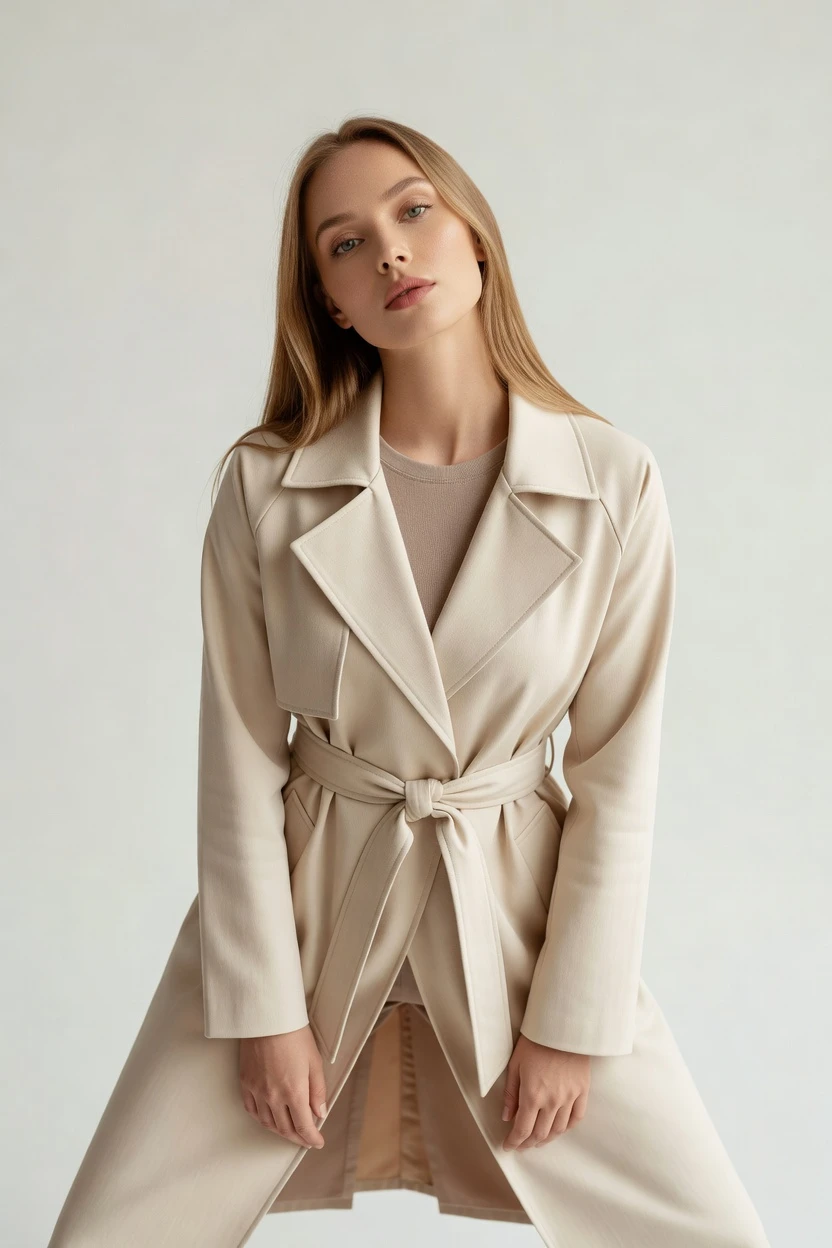
Direct campaign-ready fashion imagery with the AI High Angle Shot Generator—click, adjust, and generate without prompting.
Generate on-model high-angle shots that respect your cut, color, pattern, and logo. You direct the camera angle, framing, lighting, and style with buttons and sliders—no prompt box to babysit. Skip studio days, samples shipped cross-continent, and prompt-engineering overhead; the garment stays the brief.
- ~$0.55 per image
- ~30–40s per generation
- Tokens never expire
- 2K or 4K output
- Full commercial rights, permanent, worldwide
- 150+ visual styles
7-day free trial • 50 tokens (10 images) • Cancel anytime

Direct the shoot. Zero prompts.
Choose your camera lens, framing, lighting, and visual style. Confirm the high-angle setup for your garment, then generate—every setting is a click. 5 tokens · ~34s per image
- 6 clicks · 0 keystrokes
- app.rawshot.ai / new_shoot
How it works
Click your camera, not your prompt box
A garment-led workflow: pick the shot controls for high-angle composition, then generate consistent on-model imagery with signed provenance.
- Step 01
Select the high-angle setup
Click your lens, framing, and high-angle camera direction. Then choose your lighting, background, and visual style preset for an on-brand look.
- Step 02
Keep the garment as the brief
RAWSHOT is engineered around your actual product details. Your cut, color, pattern, logo, and fabric cues stay faithful through each take.
- Step 03
Generate with provenance included
Generate the on-model output, then download a C2PA-signed, watermarked image. Everything is labeled for compliance and publishing workflows.
Spec sheet
Twelve proofs for high-angle shoots
Each proof surface validates a different operational need: controls, fidelity, consistency, provenance, scale, and commercial readiness.
- 01
No-likeness by design
RAWSHOT synthetic models are built from 28 body attributes with 10+ options each. Accidental real-person likeness is statistically negligible by design.
- 02
Click-driven creative control
Every creative decision is a button, slider, or preset. You direct the shot with UI controls—no prompt box required.
- 03
Garment fidelity stays intact
Your cut, color, pattern, and logo remain faithful to the garment inputs. Fabric look, drape, and proportions follow through on the final frame.
- 04
Synthetic models, transparently labelled
You’ll see transparently labelled synthetic models across the workflow. The diversity of options helps teams preview styles across bodies while staying accountable.
- 05
SKU consistency across your catalog
Save and reuse the same model so the face and body stay consistent between SKUs. No drift between shoots, even when you iterate variants.
- 06
150+ visual style presets
Switch between catalog, lifestyle, editorial, campaign, street, and more. Presets are built for fashion teams that need repeatable aesthetics.
- 07
2K/4K and every aspect ratio
Publish-ready imagery at 2K or 4K. Choose the composition ratio that matches your storefront, ads, and platform crops.
- 08
Compliance and AI-labelled outputs
Outputs are C2PA-signed and AI-labelled for transparent publishing. RAWSHOT is aligned with EU AI Act Article 50 and California SB 942.
- 09
Signed audit trail per image
Each generated image includes a signed audit trail. Your team can trace what was produced and when—useful for approvals and QA.
- 10
GUI for singles, REST for catalogs
Use the browser GUI for one-off shoots. Scale through the REST API for nightly pipelines and large SKU batches.
- 11
Speed with transparent token pricing
Photo generations run in about 30–40 seconds per image at roughly ~$0.55 per image. Tokens never expire, and failed generations refund tokens.
- 12
Full commercial rights, worldwide
Every output includes full commercial rights, permanent, worldwide. Publish across your channels without separate licensing negotiations.
Outputs
High-angle looks, ready to publish Click-led, garment-faithful outputs
A proof gallery for high-angle fashion frames: consistent faces, faithful garments, and signed provenance for storefront and ads.


Browse 150+ visual styles →
Comparison
RAWSHOT vs category tools vs DIY prompting
Three lenses on every dimension — what you optimize for in RAWSHOT versus typical category tools and blank-box AI workflows.
01
Interface
RAWSHOT
Click-driven controls for lens, framing, lighting, and style—no prompt box.Category tools + DIY
Often prompt-centric or limited control surfaces for fashion composition. DIY prompting: You type prompts and iterate syntax until results look right.02
Garment fidelity
RAWSHOT
Garment-led generation keeps cut, color, logo, and drape faithful.Category tools + DIY
Controls may be shorter, and garments can mutate between outputs. DIY prompting: Garments drift as the model interprets your text creatively.03
Model consistency across SKUs
RAWSHOT
Save the model and reuse the same face/body across every SKU.Category tools + DIY
Per-shoot variation is common, with no guaranteed catalog consistency. DIY prompting: You fight changing faces and body interpretations across generations.04
Provenance + labelling
RAWSHOT
C2PA-signed, watermarked, and AI-labelled outputs with audit trail.Category tools + DIY
May omit provenance metadata and consistent labelling workflows. DIY prompting: Often no C2PA, no labelling, and no signed audit trail.05
Commercial rights
RAWSHOT
Full commercial rights to every output, permanent, worldwide.Category tools + DIY
Rights stories are less clear and may require separate terms. DIY prompting: Licensing can be unclear or inconsistent across tool outputs.06
Iteration speed per variant
RAWSHOT
30–40 seconds per photo generation with UI presets for fast rerolls.Category tools + DIY
Iteration may be slower or more guesswork with weaker controls. DIY prompting: Prompt-engineering overhead slows each variant round.07
Pricing transparency
RAWSHOT
Flat per-image pricing, tokens never expire, one-click cancel, refunds on failures.Category tools + DIY
Frequently per-seat pricing and volume tiers that punish growth. DIY prompting: Your cost is tied to experimentation and repeated prompt retries.08
Catalog API
RAWSHOT
REST API for catalog-scale pipelines, matching GUI behavior.Category tools + DIY
APIs may exist but often lack garment-led fidelity and provenance alignment. DIY prompting: DIY automation is typically glue code plus unstable output reproducibility.
Prompting does not scale
Stop writing essays. Direct the shoot.
Most AI photo tools start with a blank text box. Rawshot turns the shoot into repeatable controls, so creative teams can produce consistent fashion imagery without prompt syntax or one-off hacks.
Category norm
ManualCreate a premium editorial fashion photograph of a model wearing the exact navy oversized wool coat from SKU-1842, full-body crop, realistic hands, consistent facial identity, clean e-commerce lighting, subtle Paris street background, 85mm lens, no logo distortion, no fabric hallucination, same pose as last campaign, repeatable for all colorways...
A prompt can describe one image. It cannot become a shared production system for hundreds of products, models, angles and markets.
Rawshot
ClicksSaved shoot recipe
Apply to 1 SKU or 10,000 via GUI, CSV or REST API.
Rawshot makes creative direction visible: buttons, presets and sliders instead of hidden prompt craft. The result is easier to teach, faster to approve and built for repeat production.
Use cases
Reels, ads, and catalog frames—without retakes
Operator archetypes and how click-directed, garment-first output fits the way they actually work.
- 01
Indie designer doing launch prep
You click to dial high-angle framing for your campaign lookbook, then generate repeatable variations for each SKU.
Confidence · high
- 02
DTC brand updating PDP visuals
You reuse the same model across new colorways so the face stays consistent while the garment details remain faithful.
Confidence · high
- 03
On-demand label building micro-catalogs
You generate on-model high-angle images directly for each small drop, keeping approval cycles tight and predictable.
Confidence · high
- 04
Kidswear team producing safe, consistent angles
You align aspect ratios to platform crops and iterate shot mood presets without re-shooting physical inventory.
Confidence · high
- 05
Adaptive fashion line showcasing features
You direct lighting and background for clear garment visibility, then publish labeled outputs with full commercial rights.
Confidence · high
- 06
Lingerie DTC preparing seasonal updates
You generate studio-like high-angle frames with controlled presets while staying consistent across the entire catalog.
Confidence · high
- 07
Resale and vintage marketplace seller
You create high-angle product visuals for listings that look uniform, without negotiating studio time for every batch.
Confidence · high
- 08
Factory-direct manufacturer for retail partners
You run nightly REST API jobs to refresh distributor assets while preserving model and shot consistency.
Confidence · high
- 09
Marketplace operator shipping hero images faster
You use the GUI for single hero shots, then scale variants through the API when demand spikes.
Confidence · high
- 10
Student or portfolio creator
You learn fashion composition by clicking controls—then export labeled, publish-ready images for your reel.
Confidence · high
- 11
Influencer brand kit builder
You generate platform-ready high-angle visuals with consistent styling so each post looks like part of one campaign.
Confidence · high
- 12
Catalog team standardizing across 1,000+ SKUs
You keep the same model face across every SKU and iterate only the garment details, without prompt roulette.
Confidence · high
— Principle
Honest is better than perfect.
High-angle fashion outputs should be trustworthy at publishing time. RAWSHOT provides C2PA-signed provenance, visible and cryptographic watermarking, and AI-labelling so your team can move from generation to approvals with fewer unknowns. It’s designed to align with EU AI Act Article 50 and California SB 942 while keeping the garment the brief.
Rights & provenance
Full commercial rights. Forever.
- C2PA-signed on every image — EU AI Act Article 50 compliant
- 28-attribute synthetic models — real-person likeness statistically impossible
- Full commercial rights to every generation — no recurring licensing fees
- Tokens never expire · One-click cancel · Transparent pricing
EU AI Act
C2PA
Commercial use
Pricing
~$0.55 per image.
~30–40 seconds per generation. Tokens never expire. Cancel in one click.
- 01The cancel button is on the pricing page.
- 02No per-seat gates. No 'contact sales' walls for core features.
- 03Failed generations refund their tokens.
- 04Full commercial rights to every output, permanent, worldwide.
FAQ
Practical answers on control, rights, pricing, scale, and compliant publishing.
Do I need to write prompts to use RAWSHOT?
Never—you direct every output with sliders, presets, and clicks on the garment, not typed prompts. That UI control is consistent across GUI and REST API payloads, which is why ecommerce teams onboard buyers without rewriting creative briefs as chat threads.
For catalog teams, reliability matters more than model cleverness; RAWSHOT keeps tokens, timings, refund rules, commercial rights framing, provenance signalling, watermarking cues, REST surface, and SKU-scale batch patterns explicit so operations can rehearse PDP launches without hallucinated garment inventions.
What does AI-assisted fashion photography change for SKU-scale catalogs?
It changes your throughput and consistency: you can generate on-model imagery for many SKUs while keeping the same model face and production workflow. Instead of reshooting and re-lighting each variation, you standardize the shot controls and iterate garment details.
With RAWSHOT, you work in a browser GUI for single takes and use the REST API for catalog batches. Every output is C2PA-signed, watermarked, and AI-labelled, so teams can publish with provenance ready rather than scrambling for paperwork after the fact.
Why skip reshooting every SKU for seasonal updates?
Because reshooting is a logistics problem: studio days, sample shipping, retakes, and approvals all compound across seasons. When you need freshness across dozens or thousands of products, the schedule usually becomes the bottleneck.
RAWSHOT lets you direct a consistent set of high-angle compositions and regenerate variants from the same model. You get fast iteration at a predictable per-image price, plus signed audit trails per image to keep QA and approvals aligned.
How do we turn flat garments into high-angle, catalogue-ready imagery without prompting?
You don’t prompt; you direct. Select the lens, framing, high camera angle, lighting, background, and a visual style preset, then generate from the garment inputs.
RAWSHOT is engineered around garment fidelity—cut, colour, pattern, logo, fabric, and drape are represented faithfully. Once generated, each image includes provenance metadata and watermarking cues, so your team can move straight into product page and campaign workflows.
Why does garment-led control beat prompt roulette for PDPs?
Because garment-led control targets repeatability, not novelty. Prompt-based approaches often drift: the garment can mutate, logos can get invented, and faces can change across generations.
RAWSHOT uses click-driven shot controls and a model library designed for reuse, so you can keep the same face and body across SKUs. You also get C2PA-signed provenance and consistent labelling, which helps teams maintain a clean commercial story for what’s published.
How transparent are the outputs for licensing and publishing teams?
They’re transparent by default. RAWSHOT outputs are C2PA-signed and come with visible and cryptographic watermarking as well as AI labelling, so publishing teams can verify provenance before launch.
Licensing is also explicit: each output includes full commercial rights, permanent, worldwide. That keeps downstream decisions simple for ecommerce, marketplaces, and partner campaigns.
What QA checks should we run before we publish new generated product images?
Check garment fidelity first: verify cut, color, pattern, and logo placement in the generated frame. Then confirm model consistency across related SKUs by using the same saved model for each set of variants.
After that, validate provenance and compliance cues—C2PA signature, watermark presence, and AI labelling—so approvals don’t stall. Finally, make sure the aspect ratio and resolution match the destination (storefront, ads, and platform crops) before you ship to production.
How do token pricing and timing work for photos vs video in practice?
For photos, you pay per image at roughly ~$0.55, and each generation takes about 30–40 seconds. Tokens never expire, which matters for teams that plan batches and stagger approvals.
Failed generations refund tokens, and you can cancel with one click on the pricing page. Video costs more because it uses more tokens per second, so photo pipelines usually remain the fastest entry point for high-angle catalog visuals.
Do we need custom tooling to run catalog-scale generation?
No custom tooling is required to start. Use the browser GUI for single shots, then move to the REST API when you’re ready for nightly or scheduled pipelines.
RAWSHOT’s GUI and REST workflow are designed to behave consistently, so your controls (camera, framing, lighting, style) map cleanly into automation. Every output still carries signed audit trail and provenance metadata for QA and approvals across teams.
What changes when one operator scales to a whole team?
The workflow shifts from “single shoot” thinking to “batch production” thinking. You keep the same model and shot presets for consistency, then delegate generation and review by SKU set or campaign window.
With RAWSHOT, roles stay simple: operators direct the creative with UI controls, and the API supports the scale. Because every output is watermarked, C2PA-signed, and labelled with commercial rights, teams can coordinate approvals without slowing down launch calendars.
Keep exploring