
— Catalog imagery · 150+ styles · 4K
Build line-sheet-ready fashion imagery with the AI Line Sheet Generator.
Generate clean, sellable product imagery that helps buyers, sales reps, and merchants understand the garment fast. Direct camera, framing, lighting, background, and product focus through buttons, sliders, and presets in a real application built around apparel. No studio. No samples. No prompts.
- ~$0.55 per image
- ~30–40s per generation
- 150+ styles
- 2K or 4K
- Every aspect ratio
- Full commercial rights
7-day free trial • 50 tokens (10 images) • Cancel anytime

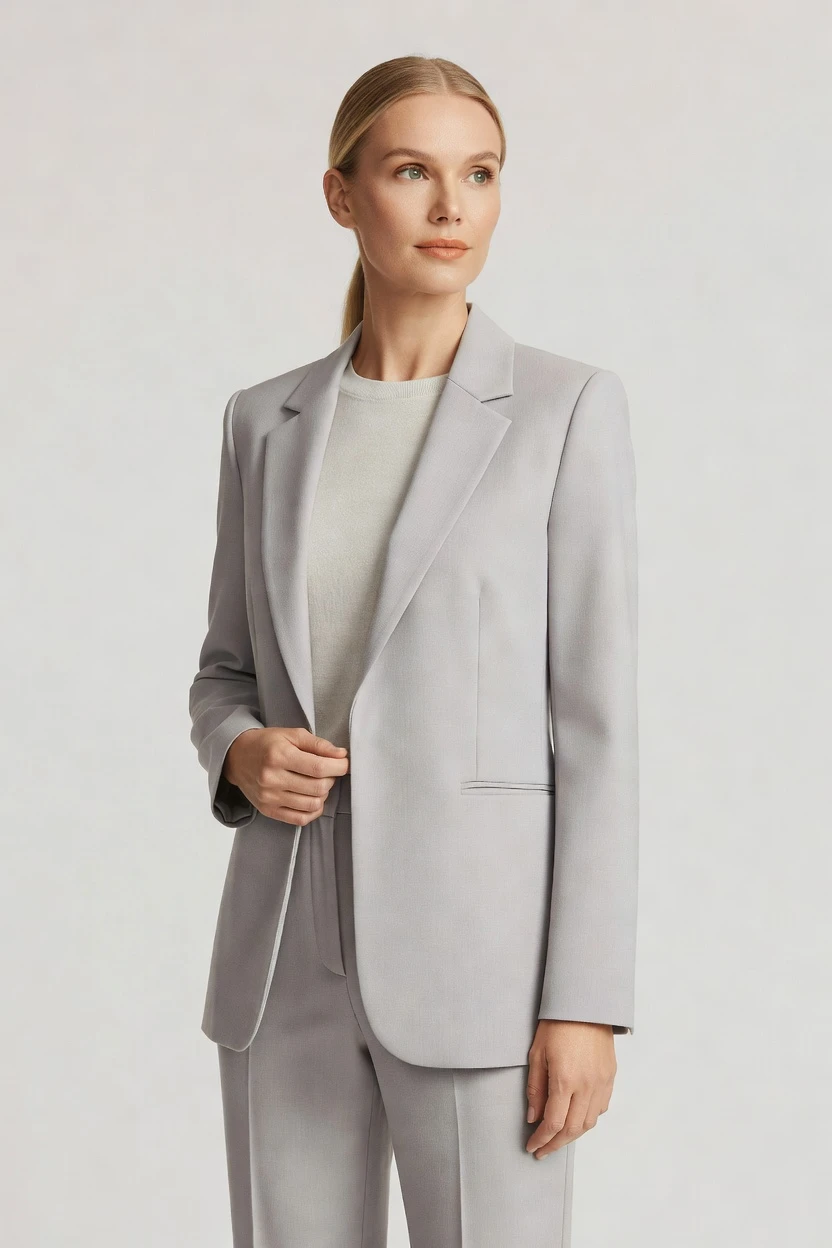
Direct the shoot. Zero prompts.
Pre-set for a clean line sheet: half-body framing, eye-level camera, soft studio lighting, light grey seamless, and full-outfit focus. You click through presentation choices that keep the garment readable for wholesale, merchandising, and sales materials. 5 tokens · ~34s per image
- 6 clicks · 0 keystrokes
- app.rawshot.ai / new_shoot
How it works
From Garment Upload to Line Sheet
Three steps to turn apparel into consistent, sales-ready imagery for line sheets, assortments, and wholesale review packs.
- Step 01
Upload the Garment
Start with the product, not a blank text box. RAWSHOT reads the item as the brief and prepares it for on-model line-sheet presentation.
- Step 02
Set the Presentation
Click through framing, lens, lighting, background, aspect ratio, and style presets that suit wholesale decks, assortments, and buyer reviews. Every decision lives in the interface.
- Step 03
Generate and Reuse
Create consistent stills in about 30–40 seconds, keep the approved setup, and apply it across more SKUs in the browser or through the API. The same output logic scales from one style to a full catalog.
Spec sheet
Proof for Line-Sheet-Ready Fashion Imagery
These twelve surfaces show how RAWSHOT stays readable for buyers, reliable for operators, and transparent for commerce teams.
- 01
Negligible by Design
Each synthetic model is built from 28 body attributes with 10+ options each, making accidental real-person likeness statistically negligible by design.
- 02
Every Setting Is a Click
Camera, angle, pose, lighting, background, style, and product focus are controlled with buttons, sliders, and presets in the interface.
- 03
The Garment Stays Central
Cut, colour, pattern, logo, fabric, drape, and proportion are represented faithfully so line sheets stay about the product, not model improvisation.
- 04
Synthetic Models, Clearly Labelled
You work with diverse synthetic models that are transparently labelled, giving commerce teams clean disclosure instead of ambiguity.
- 05
Consistency Across SKUs
Save a setup and keep the same face, body, framing logic, and presentation language across a full assortment without drift between items.
- 06
150+ Visual Styles
Switch from catalog-clean line sheets to more polished wholesale or sales-deck presentations with presets covering campaign, editorial, street, and studio looks.
- 07
2K, 4K, Every Ratio
Export in 2K or 4K and choose the aspect ratio that fits line sheets, sell-in decks, PDP support images, and marketplace requirements.
- 08
Provenance and Compliance Built In
Outputs are C2PA-signed, AI-labelled, and aligned with EU AI Act Article 50 and California SB 942, with visible and cryptographic watermarking.
- 09
Signed Audit Trail per Image
Every image carries a signed audit trail, giving merchandising, compliance, and brand teams a record they can actually trace.
- 10
GUI for One Shoot, API for Scale
Use the browser for single-line updates or connect the REST API for larger assortments, nightly catalog runs, and PLM-linked production flows.
- 11
Fast, Flat, and Transparent
Stills run at about $0.55 per image, generate in about 30–40 seconds, tokens never expire, and failed generations refund tokens.
- 12
Commercial Rights Stay Clear
Every output includes full commercial rights, permanent and worldwide, so teams can publish, sell, present, and archive without murky usage terms.
Outputs
Outputs That Read at a Glance
Built for sales teams, buyers, and merchants who need the garment understood fast. Clean presentation stays consistent from one style to the next.


Browse 150+ visual styles →
Comparison
RAWSHOT vs category tools vs DIY prompting
Three lenses on every dimension — what you optimize for in RAWSHOT versus typical category tools and blank-box AI workflows.
01
Interface
RAWSHOT
Click-driven controls for camera, framing, light, style, and product focusCategory tools + DIY
Often mix lighter controls with text-led workflows and shallower presentation options. DIY prompting: You steer through typed instructions and repeated rewrites before getting usable apparel output02
Garment fidelity
RAWSHOT
Engineered around the garment so cut, colour, logos, and drape stay readableCategory tools + DIY
Can hold broad fashion mood but often soften product-specific details. DIY prompting: Garment drift and invented logos appear across attempts, weakening sell-in clarity03
Model consistency across SKUs
RAWSHOT
Same saved model and presentation logic can run across the entire assortmentCategory tools + DIY
Consistency tools vary and often break at larger SKU counts. DIY prompting: Faces shift between outputs, so line sheets lose catalog continuity fast04
Provenance + labelling
RAWSHOT
C2PA-signed, AI-labelled, watermarked outputs with compliance-ready transparencyCategory tools + DIY
Labelling and provenance are inconsistent or absent across the category. DIY prompting: Missing provenance metadata leaves no clean disclosure or verification layer05
Commercial rights
RAWSHOT
Full commercial rights to every output, permanent, worldwideCategory tools + DIY
Rights can be narrower, tiered, or harder to verify at publishing time. DIY prompting: Usage terms are often unclear for commerce teams preparing sales and retail assets06
Pricing transparency
RAWSHOT
Flat per-image pricing, no per-seat gates, tokens never expireCategory tools + DIY
Per-seat plans and volume tiers often complicate scaling a growing catalog. DIY prompting: Tool costs may look low, but retries and operator time make budgeting murky07
Iteration speed per variant
RAWSHOT
Generate a new still in about 30–40 seconds with reusable settingsCategory tools + DIY
Iterations are possible but can require more setup and less exact control. DIY prompting: Each variant needs another round of text steering, review, and correction08
Catalog API
RAWSHOT
Browser GUI and REST API use the same production logic from one SKU to thousandsCategory tools + DIY
Some tools focus on manual usage first and add scale later. DIY prompting: No stable catalog pipeline, signed audit trail, or repeatable apparel production surface
Prompting does not scale
Stop writing essays. Direct the shoot.
Most AI photo tools start with a blank text box. Rawshot turns the shoot into repeatable controls, so creative teams can produce consistent fashion imagery without prompt syntax or one-off hacks.
Category norm
ManualCreate a premium editorial fashion photograph of a model wearing the exact navy oversized wool coat from SKU-1842, full-body crop, realistic hands, consistent facial identity, clean e-commerce lighting, subtle Paris street background, 85mm lens, no logo distortion, no fabric hallucination, same pose as last campaign, repeatable for all colorways...
A prompt can describe one image. It cannot become a shared production system for hundreds of products, models, angles and markets.
Rawshot
ClicksSaved shoot recipe
Apply to 1 SKU or 10,000 via GUI, CSV or REST API.
Rawshot makes creative direction visible: buttons, presets and sliders instead of hidden prompt craft. The result is easier to teach, faster to approve and built for repeat production.
Use cases
Twelve Operators Who Need Clearer Sell-In
Operator archetypes and how click-directed, garment-first output fits the way they actually work.
- 01
Indie Designer Preparing a First Wholesale Deck
Turn a small collection into clean presentation images that help buyers read silhouette, color story, and product intent without booking a studio day.
Confidence · high
- 02
DTC Brand Building Seasonal Assortment Sheets
Keep a consistent visual language across new arrivals so merchandising, planning, and sales teams review products in one clear format.
Confidence · high
- 03
Factory-Direct Manufacturer Pitching Retail Buyers
Present line-sheet-ready apparel imagery before physical sampling is fully scaled, giving buyers a faster read on the range.
Confidence · high
- 04
Marketplace Seller Standardizing Product Presentation
Generate consistent on-model support images that make apparel listings easier to compare across categories and sellers.
Confidence · high
- 05
Resale and Vintage Curator Organizing Edited Drops
Use clean catalog presentation to group mixed inventory into cohesive sell-in sheets for editors, stylists, or buyers.
Confidence · high
- 06
Kidswear Label Showing Range by Age Band
Build readable assortment imagery that helps wholesale partners understand shape, proportion, and coordination across the line.
Confidence · high
- 07
Adaptive Fashion Team Explaining Functional Design
Create clear imagery that keeps closures, openings, and garment construction visible for buyers and internal review.
Confidence · high
- 08
Lingerie DTC Brand Preparing Merchant Reviews
Standardize fit-forward presentation across bras, briefs, and sets so product teams can compare options without drift.
Confidence · high
- 09
Crowdfunded Fashion Project Building Pre-Sell Assets
Show the line before a full photo budget exists, giving backers and retail prospects a clearer view of the collection.
Confidence · high
- 10
Student Designer Assembling a Graduate Sell Book
Produce polished apparel images for line sheets, jury decks, and first buyer conversations without needing production-scale resources.
Confidence · high
- 11
Catalog Team Updating Carryover Styles
Refresh line-sheet visuals for repeat SKUs while preserving the same face, framing logic, and assortment consistency.
Confidence · high
- 12
Sales Rep Preparing Buyer Appointment Packs
Create clear apparel visuals that support conversations on fit category, styling direction, and range architecture across the season.
Confidence · high
— Principle
Honest is better than perfect.
Line sheets are commercial documents, not mood boards, so disclosure matters. RAWSHOT labels outputs, signs them with C2PA provenance, and applies visible plus cryptographic watermarking so buyers, brand teams, and compliance teams know what they are looking at. That transparency sits alongside GDPR-compliant, EU-hosted infrastructure and a signed audit trail per image.
Rights & provenance
Full commercial rights. Forever.
- C2PA-signed on every image — EU AI Act Article 50 compliant
- 28-attribute synthetic models — real-person likeness statistically impossible
- Full commercial rights to every generation — no recurring licensing fees
- Tokens never expire · One-click cancel · Transparent pricing
EU AI Act
C2PA
Commercial use
Pricing
~$0.55 per image.
~30–40 seconds per generation. Tokens never expire. Cancel in one click.
- 01The cancel button is on the pricing page.
- 02No per-seat gates. No 'contact sales' walls for core features.
- 03Failed generations refund their tokens.
- 04Full commercial rights to every output, permanent, worldwide.
FAQ
Practical answers on control, rights, pricing, scale, and compliant publishing.
Do I need to write prompts to use RAWSHOT?
Never. You direct every output with sliders, presets, and clicks on the garment, not typed instructions. That matters for apparel teams because line-sheet work depends on repeatable presentation choices such as framing, lens, background, lighting, product focus, and aspect ratio, not on who happens to be best at steering a chat box. In RAWSHOT, those controls are explicit and visible, so buyers, merchandisers, and ecommerce operators can review a setup together and agree on how the product should be shown.
The same click-driven logic carries from the browser GUI into the REST API, which makes it practical to move from a single assortment review to a larger catalog workflow without changing the operating model. You keep transparent pricing, token rules, refund behavior for failed generations, provenance signalling, watermarking, and commercial-rights clarity in the same product surface. For commerce teams, that means less interpretation, fewer avoidable retries, and a cleaner path from garment upload to publishable imagery.
What does an AI line sheet generator actually change for fashion catalog teams?
It changes who can produce line-sheet-ready imagery and how consistently they can do it. Traditional fashion photography asks for budget, scheduling, shipped samples, and a narrow production window, which leaves many operators without usable product presentation at all. RAWSHOT gives catalog teams a garment-led application where they can create on-model stills for assortments, buyer decks, and support assets in about 30–40 seconds per image while keeping the product readable and the setup consistent.
For commerce operations, the practical gain is control without complexity. You can keep the same model, framing logic, lighting system, and background across many SKUs, export in 2K or 4K at the ratio your channel needs, and maintain C2PA-signed provenance plus a signed audit trail per image. The result is not abstract efficiency language; it is clearer merchandise communication for teams that previously had to choose between no imagery, expensive shoots, or generic outputs that did not hold the garment together.
Why skip reshooting every SKU when the season, channel, or buyer deck changes?
Because most seasonal updates are presentation problems, not garment problems. When the product already exists, teams usually need a new framing, a different background, a cleaner line-sheet layout, or a refreshed visual style for another channel or sales context. RAWSHOT lets you adjust those presentation variables directly in the interface instead of rebuilding a production day every time a merchant, buyer, or regional team asks for a new version.
That matters especially for carryover styles, late additions, and mid-season assortment reviews. You can preserve the same face, body, visual logic, and product focus across the catalog while changing the output format to suit wholesale decks, PDP support images, or marketplace requirements. With flat per-image pricing, non-expiring tokens, refunded failed generations, and no per-seat gates, teams can iterate deliberately rather than ration every change request as if it were another studio booking.
How do we turn flat garments into catalogue-ready imagery without prompting?
You start with the garment and then choose how it should be presented. In RAWSHOT, that means selecting a model, setting the framing, choosing a lens, locking lighting, picking a background, and deciding the product focus and output ratio through visible controls. For line-sheet work, many teams use clean studio light, neutral seamless backgrounds, and disciplined half-body or full-outfit framings so the apparel reads quickly in sell-in decks and internal assortment reviews.
Once that presentation language is approved, you reuse it. A sales team can keep one setup for outerwear, another for tops, and a third for accessories, then apply those decisions across multiple products in the browser or through the REST API. Because the engine is built around garment fidelity rather than freeform text interpretation, details like logos, color blocks, drape, and proportion stay central. That gives commerce teams a repeatable workflow that feels like directing a shoot, not negotiating with a chatbot.
Why does RAWSHOT beat ChatGPT, Midjourney, or generic image tools for fashion PDPs and line sheets?
The short answer is garment control and production reliability. Generic image tools are built around text-first steering, which makes apparel work brittle when you need exact logos, stable silhouettes, and repeatable presentation across many SKUs. In that environment, teams run into garment drift, invented branding, inconsistent faces, and unclear rights and provenance, all of which are serious problems for line sheets, PDP support imagery, and buyer-facing documents where the product must remain trustworthy.
RAWSHOT is built as a click-driven fashion application instead. You select camera, framing, lighting, style, background, and product focus directly, keep the same synthetic model across the assortment, and receive C2PA-signed, AI-labelled outputs with watermarking and a signed audit trail per image. Full commercial rights are explicit, the browser GUI and REST API follow the same logic, and pricing remains flat per image. For apparel operators, that turns creative control into an operating system rather than a guessing game.
Can we use these images in wholesale decks, ecommerce, ads, and sales materials with clear rights?
Yes. RAWSHOT gives full commercial rights to every output, permanent and worldwide, which is the clean answer commerce teams need before they publish, circulate, or archive visual assets. That clarity matters because line sheets and sales decks do not stay in one place; they move across internal teams, buyer meetings, wholesale portals, marketing systems, and regional operations. Rights ambiguity creates hesitation, and hesitation slows launches.
RAWSHOT also treats disclosure as part of the product, not as an afterthought. Outputs are AI-labelled, C2PA-signed, and watermarked with visible and cryptographic layers, while the platform remains GDPR-compliant and EU-hosted. For operators, that means you can pair usage rights with provenance and traceability in one workflow instead of patching together policy decisions after the images already exist. The practical takeaway is simple: if your team needs assets that are usable and accountable on day one, RAWSHOT gives both.
What should a merchandiser check before publishing line-sheet imagery from RAWSHOT?
Start with the garment itself. Confirm that cut, colour, pattern, logo placement, drape, and proportion read accurately, then review whether the framing and lighting support the commercial task at hand. A buyer deck usually benefits from clearer, flatter presentation than a campaign image, so teams should check that the visual style fits the document rather than chasing unnecessary mood. Because RAWSHOT is garment-led, these checks are about presentation discipline, not about rescuing a random output.
Then confirm the trust layer. Make sure the exported files carry the expected provenance and labelling, preserve the signed audit trail, and sit inside the approved publishing path for your organization. RAWSHOT provides C2PA signing, AI labelling, and watermarking cues alongside explicit commercial rights, so QA is not limited to visual review alone. A strong publishing workflow checks fidelity, disclosure, and intended channel together, which is how commerce teams keep imagery both useful and accountable.
How much does a still-image workflow cost for line sheets and assortment reviews?
For stills, RAWSHOT runs at about $0.55 per image, with generation taking about 30–40 seconds. Tokens never expire, failed generations refund their tokens, and cancellation is one click from the pricing page, which gives planners and operators a much clearer budgeting model than seat-based software or vague enterprise tiers. For line-sheet work, that matters because the workload often comes in waves: pre-line review, buyer edits, regional assortment changes, and final launch updates.
The pricing structure stays straightforward whether you are producing a handful of images for a new range or extending a presentation system across a much larger catalog. There are no per-seat gates for core features, so a merchandising lead, a designer, and an ecommerce manager can work from the same product surface without procurement friction. In practice, teams should budget by image volume and revision rounds, not by access negotiations, which keeps planning tied to real output instead of software politics.
Can RAWSHOT plug into Shopify-scale or PLM-driven catalog workflows?
Yes. RAWSHOT supports both the browser GUI for hands-on shoot direction and a REST API for larger production flows, so teams can move from individual approvals to batch operations without switching products. That matters for catalog organizations that already manage product data in PLM, PIM, ecommerce platforms, or internal merchandising systems and need imagery generation to fit into an existing release process rather than sit outside it.
The operational advantage is consistency. The same logic used by a creative or merchandising team in the interface can be translated into repeatable API-driven jobs for larger SKU volumes, with a signed audit trail per image and the same provenance and rights framing attached to the result. For Shopify-scale storefronts, marketplaces, and wholesale support systems, that means image production can become another governed content step in the pipeline instead of a separate experimental lane.
What happens when we need one shoot today and a thousand SKUs next month?
The product stays the same. RAWSHOT is designed so the indie label building one assortment review and the enterprise catalog team running a large update use the same engine, the same model system, the same core controls, and the same per-image pricing logic. That continuity matters because fashion teams rarely scale in a straight line; they move from single launches to broader catalogs, then back to selective updates, and they need a tool that does not punish growth or force a platform switch midstream.
In practical terms, a creative lead can establish the visual rules in the GUI, save the approved model and presentation language, and then hand those decisions into a broader operational workflow through the API. The outputs remain labelled, signed, and commercially usable, with no per-seat gatekeeping around the core production path. For teams planning ahead, that means you can build your process once and extend it as volume grows, instead of rebuilding your image stack every time the catalog gets larger.
Keep exploring